Using your telephone
8AL91446ENAA ed02 58 /113
3.17 Programmable keys
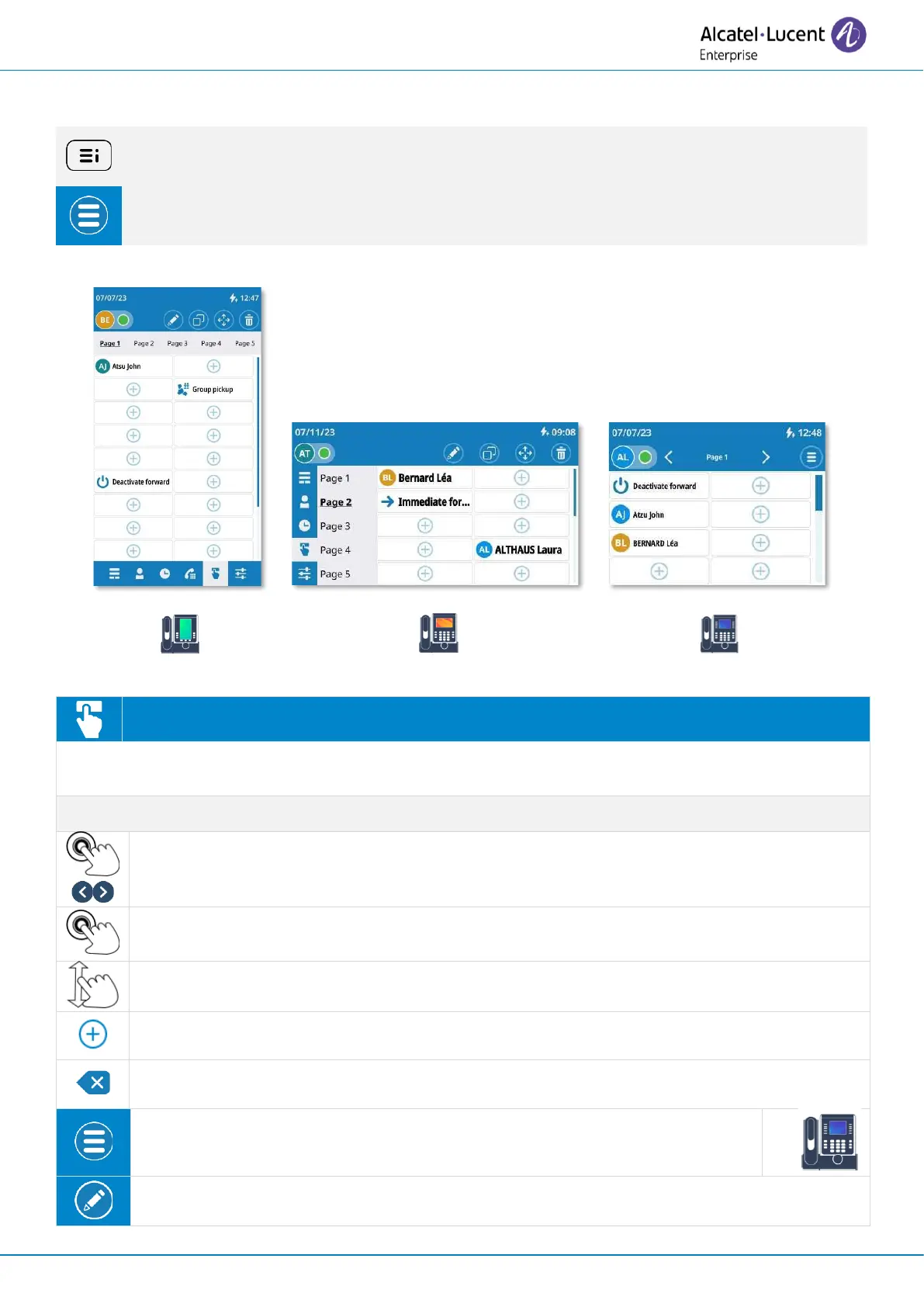
If possible, use the user local menu displayed on the current page (ALE-500, ALE-400) or
open it using the user local menu button.
Depending on the desk phone, some actions may be directly accessible from the current
page (ALE-500, ALE-400). If not, use the contextual menu (ALE-300).
Open the user local menu: Prog keys.
Your desk phone provides a virtual add-on module with 5 pages and 24 programmable keys per
page. You can program a key by entering a number or a service prefix.
Select a page to display by tapping on a page at the top of the screen (ALE-500) or at the
left of the screen (ALE-400) or by using the left/right navigation keys (ALE-300).
Select a key to use it: call a direct number, activate/deactivate a service or answer an
incoming call from a supervised contact.
Scroll the page to display the rest of the list (touch screen or navigation keys).
Create a programmable key by selecting a free key.
press this softkey to delete a character.
Open the context menu to access the following actions (ALE-300 only).
Modify: Modify a programmable key.


 To Next Page