Using your telephone
8AL91446ENAA ed02 59 /113
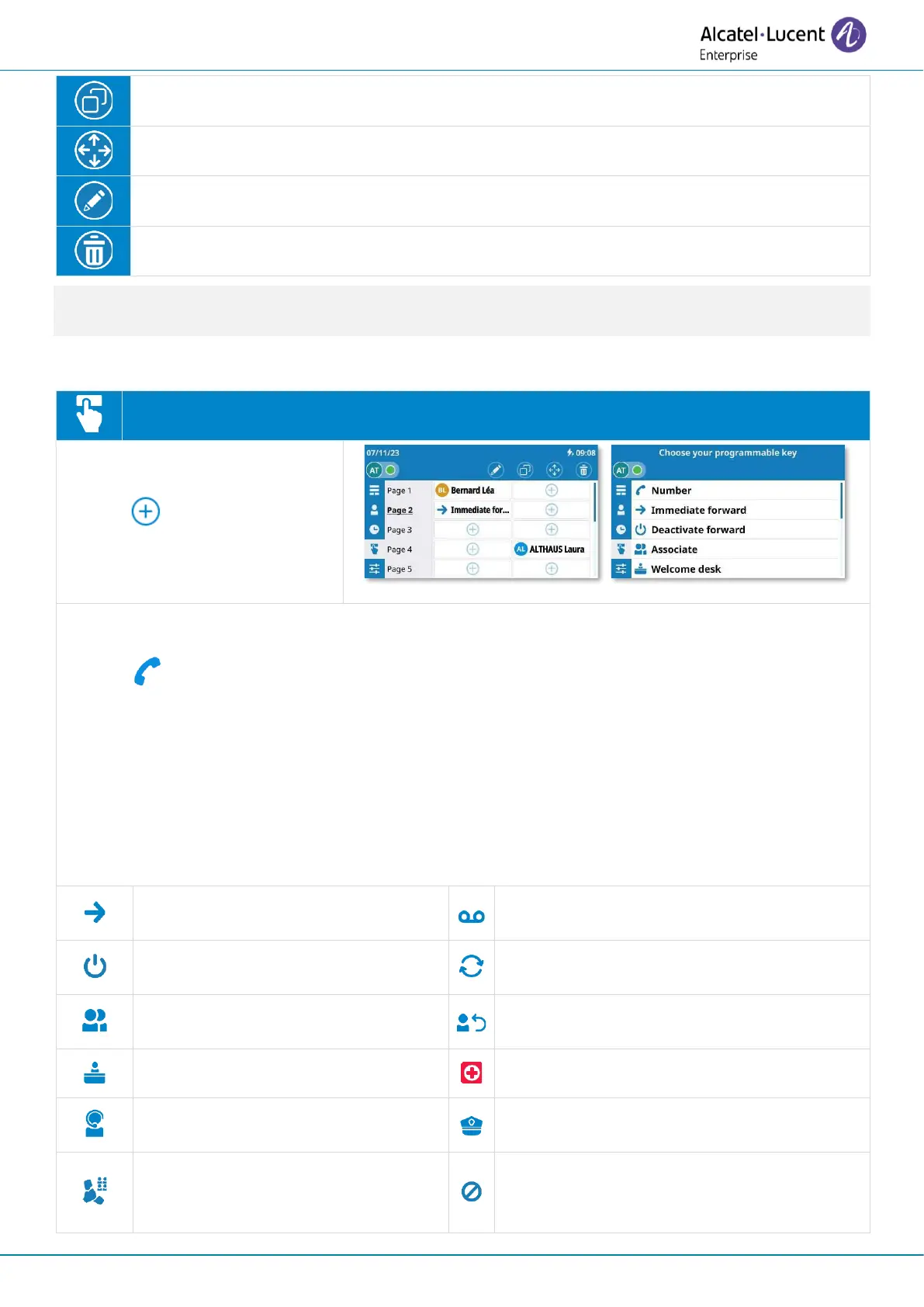
Copy: Duplicate a programmable key.
Move: Move a programmable key.
Edit pages: Modify the page name (ALE-500, ALE-400: long press on page name).
Delete: Delete a contact.
The first programmable keys are also shown on the dashboard. The number of programmable keys
displayed on the dashboard will depend on your desk phone model.
3.17.1 Create a programmable key
Open the user local menu: Prog keys.
• Select a page.
• : select a free key.
Use one of the following:
• : select direct call number
o To create a direct call key: enter the number of your contact.
o To define a service associated with the key: enter the service prefix followed by the
number. If a service is defined for a key without a number, the number will be
requested when you click on the key. For more information about the prefix,
please contact your administrator.
• The application can propose the most commonly available services in order to facilitate
programming (some features depend on system configuration). See examples below.
Immediate forward
Immediate forward to a number.
Voicemail
Access to voicemail.
Redial
Redial a recent number.
Associate
Call associate.
Last caller
Redial the last caller.
Operator
Call the operator.
Group pickup
Get your active call started on
another device.


 To Next Page