OmniPCX Enterprise - Release R100.1
Update of User Manual of ALE-300 DeskPhone in Attendant mode TC3046 ed.02
© Copyright 2023 ALE International, ALE USA Inc.
page 10/75
2 Getting to know your telephone
2.1 Enterprise DeskPhone
2.1.1 ALE-300 Enterprise DeskPhone
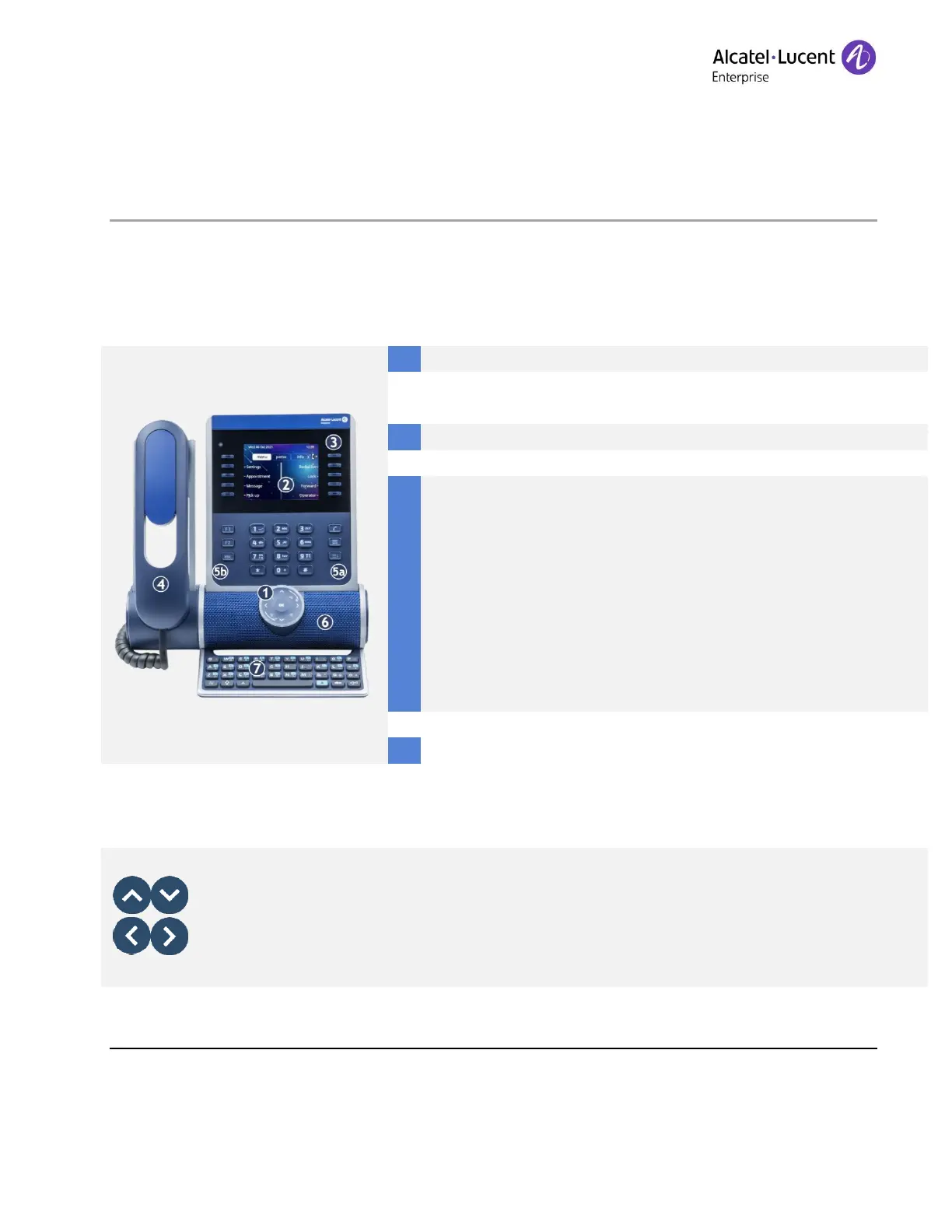
Color display with auto brightness adjustment which enhances
user experience and saves power (ambient light sensor).
10 dedicated functions keys.
Corded handset (ALE-150 Super WideBand Corded Handset).
Permanent feature keys: quick access to the phone's main
features.
(5a) 3 permanent keys (hang up key, messaging key, local
menu key).
(5b) 3 removable keys depending on the system configuration
(F1/F2/abc, Hold/ Transfer/Conference). In case they are not
configured as hold, transfer and conference keys, these keys
are programmable. When a magnetic keyboard is connected,
'abc' key is programmable.
Wideband loudspeaker for optimized sound.
Magnetic alphabetic keyboard (optional - ALE-100 Keyboard).
2.1.2 Keys specific to the Enterprise DeskPhone
Up-down navigator
Used to scroll through the content of a page.
Left-right navigator
In idle state, use this key to move from one page to another. In conversation, use this key











 To Next Page