OmniPCX Enterprise - Release R100.1
Update of User Manual of ALE-300 DeskPhone in Attendant mode TC3046 ed.02
© Copyright 2023 ALE International, ALE USA Inc.
page 23/75
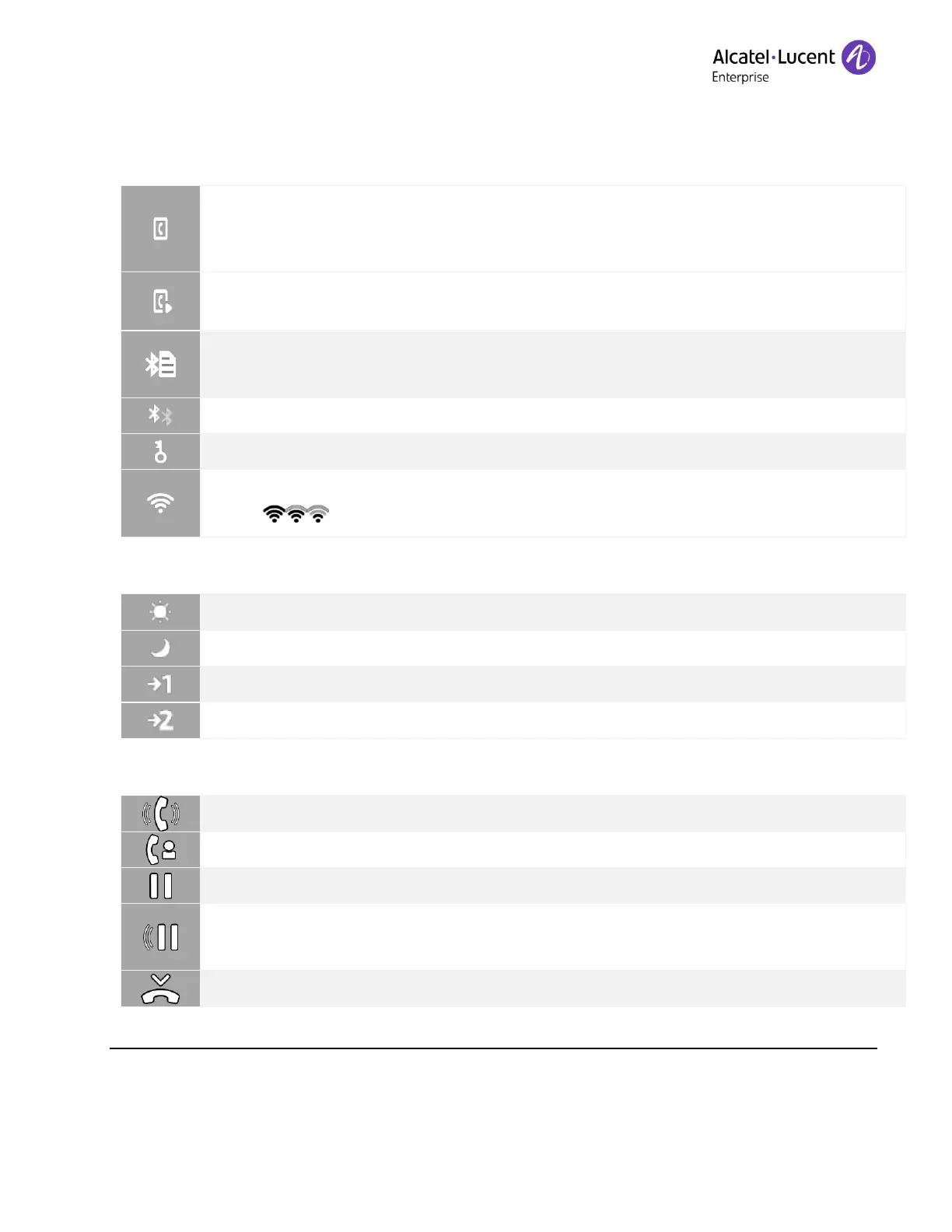
Audio hub: a Bluetooth
®
mobile phone is connected. The desk phone is ready to
make or receive calls from the connected mobile phone. The audio player is
disabled.
Audio hub: a Bluetooth
®
mobile phone is connected. The desk phone is ready to
make or receive calls, and to play audio from the connected mobile phone.
Missed call/new voice message on your connected mobile phone (the desk phone
is used as Bluetooth
®
Audio Hub).
Active Bluetooth
®
connection.
Wi-Fi enabled. The strength of the Wi-Fio signal is indicated by the following
icons: .
2.4.2 Specific status icons for attendant set
The status of the attendant group is 'day service'.
The status of the attendant group is 'night service'.
The status of the attendant group is 'forward 1'.
The status of the attendant group is 'forward 2'.
Retrieve call icon (retrieve the first call after having ended a second call, for
example).











 To Next Page