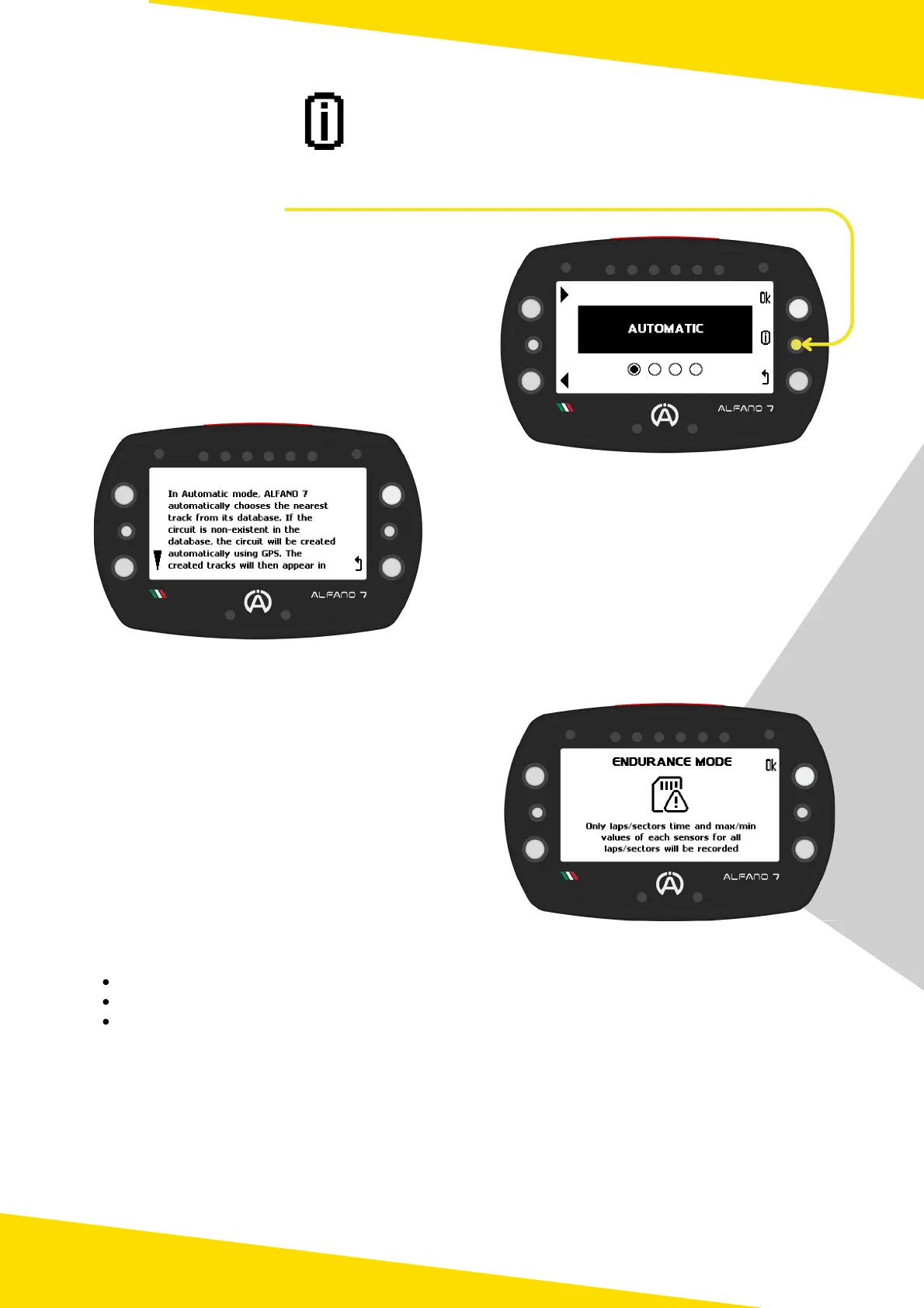
The Alfano 7 screens often have an 'info' button that provides additional explanations
about the current page
2. Info Button
To access an explanation of the current
screen in your device's language, simply
press the the central right button
Note that for Dutch, Norwegian, Finnish and
Swedish languages, the content will be
displayed in English
To scroll through longer messages, use the
upper and lower left buttons
To return to the previous page, simply click
the 'back' button (lower right button)
3. Endurance Mode
The Alfano 7 will automatically activate
Endurance Mode when its memory capacity
exceeds 99%
Upon turning on the device, an informational
message will be displayed
The Alfano 7 will not record the data according to the set data acquisition frequencies (see
page 40) but will only record:
Lap times
Sector times (if split times are present)
Minimum and maximum of each connected sensor to the Alfano 7 for each lap and for
each sector (if split times are present)
In this way it will still be possible to keep track of the fundamental data of the session
carried out
Direct on-device analysis of sessions recorded in Endurance Mode is interrupted at screen 5
due to the smaller amount of recorded data (see page 77 for more information)
It is not possible to directly activate or deactivate the endurance mode. To deactivate it free
up space in the device's memory
10



 To Next Page