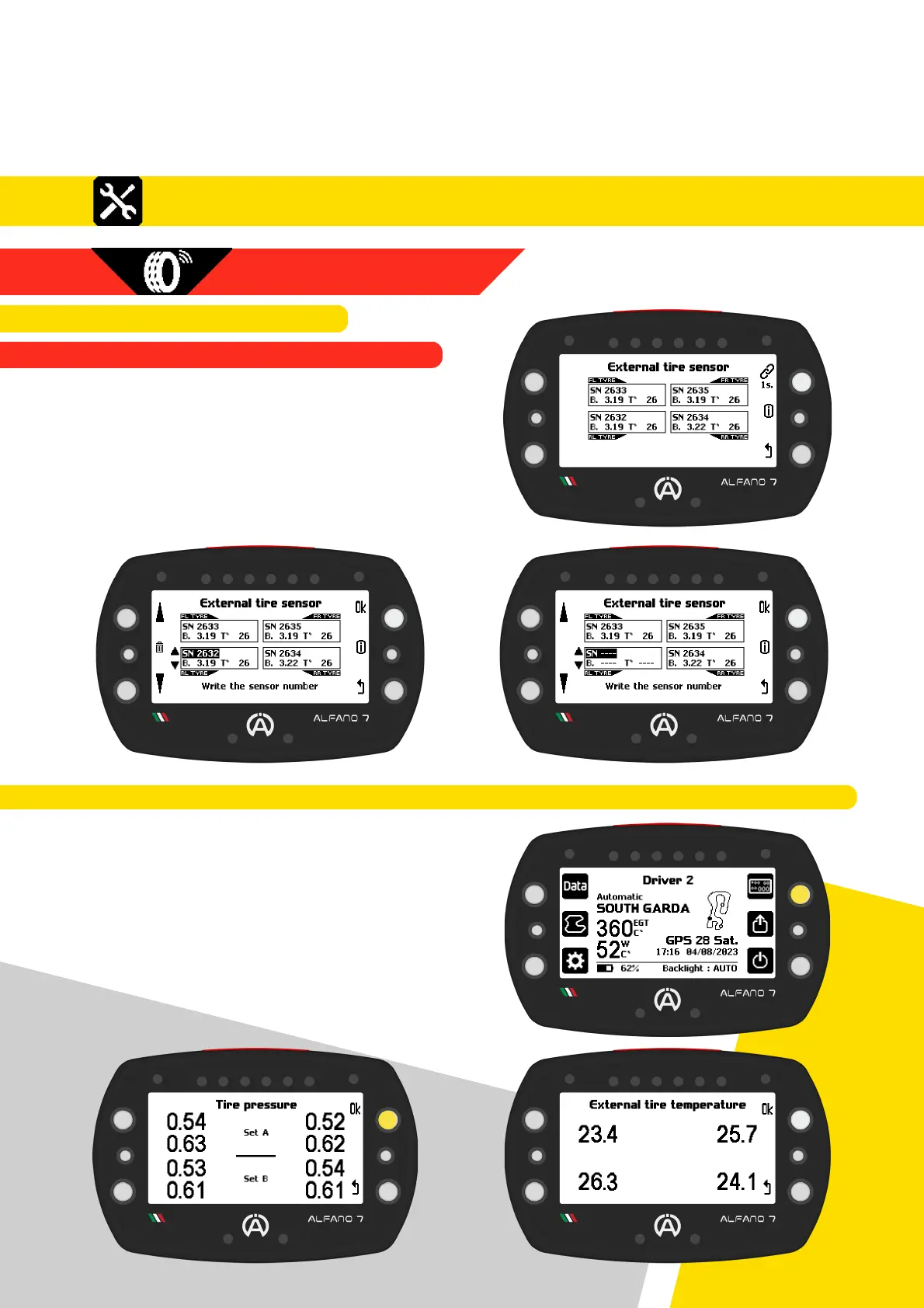
Once the connection is established, the tire
surface temperature will be displayed
39
8. Settings
8.2.5.2. EXTERNAL SENSORS
8.2.5.2.1. EXTERNAL SENSOR CONNECTION
8.2.5. WIRELESS WHEEL SENSORS
To remove a connected sensor, enter
connection mode by pressing the connection
button for one second. Then, select the
desired external sensor and press the central
left button for one second
8.2. Alfano 7 Settings, Connected Sensors and Boxes
8.2.5.3. SHORTCUT TO DISPLAY VALUES OF CONNECTED INTERNAL AND EXTERNAL SENSORS
To view the values detected by the wireless
sensors, press and hold the top right button
while on the homepage
The screen will display real-time detected
pressure values of internal sensors coupled to
SET A and B
Press the upper right button on this screen to
display real-time detected temperature
values of the external sensors



 To Next Page