7.6. Swap Driver’s Name while Session Recordering
During a track session, it is possible to change drivers, which is useful for endurance races
to keep track of the sessions completed by different drivers.
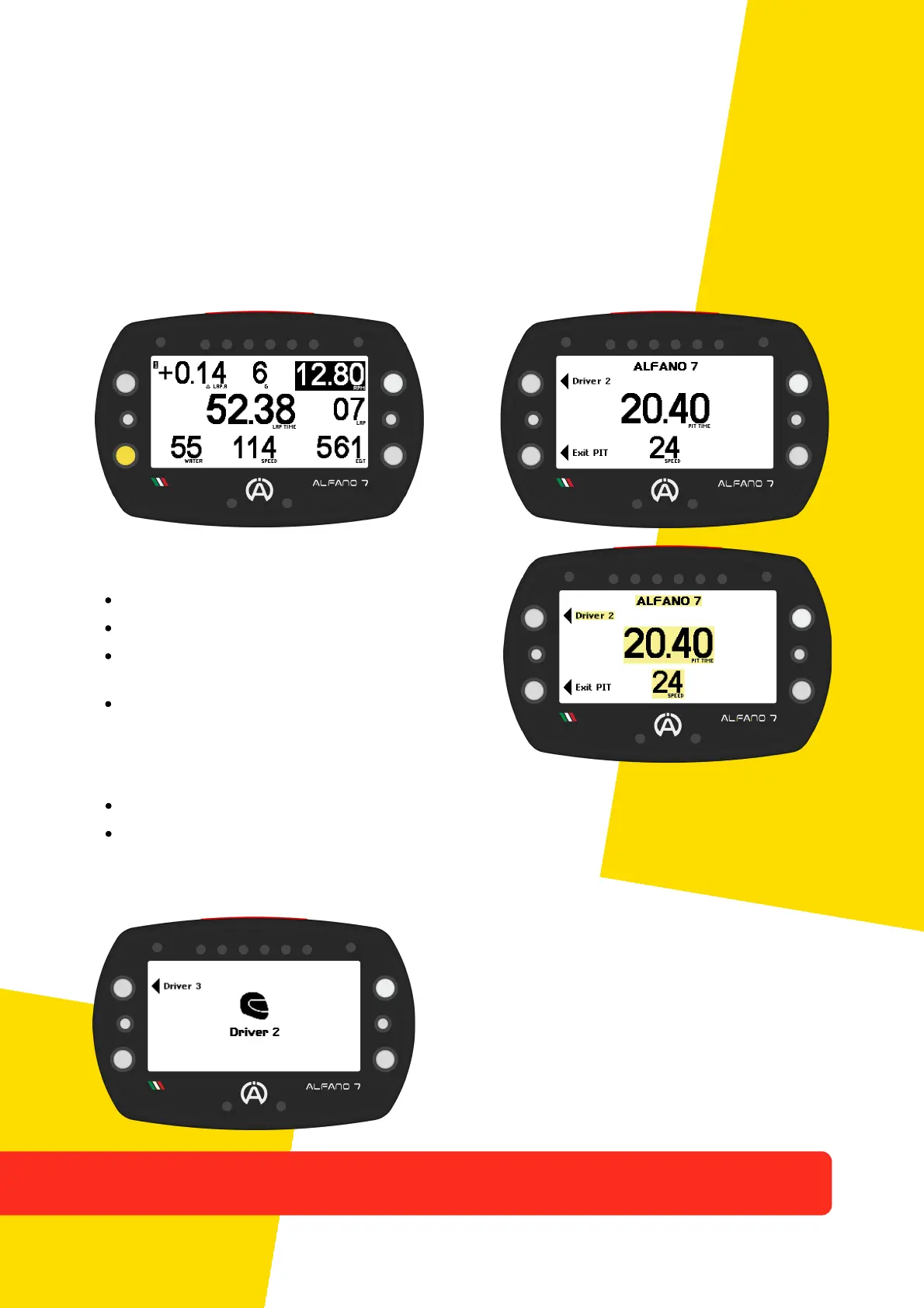
To change drivers, enter pit lane mode by pressing the lower left button directly from the
race screen
The screen for to the pit lane and driver
change consists of:
Current driver name on the top
Name of the next driver
Time counter that is triggered as soon as pit
lane mode is activated
Instant speed for respecting speed limits in
pit lane
In pit lane mode you can perform two actions with the left buttons:
Lower left button: exit pit lane mode and return to the race screen
Upper left button: set the next pilot
After a short period of inactivity, the Alfano
7 will return to the main pit lane mode
screen
By changing the driver during the race, Alfano 7 will interrupt the session and start a new
one with the driver name updated immediately or at the latest on the next lap (a
condition that depends on the layout of the circuit and where the driver change is made
28
Press the top left button to change the pilot. The new selected pilot will be displayed in the
center and the next pilot in the top left. Press the upper left button until the desired driver
is set
7. Race Screen



 To Next Page