8.3.2 G-FORCE SENSOR
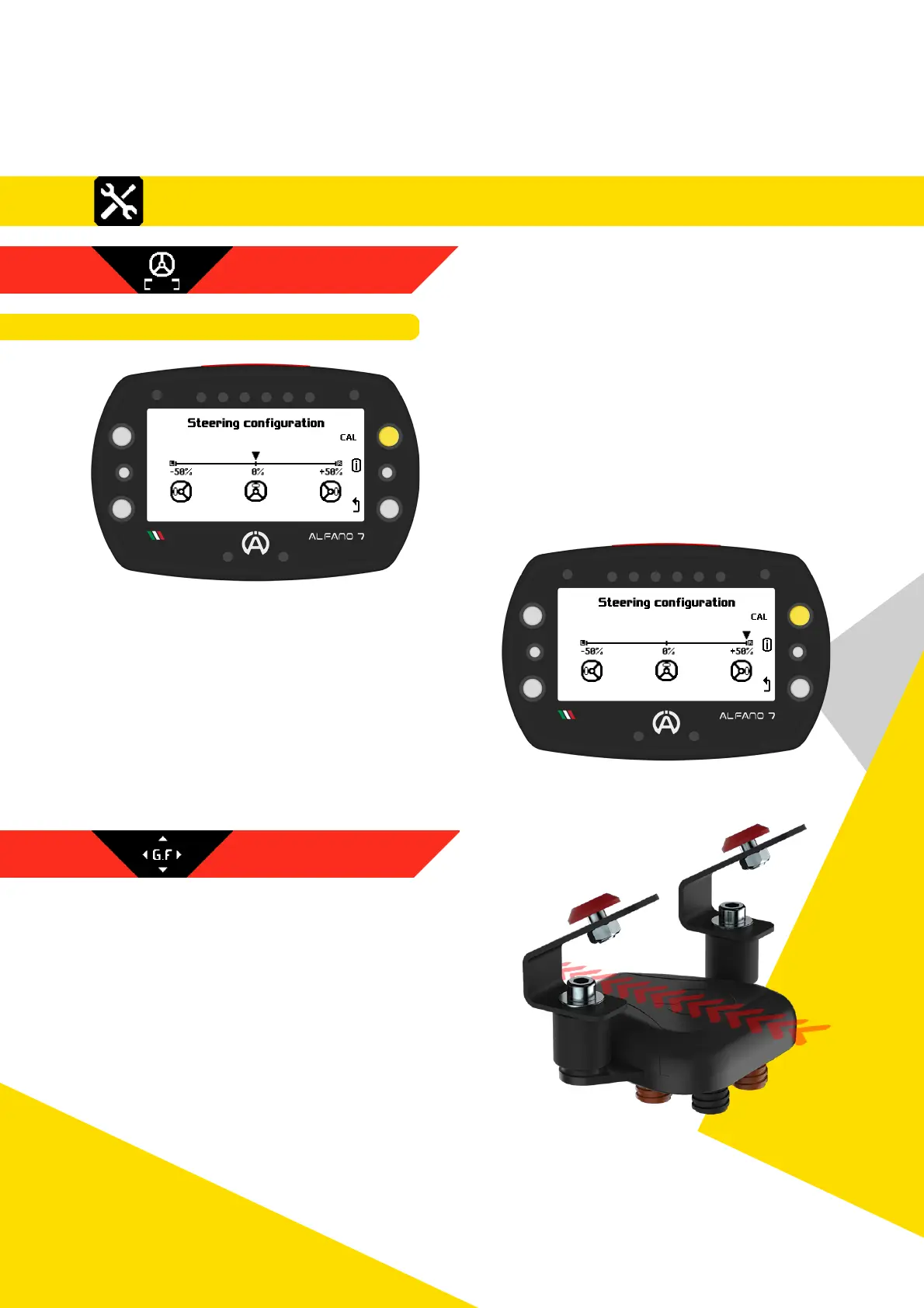
Once the position has been confirmed with
the steering wheel fully turned to the left,
the cursor will position itself on the 0% value
corresponding to a straight steering wheel
Straighten the steering wheel and record the
second point with the upper right button
Once the position corresponding to the
straight steering wheel has been recorded,
the cursor will move to the +50% value
corresponding to the steering wheel turned
all the way to the right
Turn the steering wheel all the way to the
right and record the third and final point
with the top right button
Once calibration is complete, the Alfano 7 will display the current status of the steering
wheel
The Box4Move has an internal G-force sensor
that must be calibrated for correct operation
To calibrate the G-force sensor, the
Box4Move must be installed so that the
connectors are perpendicular to the ground
The box must be positioned as shown in the
photo in relation to the direction of
movement of the vehicle as indicated by the
red arrows
46
8. Settings
8.3.1.3. STEERING WHEEL CALIBRATION
8.3.1 MOTION SENSORS
8.3. Settings - Box4Move



 To Next Page