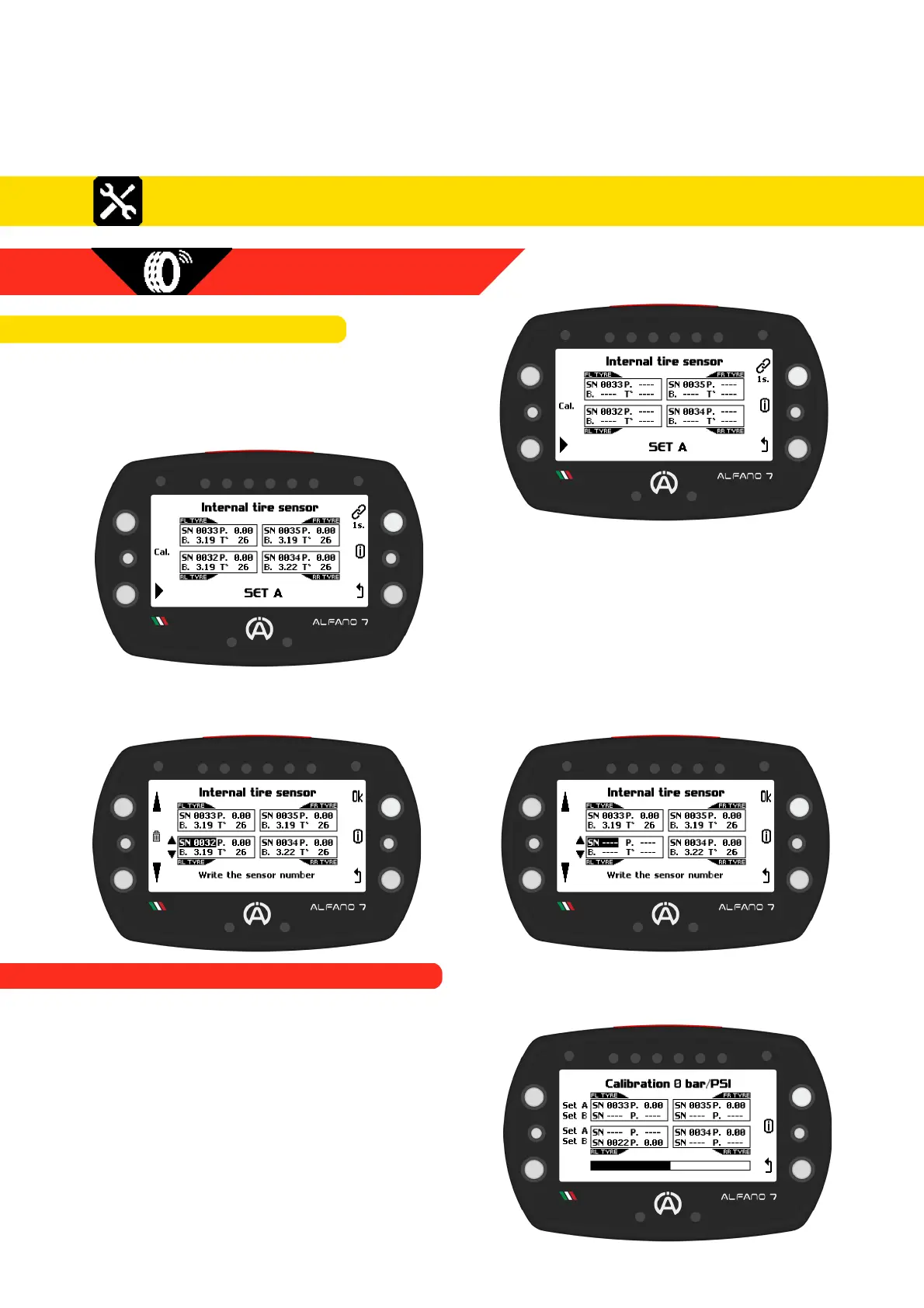
Due to the energy-saving algorithm, when
the sensors have not yet self-activated, it will
be necessary to wait a maximum of 1 minute
for connection
After establishing the connection, you will be
able to read the detected air pressure and
internal air temperature values
To remove a connected sensor, enter connection mode by pressing the connection button
for one second. Then, select the desired internal sensor and press the central left button for
one second
8.2.5.1.2. INTERNAL SENSOR CALIBRATION
37
8. Settings
8.2.5.1. INTERNAL SENSORS
8.2.5. WIRELESS WHEEL SENSORS
8.2. Alfano 7 Settings, Connected Sensors and Boxes
This operation is necessary to compensate for atmospheric pressure in your location
Calibration is possible if at least one sensor
has been associated with a SET
Ensure that all sensors associated with both
SETs are exposed to ambient air and
positioned close to Afano 7
Press the center button and wait for the
loading bar to complete, the device will
confirm successful calibration with a
message on the screen



 To Next Page