8.3.1 MOTION SENSORS
8.3. Settings - Box4Move
Connecting a Box4Move to the Alfano 7 unlocks the settings menu items related to the
operation of the additional module, in particular the "Motion sensors" and "G-Force
sensor" menus
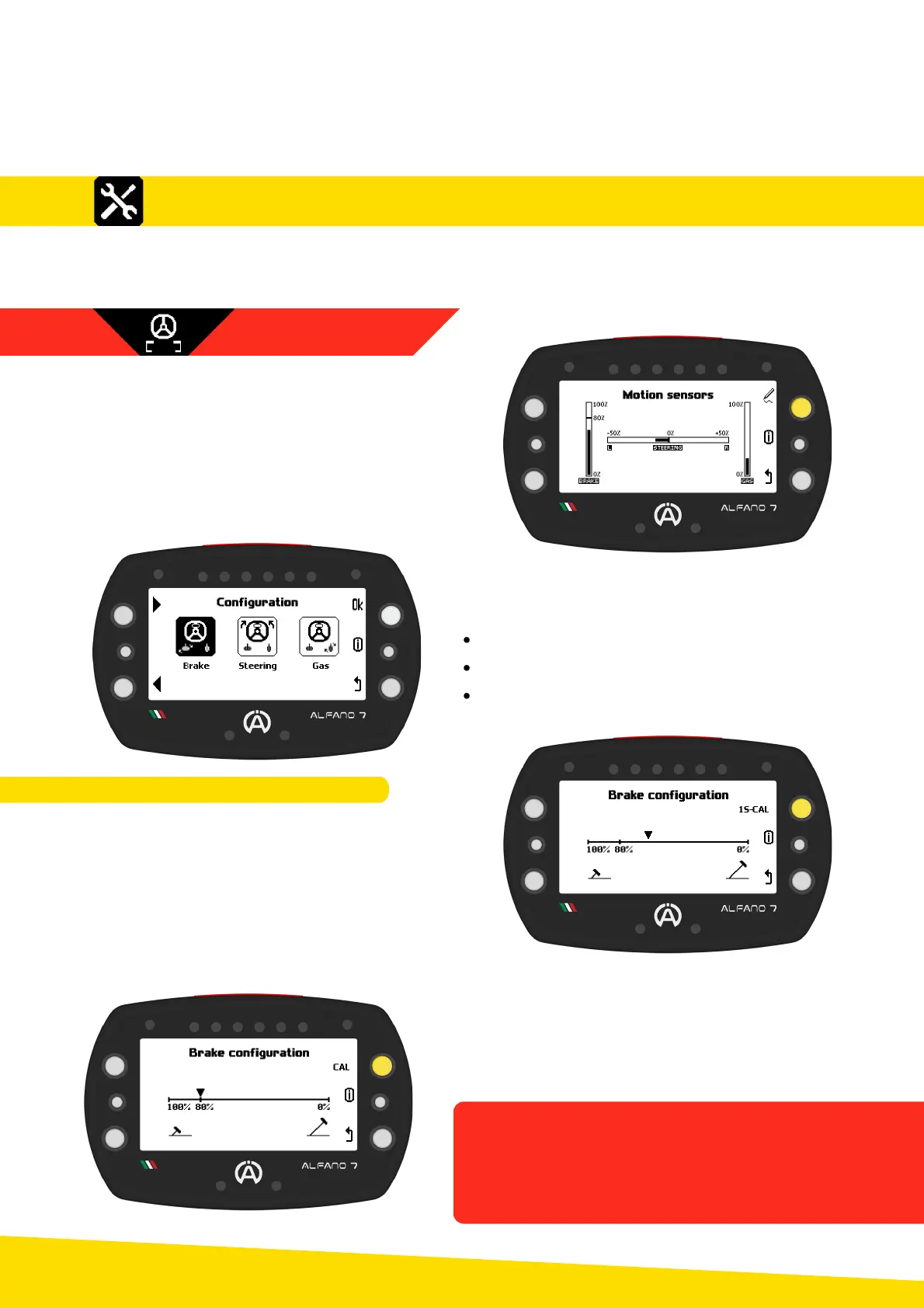
By accessing the motion sensors page, the
current status of the sensors is displayed
The sensors must be calibrated after each
installation
To access the calibration menu, press the top
right button
The selection page of the sensor you want to
calibrate will open, select:
Brake pedal calibration
Steering calibration
Accelerator pedal calibration
By accessing the brake pedal calibration, the
status of the brake pedal is displayed again,
i.e. the detected position
To calibrate the brake pedal, press and hold
the upper right button for one second, as
indicated by "1S-CAL"
When you confirm that you want to calibrate
the sensor, the cursor will move to the 80b
position
Fully depress the brake pedal and confirm
with the upper right button to record the
position
8.3.1.1. BRAKE PEDAL CALIBRATION
44
8. Settings
The value corresponding to the pedal being
fully depressed is 80% to monitor the wear of
the brake pads
When the brake pads have worn down,
values greater than 80% will be recorded



 To Next Page