ALPINE iLX-F509E 68-41657Z84-A (EN)ALPINE iLX-F509E 68-41657Z84-A (EN)
13-EN
■
Normal mode screen example
■
Enhanced Text mode screen example
Touch to display the Sound Setup scr
• The Sound Setup screen can also be display
pressing the
(HOME) butt
screen is displayed.
Touch to change the page.
• Pages can also be changed b
screen horizontally with your finger.
Audio source select area
Touch your desired source icon t
source.
• The order of source icons can be changed. F
see “Editing HOME screen” (page 25).
HOME screen navigation
Thumbnail window for the current sour
Source name, artwork and title information ar
displayed. Touch the artwork to displa
screen. Touch [
] to play/pause a tr
About the Indicator Display
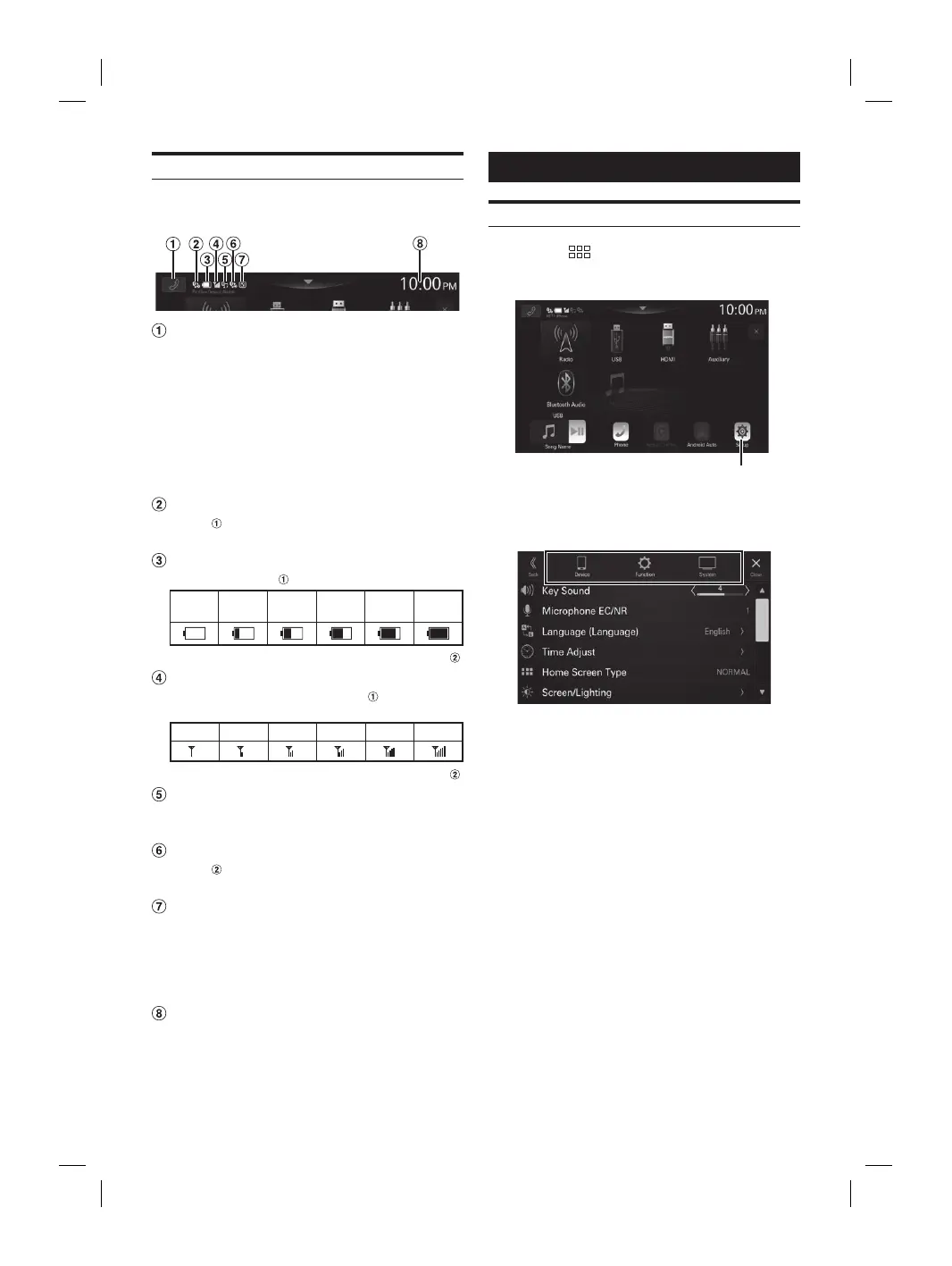
The Indicator Bar at the top of the screen displays various
types of information, like the current time.
Phone shortcut button
The Device List screen is displayed when a Phone,
CarPlay or Android Auto device is not connected.
The hands-free phone screen (Recent Call, Phone Book,
Keypad) is displayed when the hands-free phone is
connected. The screen of the previous logout is
displayed.
The Apple CarPlay screen is displayed while Apple
CarPlay is connected.
The Android Auto screen is displayed while Android
Auto is connected.
Lights up when connecting the hands-free
phone
via Bluetooth. (Does not display when
connection is set to OFF.)
Indicates the battery level of the connected
hands-free phone
.
No
Battery
Level 1 Level 2 Level 3 Level 4 Level 5
• This may not be displayed for the hands-free phone .
Indicates the Bluetooth signal strength level of
the connected hands-free phone
.
Displayed when Bluetooth setting is ON.
0 1 2 3 4 5
• This may not be displayed for the hands-free phone .
Lights up when connecting the audio device via
Bluetooth. (Does not display when connection is
set to OFF.)
Lights up when connecting the hands-free
phone
via Bluetooth. (Does not display when
connection is set to OFF.)
Lights up when connecting a separately sold
ALPINE KNOB (RUE-BK01E) via Bluetooth. You can
use the RUE-BK01E to adjust the volume level
and sound quality (Bass Level, etc.) of this unit.
For details, refer to the Owner’s Manual of
RUE-BK01E.
Indicates the current time.
Touch to turn ON/OFF the clock display.
You can switch between the 12 hour display and 24 hour
display options (page 24).
Setup
Setup Operation
1 Press the (HOME) button.
The HOME screen is displayed.
[Setup] button
2 Touch [Setup].
The Settings menu screen is displayed.
3 Touch the required setting category on the
upper part of the Settings menu screen, and
then touch the setting item.
Setting categories:
Device: See “Device Setup” (page 14)
Function: See “Function Setup” (page 16)
System: See “System Setup” (page 23)














 To Next Page