ALPINE iLX-F509E 68-41657Z84-A (EN)ALPINE iLX-F509E 68-41657Z84-A (EN)
29-EN
■
Basic EQ
1 Touch [EQ Setting].
2 Touch [Advanced EQ] or [Basic EQ] t
Equalizer mode.
3 Select a speaker to adjust.
Advanced EQ: Front Left / Front Right / R
Rear Right / Subw.
Basic EQ: Front / Rear / Subw.
4 Touch [Band] to select the band to be
adjusted.
Band1 Band2 ••• Band12 Band13
• You can select a band directly by t
5 Touch [ ] or [ ] of “Frequency” t
frequency of the selected band.
Adjustable frequency bands:
20 Hz to 40 kHz (in 1/3 octave steps)
Band1: 20 Hz~100 Hz (63 Hz)
Band2: 63 Hz~315 Hz (125 Hz)
Band3: 100 Hz~500 Hz (200 Hz)
Band4: 160 Hz~800 Hz (315 Hz)
Band5: 250 Hz~1.25 kHz (500 Hz)
Band6: 315 Hz~1.6 kHz (630 Hz)
Band7: 500 Hz~2.5 kHz (1 kHz)
Band8: 1 kHz~5 kHz (2 kHz)
Band9: 1.6 kHz~8 kHz (3.15 kHz)
Band10: 2.5 kHz~12.5 kHz (5 kHz)
Band11: 4 kHz~20 kHz (8 kHz)
Band12: 6.3 kHz~31.5 kHz (12.5 kHz)
Band13: 10 kHz~40 kHz (20 kHz)
6 Touch [ ] or [ ] of “Level” t
of selected band.
Setting contents:
-9 to +9 (Initial setting: 0)
7 Touch [ ] or [ ] of “Q Adjustment” t
the bandwidth.
Setting contents:
Wide (Initial setting) / Medium / Narrow
8 To adjust another band, repeat steps 2 to 6,
and adjust all bands.
9 To store the adjusted setting value, touch and
hold [Preset 1], [Preset 2], or [Preset 3] for at
least 2 seconds.
• Band2 and Band11 are the same as the Bass and Treble
controls. For details on setting Bass and Treble, see “Adjusting
Bass Level/Treble Level” (page 31).
• Settings exceeding the frequency of adjacent bands are not
available.
• While adjusting the Parametric EQ, you should consider the
frequency response of the connected speakers.
• When the Parametric EQ is adjusted, the Preset EQ is
overridden.
• When Preset EQ is set, the linked Parametric EQ settings are
also changed. We recommend storing Parametric EQ settings
in a Preset in advance.
• Touch [Flat] to initialise all values.
Calling the Parametric EQ adjusted value
Calling the pre-set Parametric EQ adjusted value.
Touch [Preset 1], [Preset 2], or [Preset 3] on the
Parametric EQ screen.
The setting stored in the Preset will be recalled.
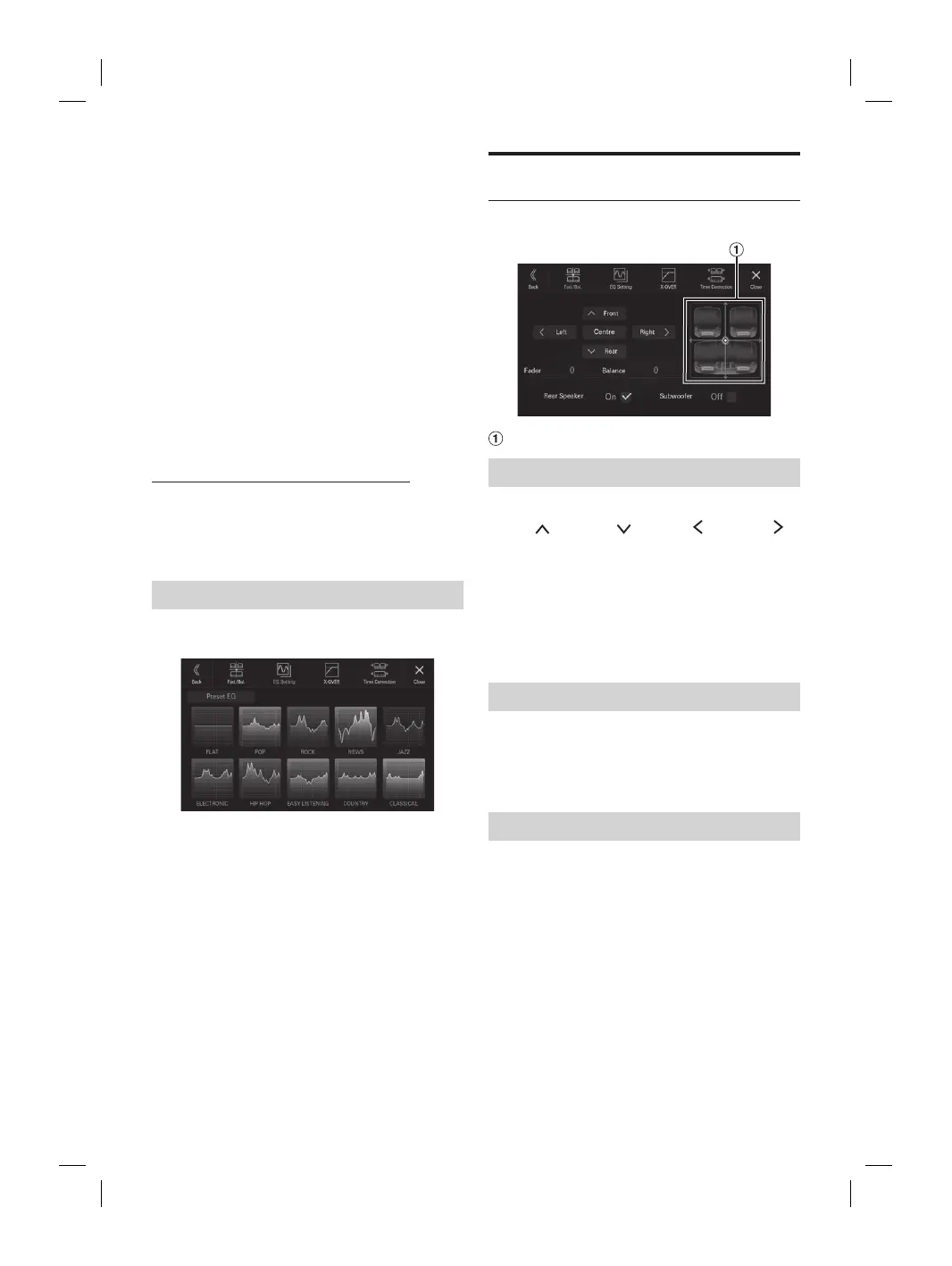
Equalizer Presets (Preset EQ)
10 typical equalizer settings are preset at the factory for a
variety of musical source material.
Setting item:
Preset EQ
Setting contents:
FLAT / POP / ROCK / NEWS / JAZZ / ELECTRONIC / HIP
HOP / EASY LISTENING / COUNTRY / CLASSICAL
• Only one type can be set to On.
• When Preset EQ is set, the linked Parametric EQ settings are
also changed. We recommend storing Parametric EQ settings
in a Preset in advance.
Fader/Balance/Rear Speaker/
Subwoofer Settings
[Fad./Bal.] is selected on the Sound Setup Menu screen.
Fader/Balance Image area
Setting the Fader/Balance
Touch the desired point within the image area, or
touch [
] (Front), [ ] (Rear), [ ] (Left) or [ ]
(Right).
Fader:
F15 to R15
Balance:
L15 to R15
• To reset to the initial setting (Balance: 0, Fader: 0), touch
[Centre].
Rear Speaker Setting
You can set the rear speaker output to “Off.”
Setting item:
Rear Speaker
Setting contents:
On (Initial setting) / Off
Turning Subwoofer ON/OFF
If an optional subwoofer is connected to the unit, make the
following setting.
Setting item:
Subwoofer
Setting contents:
On / Off (Initial setting)














 To Next Page