ALPINE iLX-F509E 68-41657Z84-A (EN)ALPINE iLX-F509E 68-41657Z84-A (EN)
37-EN
3 Touch [ ] repeatedly to selec
mode.
The radio frequency up or down butt
depending on the tuning mode.
Seek mode: Both strong and w
will be tuned in.
Manual mode: The frequenc
tuned in steps.
Preset mode: You can direc
stations.
4 Touch [ ], [ ] to change the radio fr
up or down respectively.
In Manual mode, touch and hold t
frequency continuously.
• The
, buttons pro
above.
Presetting Stations Manually
1 Tune in a desired radio station y
store in the preset memory b
automatic seek tuning.
2 Touch and hold the preset button y
store for at least 2 seconds.
The selected station is stored.
3 Repeat the procedure to store up t
stations onto the same band.
To use this procedure for other bands
desired band and repeat the procedure.
A total of 60 stations can be stored in the pr
memory
(12 stations for each band; FM1, FM2, FM3, A
AM2).
• If a preset memory has already been set in the pres
will be cleared and the new station will be memor
Presetting Stations Automatically
The tuner can automatically seek and store 12 strong
stations in the selected band in ascending order of
frequency.
Select the desired band then touch and hold
[Auto Memory].
The tuner automatically seeks and stores 12 strong stations
into the preset buttons in ascending order of frequency.
When automatic storing has completed, the station stored
in the preset 1 is selected.
• If no stations are stored, the tuner will return to the original
station you were listening to before the automatic storing
procedure began.
• You can cancel this process by touching [Auto Memory] while
the tuner is automatically seeking stations. Canceling will
return the tuner preset to the previous setting.
Tuning to Preset Station
After selecting the desired band, touch the
desired preset button.
The preset station is received.
USB Flash drive (Optional)
You can play back music files (MP3/WMA/AAC/FLAC/WAV/
APE), video files (MP4/MOV/FLV/MKV) stored in a USB flash
drive on the internal player of this system.
WARNING
It is dangerous for the driver to watch video while
driving the vehicle. The driver may be distracted
from looking ahead and an accident could occur.
Install the unit correctly so that the driver cannot
watch a video unless the car is stopped and the
parking brake is applied.
If the unit is not installed correctly, the driver will be
able to watch a video while driving and may be
distracted from looking ahead and cause an
accident. The driver or other people could be
severely injured.
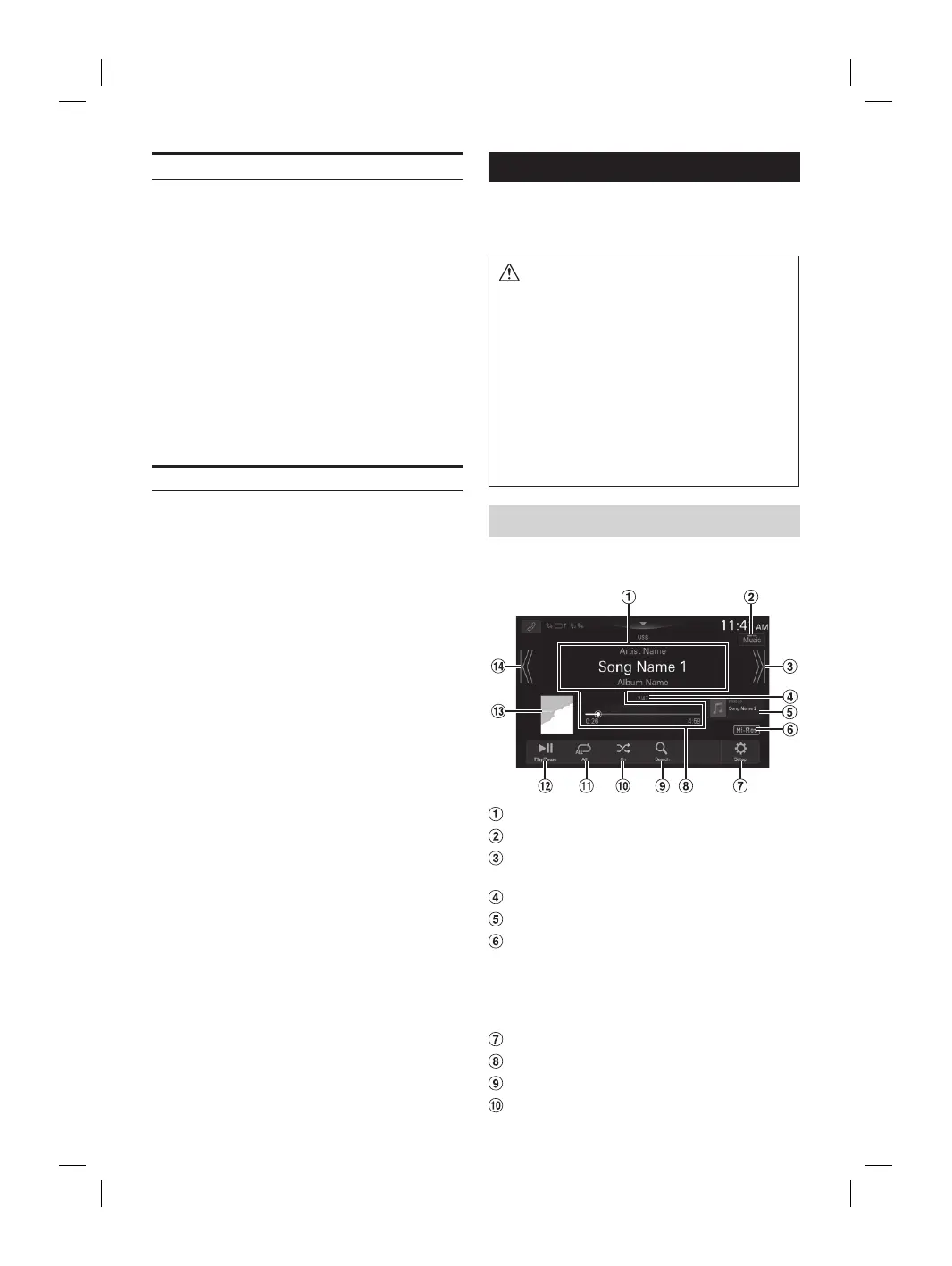
USB Audio
■
USB Audio mode screen
Information display
Switches to USB Video mode
Finds the beginning of next chapter/Fast-
forwards when touched for at least 1 second
Current track number/Total track number
Next song information display
Hi-Res icon display
• Not displayed if the following conditions are not
satisfied.
– Extension: .flac/.wav
– Sampling frequency: 96 kHz or more
– Quantization bit rate: 24 bit or more
Displays the USB Setup Menu screen (page 18)
Time Bar (Elapsed time/Total time for playing)
Displays the search screen
Shuffle mode














 To Next Page