ALPINE iLX-F509E 68-41657Z84-A (EN)ALPINE iLX-F509E 68-41657Z84-A (EN)
65-EN
Mounting the GPS Ant
vehicle
1 Clean the mounting location.
2 Put on the GPS Antenna moun
3 Mount the GPS Antenna.
GPS Antenna
Antenna mounting plate
This unit
• Do not mount the GPS Antenna inside the centre c
– Mount the GPS Antenna on a flat plane of the d
or rear tray.
– Make sure the GPS Antenna is not covered (obst
any metallic surface or object.
• If the GPS Antenna is mounted near the unit, the r
becomes poor, and the location of your vehicle may
displayed correctly.
– Mount the GPS Antenna far away enough from t
– Bundle the GPS Antenna cable away from the re
unit.
• Some thermal reflection type or thermal absorptio
may interrupt high frequency waves. If reception i
the antenna installed inside the car, try to mount t
outside the car.
Note on using HDMI Connec
Cables
When using HDMI connection cables, secur
the HDMI Terminals with the supplied HDMI Fixa
Bracket.
Secure the HDMI Fixation Brack
(A).
HDMI Terminal
HDMI Fixation Bracket
(Included)
(A)
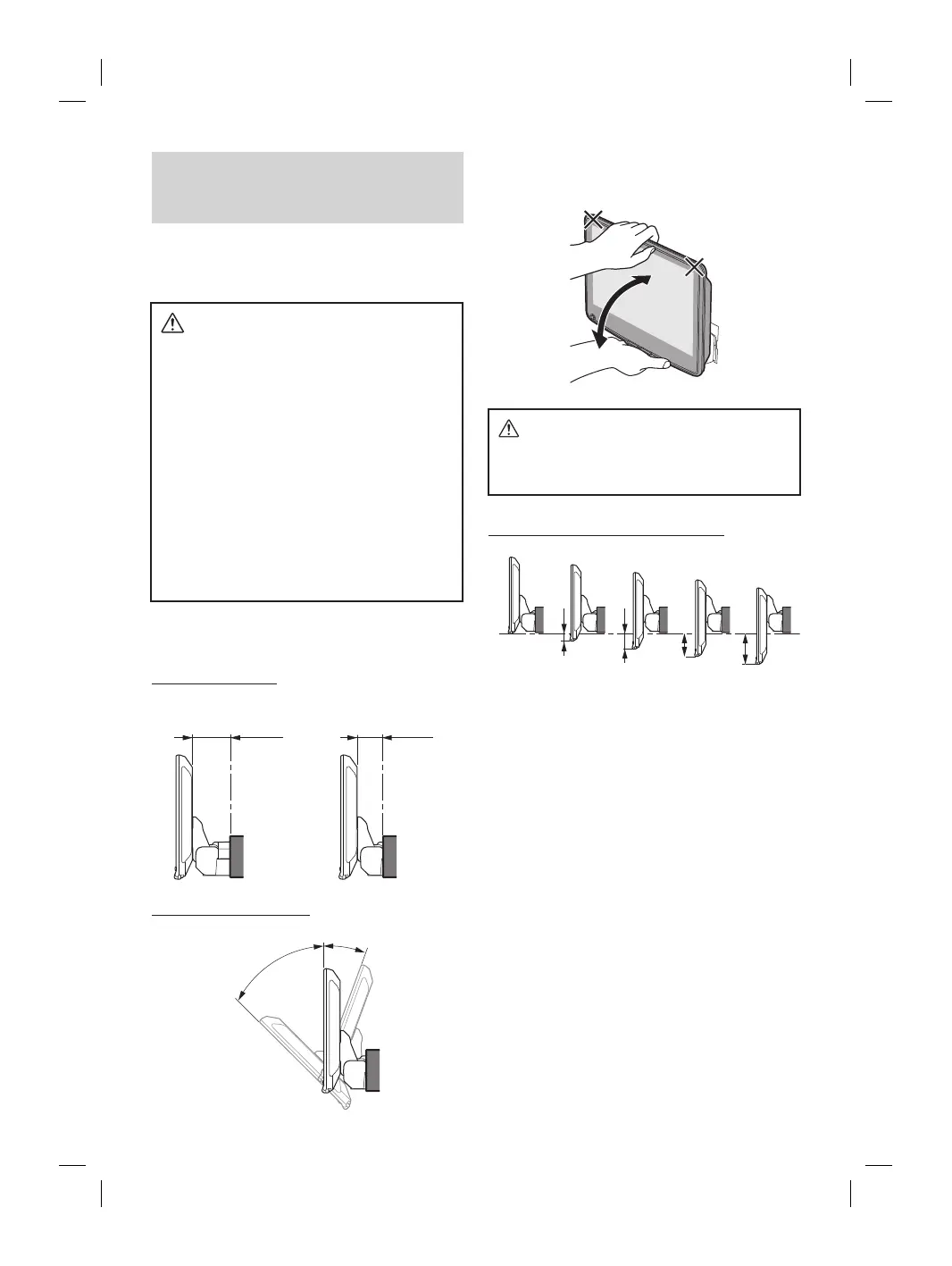
Position Adjustment and Mounting
Dimensions of the Display
(iLX-F509E/iLX-F511E only)
The mounting position of this unit’s Display can be adjusted
(front-back/angle). When mounting the Display, confirm the
mounting position and mounting dimensions so that it
does not obstruct your field of vision or impair driving.
WARNING
• In the following cases, the display cannot be
mounted.
– It impairs operation of the steering wheel or various
levers (gearshift, windshield wiper switch, turn
signal switch, etc.)
– It impairs operation of the airbag
– It significantly impairs operation of the hazard
switch
– It impairs identification or operation of any other
control switches
– It impairs confirmation of gauges or warning
indicators
– It interferes with vehicle equipment (switches,
panels, etc.)
∗ Depending on the vehicle, the glove compartment or
cup holders may become inaccessible, or air
conditioner ventilation ducts may be covered.
■
Display mounting dimensions and adjustable
positions
Front-back position
<Forward position>
51.5 mm
31.5 mm
<Back position>
Adjustable Display angle
45°
-20°
0°
• To adjust the display angle, hold the center of the top and
bottom of the display to move it. To protect the display, do not
hold the left and right ends to move it.
CAUTION
Do not adjust the display angle when the display
unit is not fixed to the slider of the main unit using
4 screws (M5×8). Doing so may not turn power on.
Adjustable Display up-down position
-15 mm
-30 mm
-45 mm
-60 mm
0














 To Next Page