VLAN can be configured
DHCPS, NAT and PPPoE are disabled
In Gateway mode
VLAN is disabled
DHCPS, NAT and PPPoE can be configured
4.11 SWITCH MODE
4.11.1 Static IP address
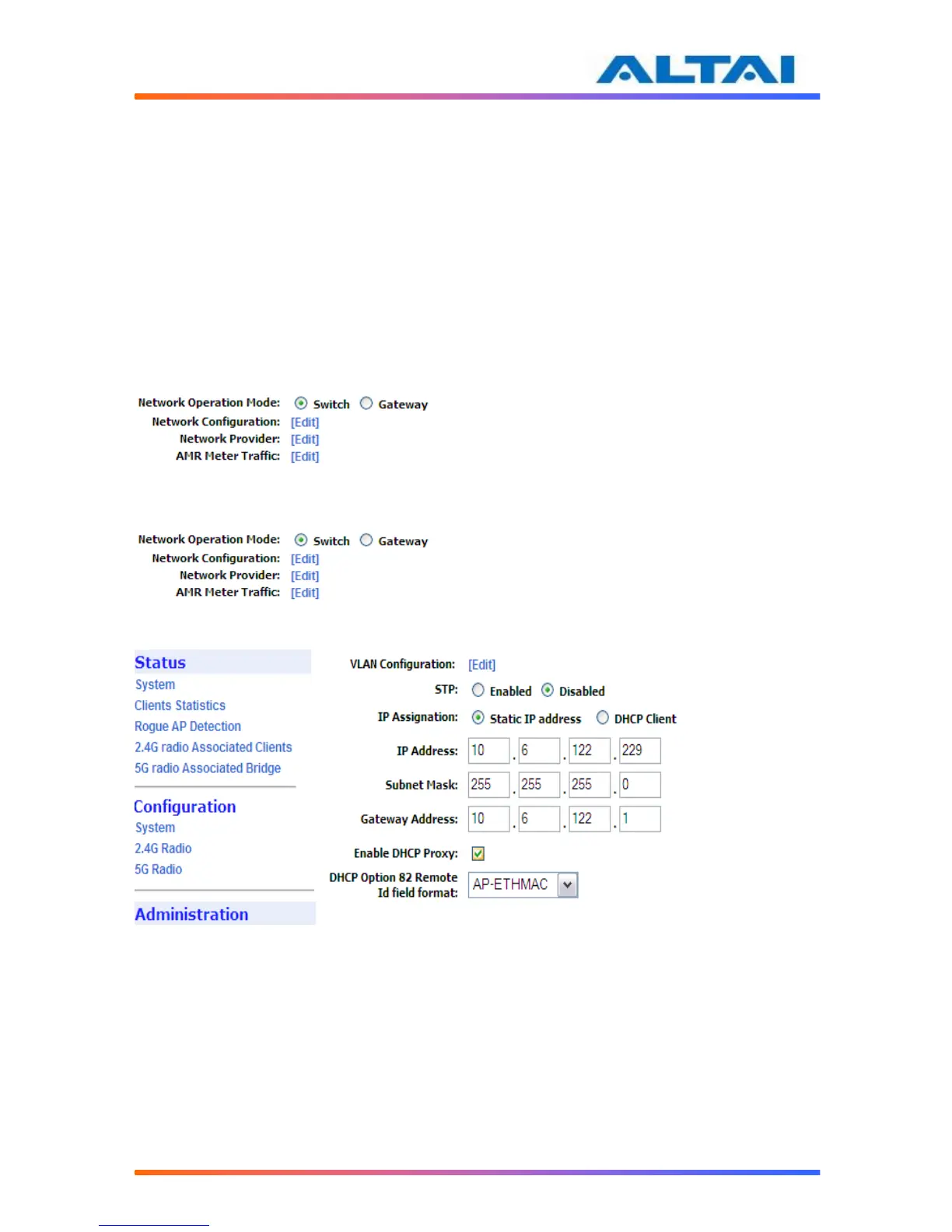
In IP Assignation, there are two kinds of mode for A2: Static IP address and DHCP Client. In
Switch mode, by clicking Network Configuration in the System page, users can configure the
IP Address, Subnet Mask and Gateway Address, as shown in
Figure 9 and Figure 10.
Figure 9 The IP address here is the Ethernet interface of the A2
Figure 10 Network Configurations under Switch mode and the IP address here is the Ethernet interface of the A2
4.11.2 DHCP Proxy
DHCP Proxy (also known as DHCP option 82) provides additional security when DHCP is used
to allocate network addresses. It enables the Access Point to act as a DHCP relay agent to
prevent DHCP client requests from untrusted sources. You can configure the Access Point to
adds option 82 information to DHCP Request from client before forwarding the request to the
DHCP server.
4.11.3 The Access Point adds the DHCP option 82 payload and forwards the request to the
server. The payload can contain the MAC address or the MAC address and SSID of the



 To Next Page