Table 6 Beacon Interval
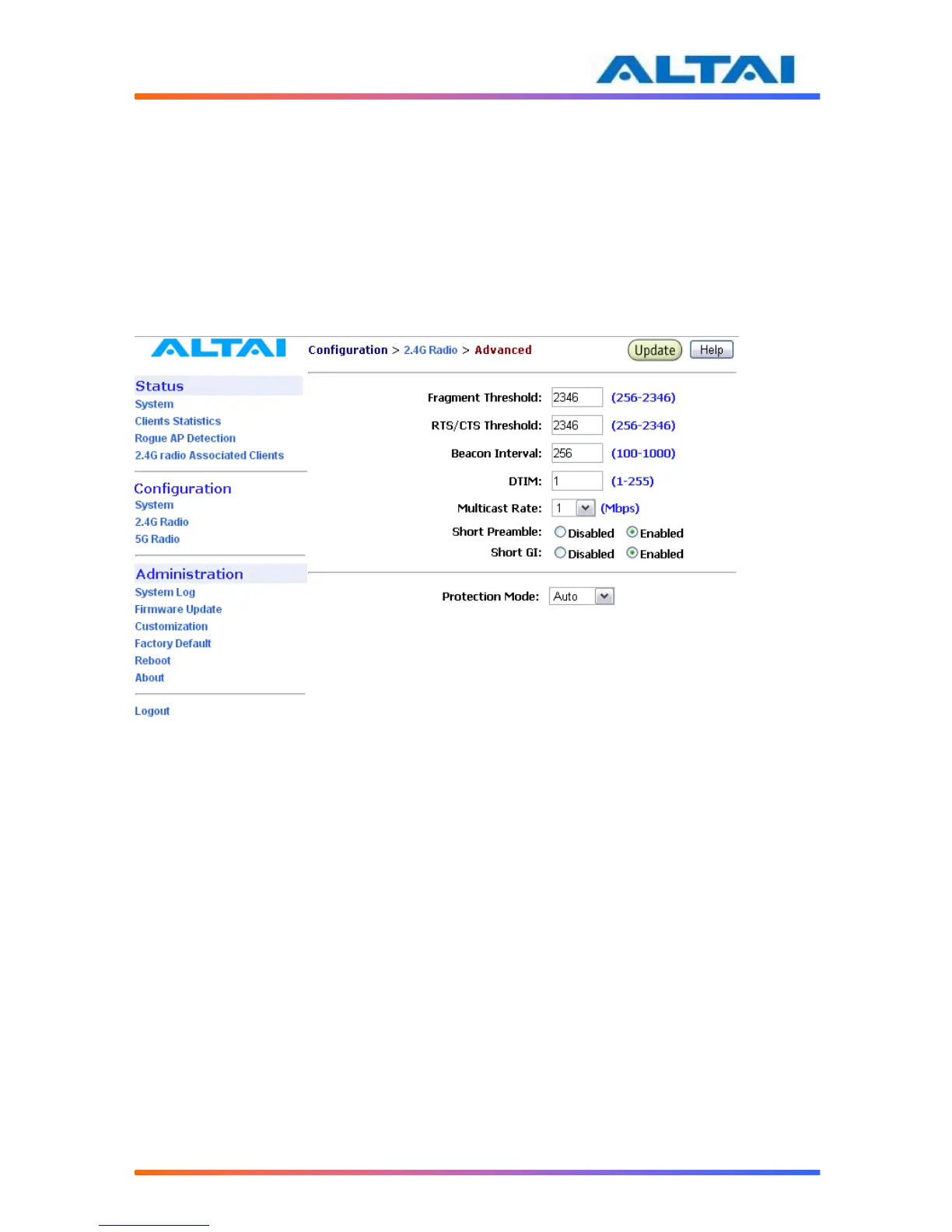
Fragment Threshold: It means the size of each frame. If it is set to 256 bytes and the size of data
block is 1024 bytes, the data block will be divided to four frames to send.
RTS/CTS Threshold: RTS is a flow control mechanism to prevent collision between 802.11b
and 802.11g mobile stations to send data to the access point in the same time. CTS is another
flow control mechanism to prevent collision when two mobile stations, who do not know the
existence of each other, send data to the access point in the same time. RTS and CTS are used
for point-to-multipoint bridge application and they are enabled when the threshold set to 2346.
Figure 21 Advanced Wireless Radio Setting
4.17.6 Service Set IDentifier (SSID) and Virtual Access Point (VAP)
In order for the A2 and mobile clients to communicate, all of them must be configured to use the
same SSID for communication both at the VAP and clients ends. SSID broadcast can be
disabled by selecting Suppress SSID. Suppress SSID is used to prevent unauthorized users
scanning for SSID while still allowing users who know the correct SSID to connect.
VLAN can be enabled by adding different VLAN Tag ID. The traffic will pass through the
specific VLAN switch port when VLAN is enabled.
Each VAP setting (including SSID) can be altered by selecting Edit. The setting of each VAP is
shown in Figure 17. The default SSID for each VAP ID is Altai Wireless Network. VLAN Tag
can also be set here.



 To Next Page