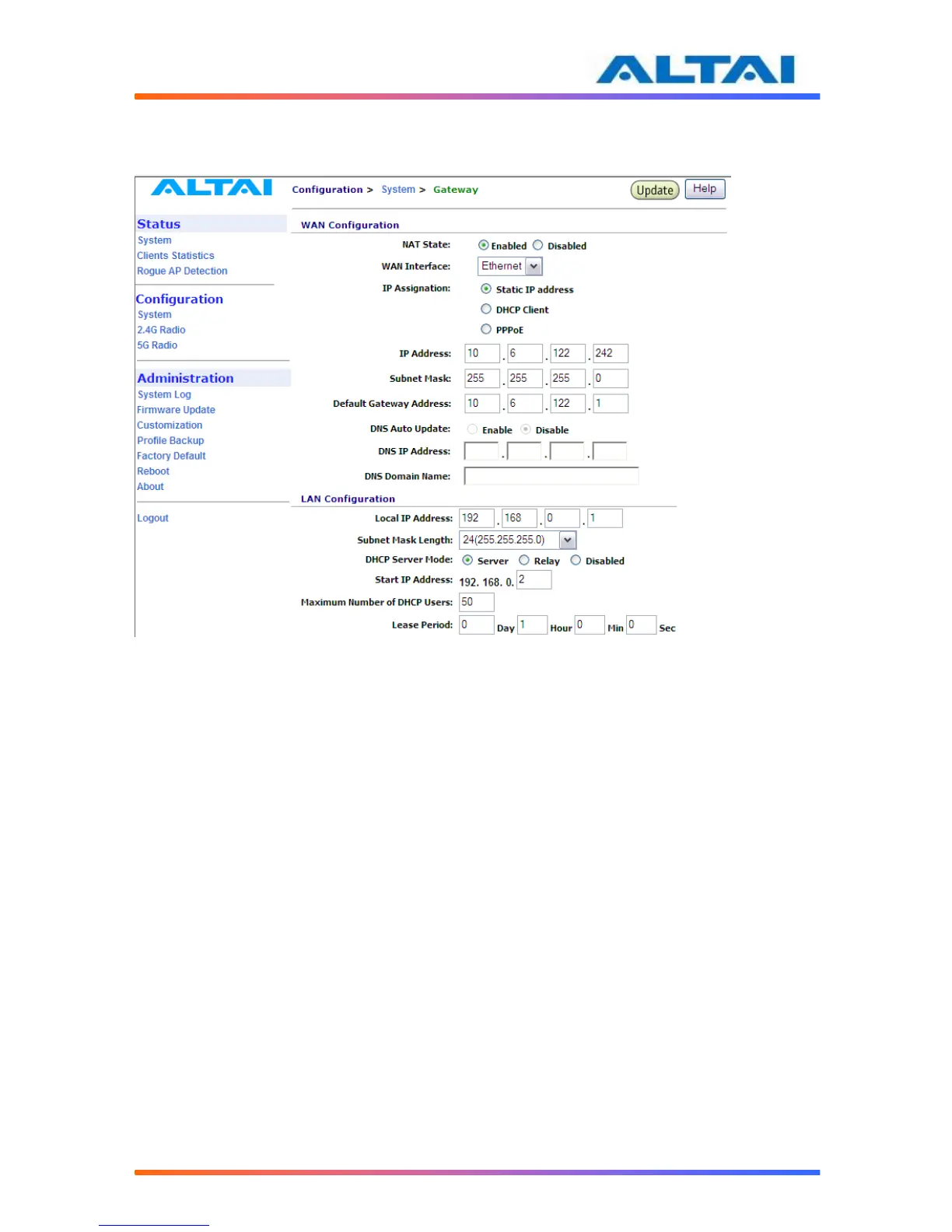
4.12 GATEWAY MODE
In Gateway mode, by clicking Network Configuration in the System page, users can configure
the WAN and LAN settings.
Figure 11 Network Configurations under Gateway mode
4.12.1 WAN Configuration
NAT is set to “Enabled” as default.
The settings for Static IP address and DHCP Client are similar to those in switch mode. Please
refer to the previous section for details.
4.12.1.1 WAN Interface
Default setting is "Ethernet". This control is used to specify the WAN interface. The Ethernet
interface or 5G bridge interfaces can be used as the WAN interface when the A2 works in AP
mode. Use the pull down menu to select either one. The 2.4G Radio Client interface is used as
the WAN interface when the A2 works in Station mode.
4.12.1.2 PPPoE Configuration
If PPPoE is chosen, a PPPoE login will be attempted for the PPPoE Username, PPPoE
Password and PPPoE Service Name, see Figure 12.



 To Next Page