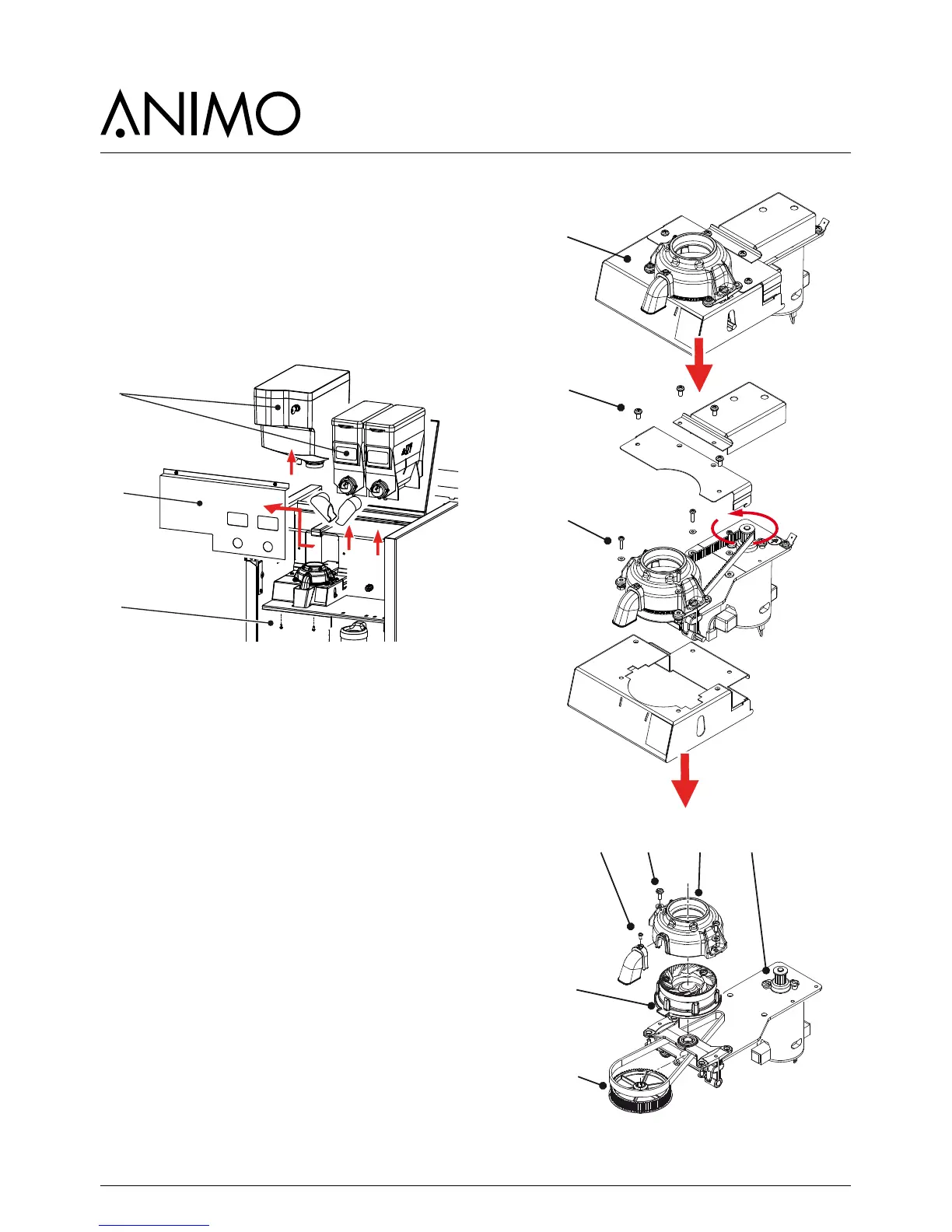
3.5.5 Replacement drive belt
Coffee grinder housing disassembly
1. Remove the bean- and instant canister [1] and
remove the cover plate [2] behind it.
2. Disconnect the electrical connections to the small
coffee grinder circuit board (via the rear wall).
3. Remove the two screws [3] on the underside of the
housing.
Drive belt removal
4. The whole assembly [4] can now be removed from
the machine.
5. Remove the three screws [5] and remove the belt
cover plate.
6. Remove the four screws [6] from the mounting
rubbers and remove the coffee grinder with motor
plate.
7. Loosen the screen [7] on the coffee outlet and
remove it.
8. Remove the two screws [8] from the grinder
housing [9].
9. Remove the grinder housing [9].
10. Slightly loosen the motor screws [10] so that the
drive belt tension is released.
11. Pull the grinding disk [11] carrier vertically upwards.
12. Remove the belt disk and belt [12] and replace
these parts.
13. Fit the new belt disk and drive belt [12] in reverse
order.
14. Tension the belt disk and re-tighten the motor
screw [10].



 To Next Page