12. PAYMENT SYSTEMS
12.1 Coin mechanism (optional)
The OptiBean is available with an optional coin
mechanism suitable for euros (€ 0.05 to 2.00). Other
currencies are available on request.
The coin mechanism can also be easily programmed
for a token (coffee coin).
Retroactively tting a machine with a coin mechanism is
also possible.
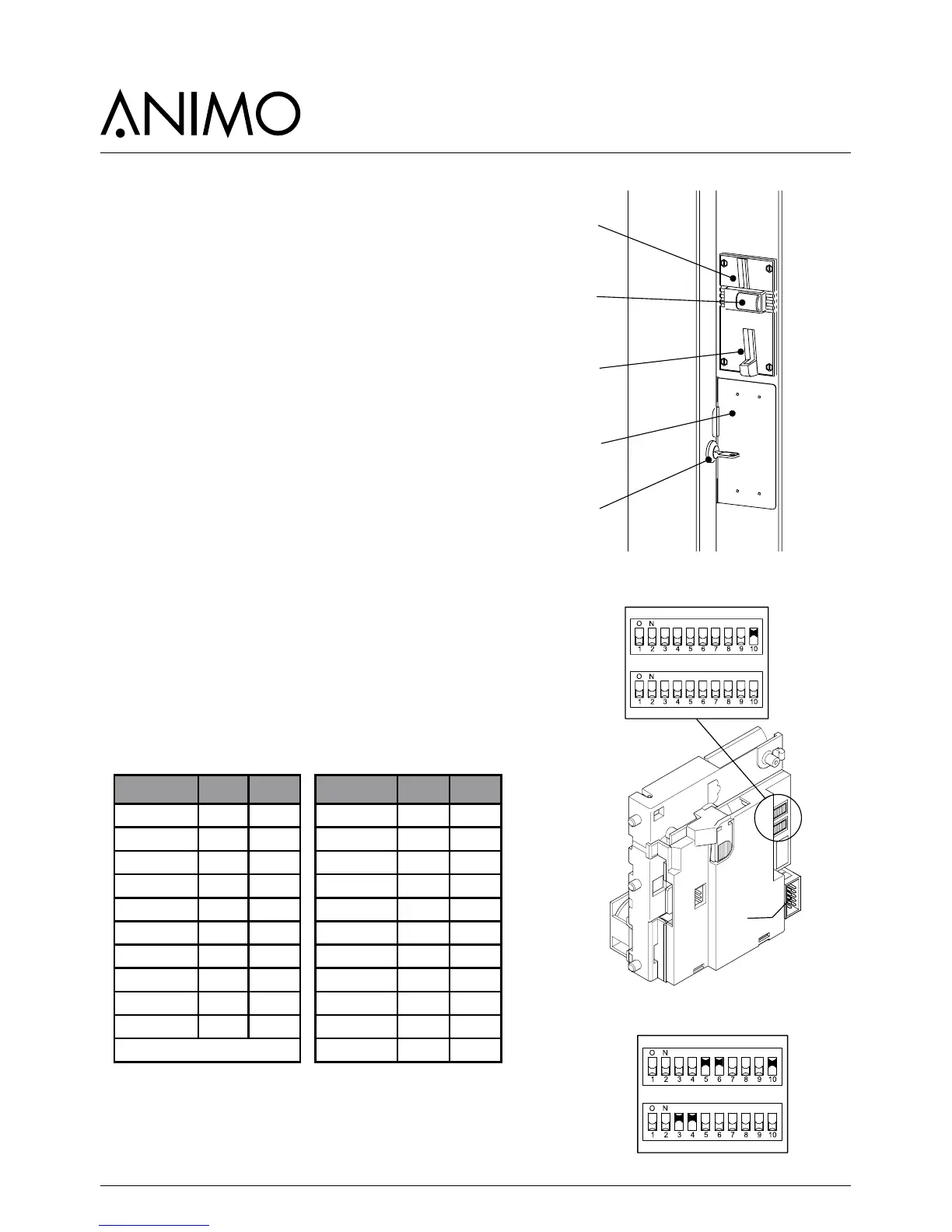
The right side wall is replace with a wide side wall into
which the coin mechanism and money drawer is built.
1. Coin slot
2. Return button
3. Return groove
4. Money drawer
5. Door lock (locks the money drawer at the same time)
12.1.1 Standard conguration
The gure shows the standard conguration of the DIL
switches, S1-10 ON
The coin mechanism is connected to the machine by
connector A.
12.1.2 Blocking coins
If required, certain euro coins can be blocked using DIL
switch block S1 + S2
Coin € S1 S2 Coin £ S1 S2
€ 0.05 S1-1 S1-7 £ 0.05 S1-1 -
€ 0.10 S1-2 S1-8 £ 0.10 S1-2 -
€ 0.20 S1-3 S2-1 £ 0.20 S1-3 -
€ 0.50 S1-4 S2-2 £ 0.50 S1-4 S2-1
€ 1.00 S1-5 S2-3 £ 1.00 S1-5 S1-7
€ 2.00 S1-6 S2-4 £ 2.00 S1-6 S1-8
Token 607 - S2-5 £ 0.05 new S1-4 -
Token Eagle - S2-6 £ 0.10 new S1-5 -
Token new - S2-7 Token 607 - S2-6
Token new - S2-8 Token Eagle - S2-7
ON = locked / OFF = free Token new - S2-8
For example, to block € 1.00 and € 2.00 coins
● S1-5, S2-3 -> ON (€ 1.00 blocked)
● S1-6, S2-4 -> ON (€ 2.00 blocked)



 To Next Page