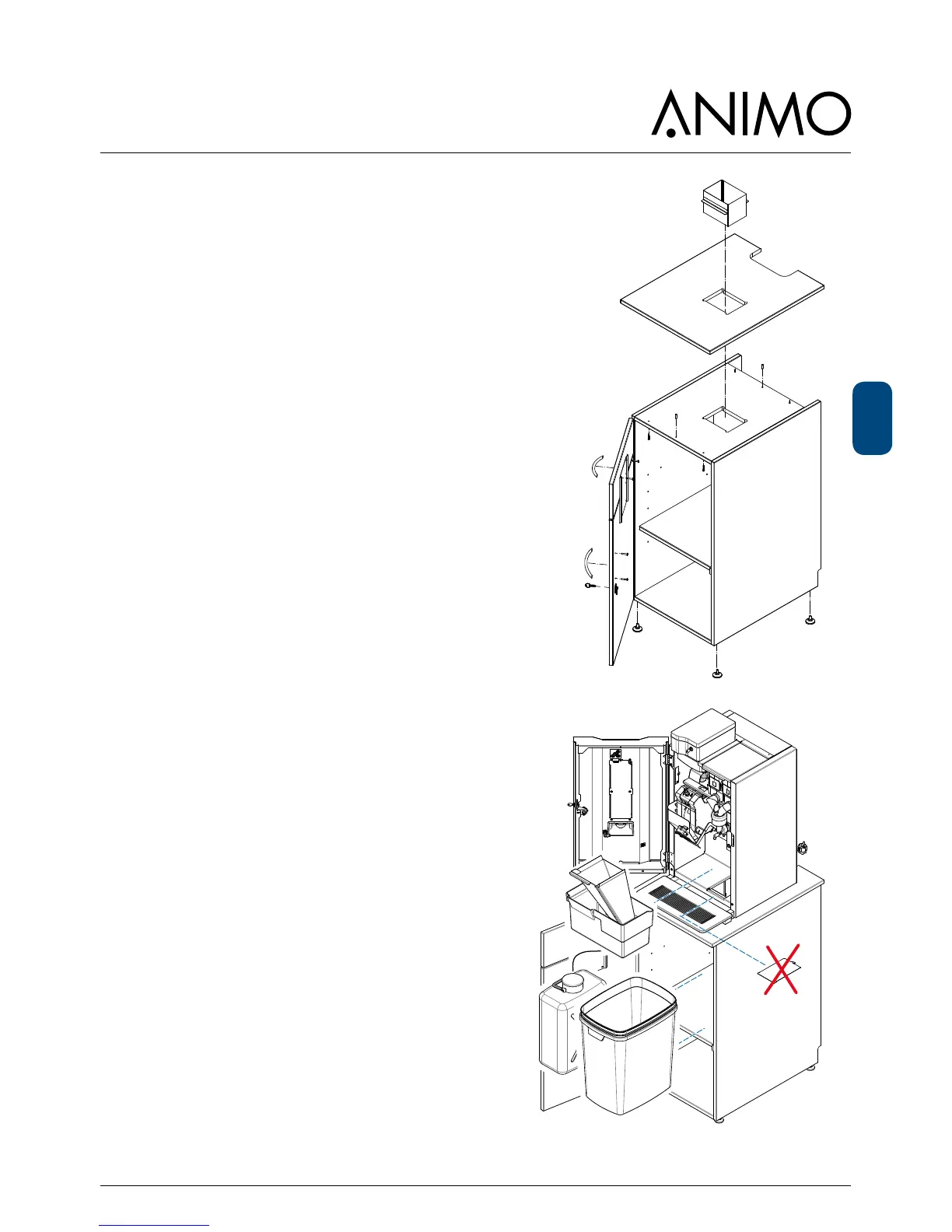
11.3 Installation OptiBean with waste to
litter bin
Required equipment:
• OptiBean
• Base cabinet with access to litter bin [1001559]
• Top board with access to litter bin, [65031] small or
[65032] large.
1. Build up the cabinet according the instructions
supplied.
2. Install the drain set which is supplied with the
cabinet, see chapter 10.1
3. Remove the stainless steel hatch in the bottom of
the OptiBean, and centre the machine over the
transit case.
4. Replace the standard coffee waste bin for the
special waste bin with stainless steel funnel and
place it into the OptiBean.
5. Connect the OptiBean to the water (incl. water lter)
and electricity.
6. Connect the drain water into the jerrycan supplied or
to a drainpipe (when available).
7. Change the cup amount counter: Service menu /
2.13 Other settings / Waste bin management /
cup amount between 300 to 500 cups.
2.13Othersettings
│
└──2.13.0Wastebinmanagement
│
└──2.13.00Cupamount
We don’t recommend to switch off the waste bin
signal. By taking out the waste bin & funnel regularly
when cleaning it the counter will be reset
automatically.
8. Place the big litter bin directly under de transit case.













 To Next Page