When loading new software the following changed
settings (data) are lost:
- Changed recipes
- Changed personal settings
- A non-standard language le will be overwritten by
the standard language le NL/GB/DU/FR
Counts, Log and operating hours will be preserved!
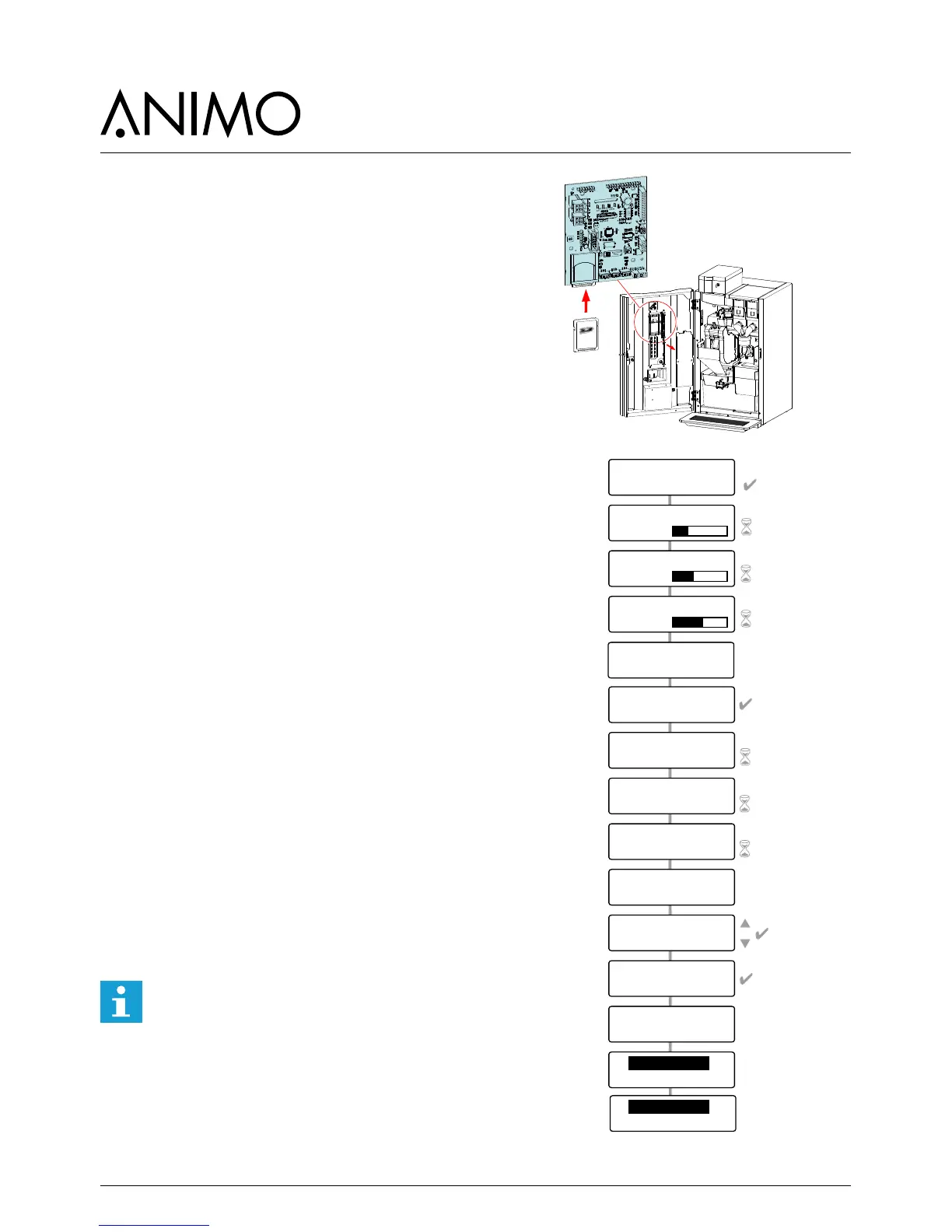
1. Download the OptiBean software from the Animo
extranet site.
2. Unpack the ZIP le and copy all les to an SD card.
3. Remove the cover plate on the inside of the door.
4. Insert the SD card in the card holder.
Tip: Save any changed settings rst on an SD
card. This can be the same SD card as the one
containing the new software. Go to service menu
item 2.10 SD menu / Save data and save the
required settings.
5. Switch the machine off (0).
6. Switch the machine on again (I).
7. Press the Enter key (key 10). The new software will
now be installed automatically. The following
procedure takes about 5 minutes.
8 Choose the appropriate model and conrm your
selection with Enter.
9. The display now shows ‘Make your choice’.
10. The new software has now been installed.
11. Now reload the Personal recipes and settings
saved in step 4 into the machine. Go to service
menu item 2.10 SD menu / Load data and reload
the saved settings back into the machine.
12. Remove the SD card from the card holder.
After installation, check the display contrast in the
Operator menu / 1.9 Contrast
Attention: during the software installation the
display can show some contrast uctuations.
This is a normal symptom because the contrast
parameter is rst active after the whole software
is installed.













 To Next Page