Digital Video Recorder User Manual
20
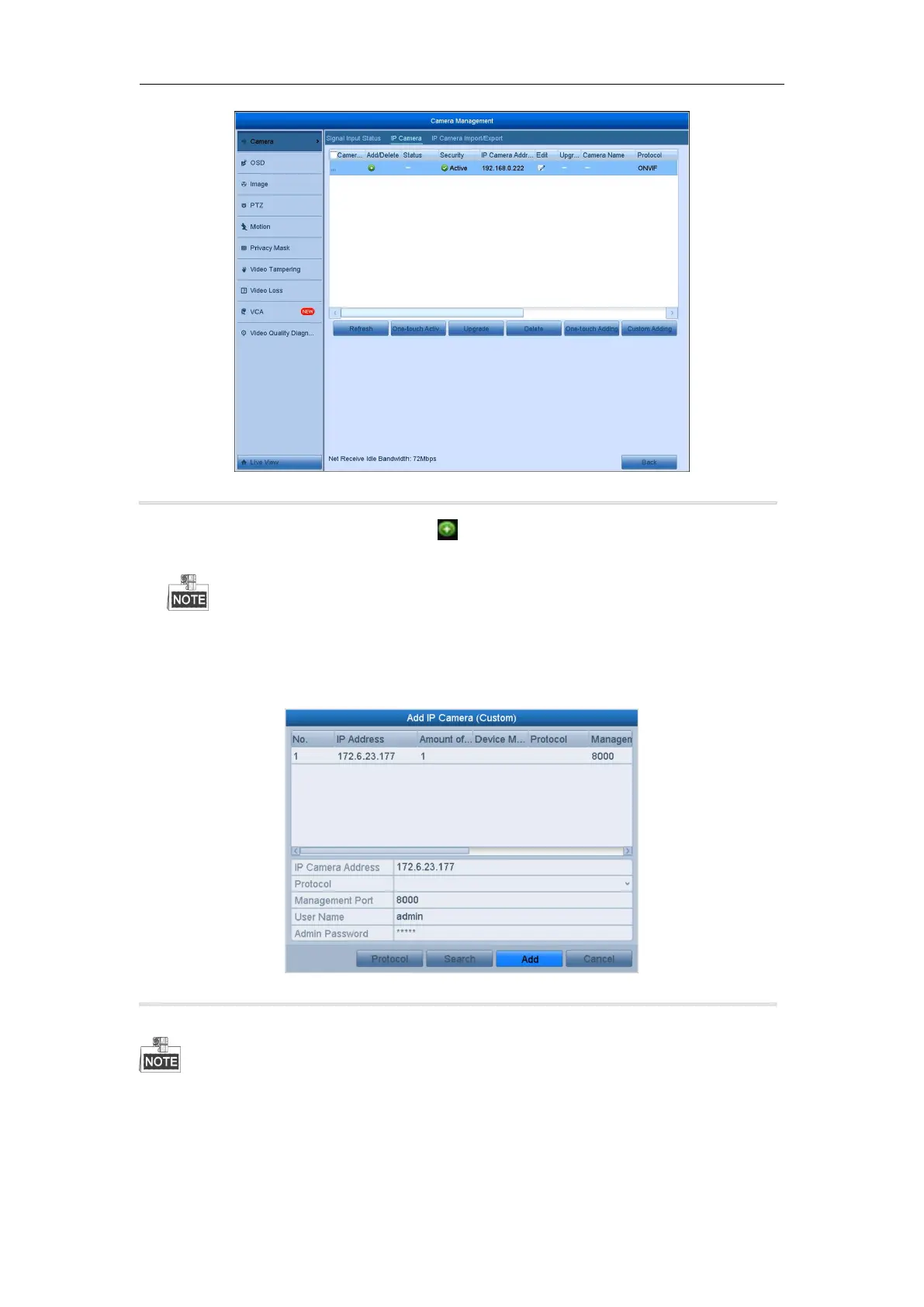
Figure 2. 16 Adding IP Camera Interface
2. The online cameras with same network segment will be detected and displayed in the camera list.
3. Select the IP camera from the list and click the button to add the camera (with the same admin password
of the DVR’s). Or you can click the One-touch Adding button to add all cameras (with the same admin
password) from the list.
Make sure the camera to add has already been actiavted by setting the admin password, and the admin
password of the camera is the same with the DVR’s.
Steps:
1) On the IP Camera Management interface, click the Custom Adding button to pop up the Add IP Camera
(Custom) interface.
Figure 2. 17 Custom Adding IP Camera Interface
2) You can edit the IP address, protocol, management port, and other information of the IP camera to be
added.
If the IP camera to add has not been actiavated, you can activate it from the IP camera list on the camera
management interface.
3) Click Add to add the camera.
For the successfully added IP cameras, the Security status shows the security level of the password of camera:
strong password, weak password and risk password.



 To Next Page