Apogee Symphony Desktop User’s Guide
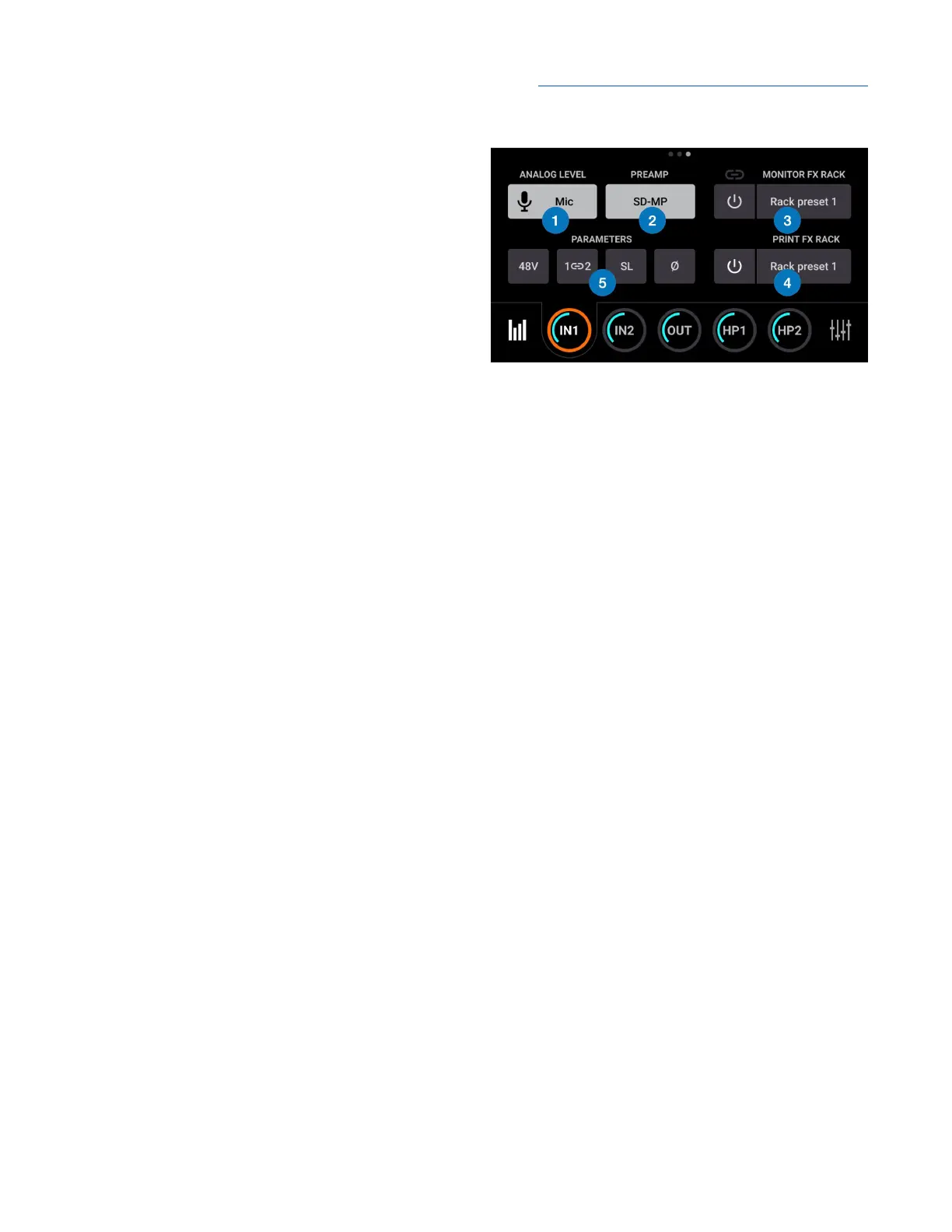
Input 1-2 Settings
1. Analog Level - choose the analog reference
level for Analog inputs 1-2.
● Choose Mic when connecting
microphones or direct boxes to the XLR
input.
● Choose Inst when connecting a guitar,
keyboard, or any high impedance (Hi-Z)
instrument to the 1/4” input (balanced
TRS or unbalanced TS).
● Choose +4dBu when connecting “pro”
gear with a nominal +4 dBu output level
(such as an external mic pre, compressor, or EQ) to the XLR input.
● Choose -10dBV when connecting “semi-pro”, hi-fi, or musical instrument gear with a nominal
-10dBV dBu output level to the XLR input.
2. Preamp - select the mic preamp:
● SD-MP - Symphony mic pre with no emulation processing and a gain range of 0-75 dB.
● AP-66 - based on a vintage Neve 1066 mic preamp section with a gain range of 20-80 dB.
● AP-57 - based on a highly modified Ampex tube mic preamp with a gain range of 0-10.
3. Monitor FX On/Off & Preset Select - Enable Apogee Channel FX processing in the Monitor path
(through the Control app direct monitoring mixer), and select a preset.
4. Print FX On/Off & Preset Select - Enable Apogee Channel FX processing in the Record path (to
audio software) and select a preset.
5. Input Settings
● 48V - enable 48 volt phantom power on each analog input when Analog Level is set to Mic.
Most condenser mics require 48 volt phantom power to operate.
● Group - Link the Input Gain (plus Output Level and Gain Link button when present) of each
analog input. Any level offsets that exists before inputs are grouped will be preserved after a
group is chosen.
● Soft Limit - engage Soft Limit on each analog input. Soft Limit is an analog circuit that begins
to attenuate transient peaks at a threshold of -4dBfs, replicating the transient softening of
analog tape.
● Polarity Invert - invert the polarity of the analog input signal.
26



 To Next Page