Apogee Symphony Desktop User’s Guide
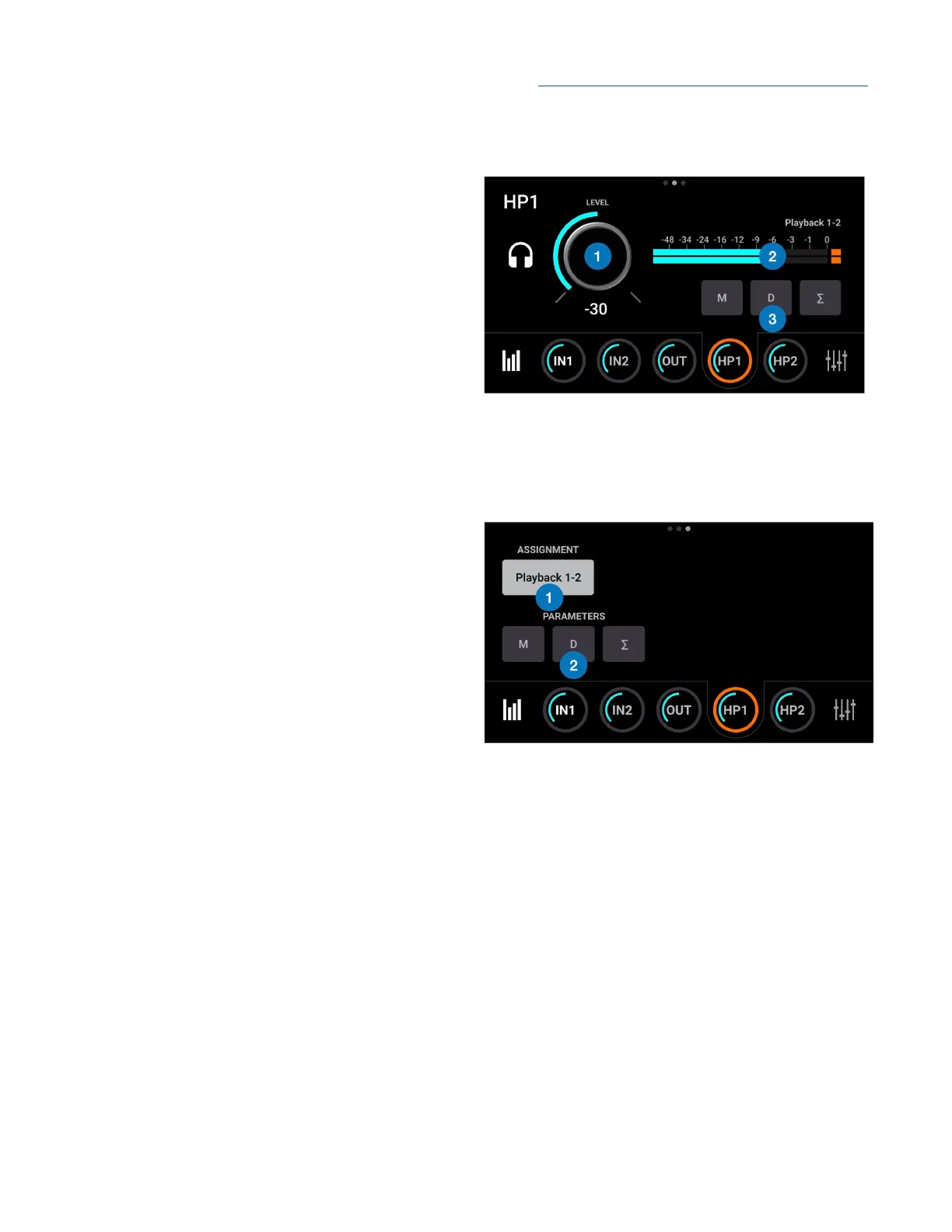
Headphone Out 1-2 Overview
1. Level - displays the level of the headphone
output:
● HP1 = front panel output.
● HP2 = rear panel output.
2. Source Meter - displays the digital level of
the HP output source, before D/A conversion.
3. Main Out parameters:
● Mute - mute the Main outputs 1-2.
● Dim - dim (reduce) the Main output 1-2
level by 15 dB.
● Sum to Mono - sum to mono the Main outputs.
Headphone Out 1-2 Settings
1. Assignment - choose the signal source for
the headphone output;
● Follow Main -
● SW:Playbacks - route the selected stereo
Playback signal from audio software to
the HP output.
● Direct:Mixers - route the stereo signal
from the selected mixer to the HP output.
● Direct:HW Inputs - route the selected
mono or stereo signal from the selected
hardware input(s) to the HP output.
2. HP 1-2 parameters:
● Mute - mute the HP1 or HP2 outputs.
● Dim - dim (reduce) the HP1 or HP2 output level by 15 dB.
● Sum to Mono - sum to mono the HP1 or HP2 outputs.
28



 To Next Page