Page 43
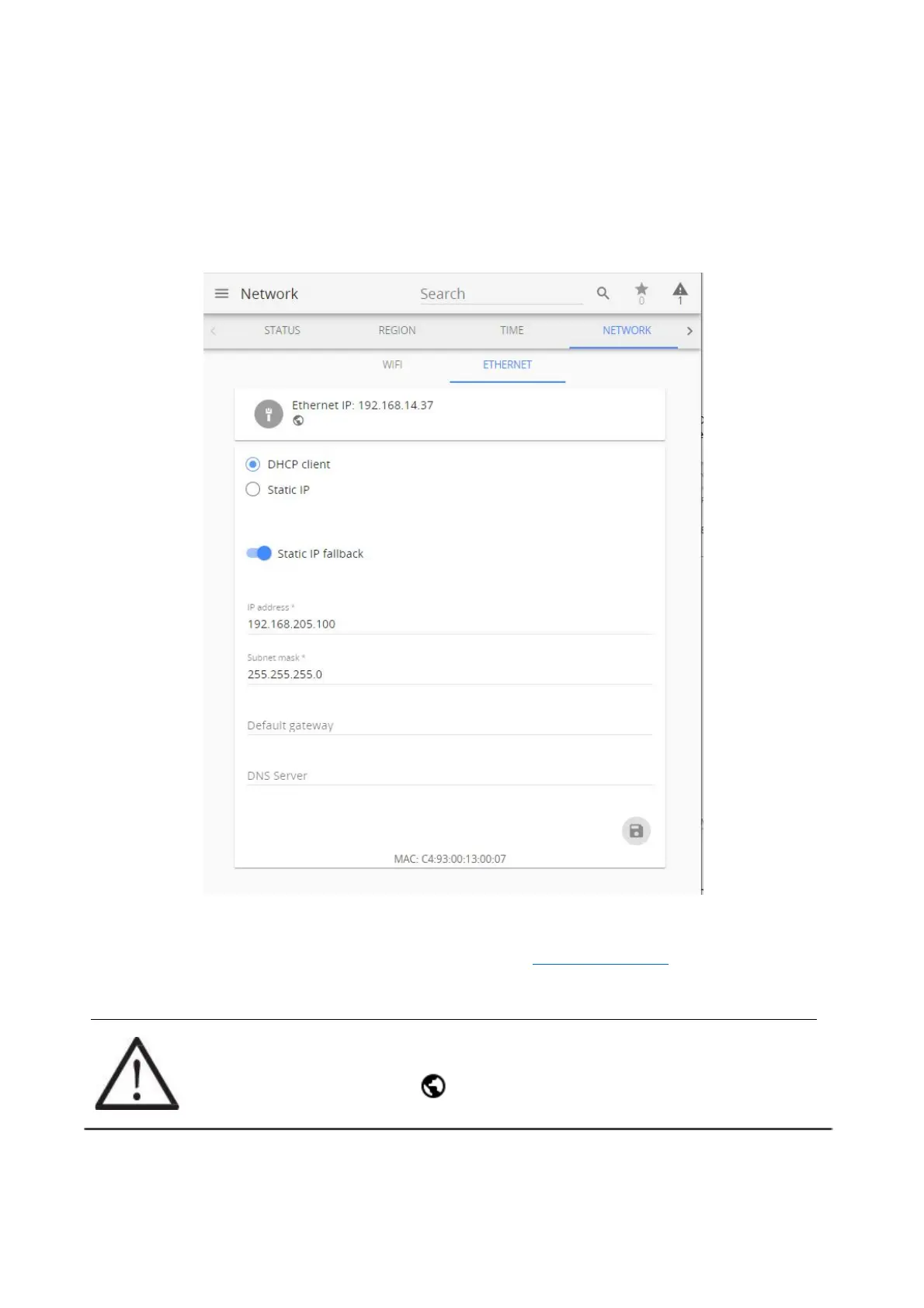
3.6.4.2 Ethernet menu
Ethernet connection is preferred for Aranet PRO/PRO+, as it is generally more reliable. In the Ethernet
menu there are two options - either to have it work in DHCP client mode or have a Static IP.
Factory settings of Aranet PRO/PRO+ Ethernet interface are:
• DHCP client – On;
• Static IP fallback – On;
• IP address – 192.168.205.100;
• Subnet Mask – 255.255.255.0.
Static IP fallback switch is visible when DHCP client mode is selected. When switched ON, and Aranet
PRO/PRO+ did not receive IP address from DHCP server, last settings entered in IP address, Subnet
mask, Default gateway and DNS server fields are applied. If no settings were entered before, default
Factory settings are in force. The same settings are in force after NETWORK RESET.
If Static IP fallback is switched OFF, no valid IP address is assigned to Aranet PRO/PRO+ Ethernet
interface when it did not receive IP address from DHCP server.
!NOTE! Most routers have DHCP enabled by default, we recommend keeping this setting
for ease of set up. For more advanced users, however, static IP address set up is possible.
Globe symbol with no crossover indicates successful connectivity to network.



 To Next Page