LS-200 User Manual
18www.arec.com
Streaming to Ustream
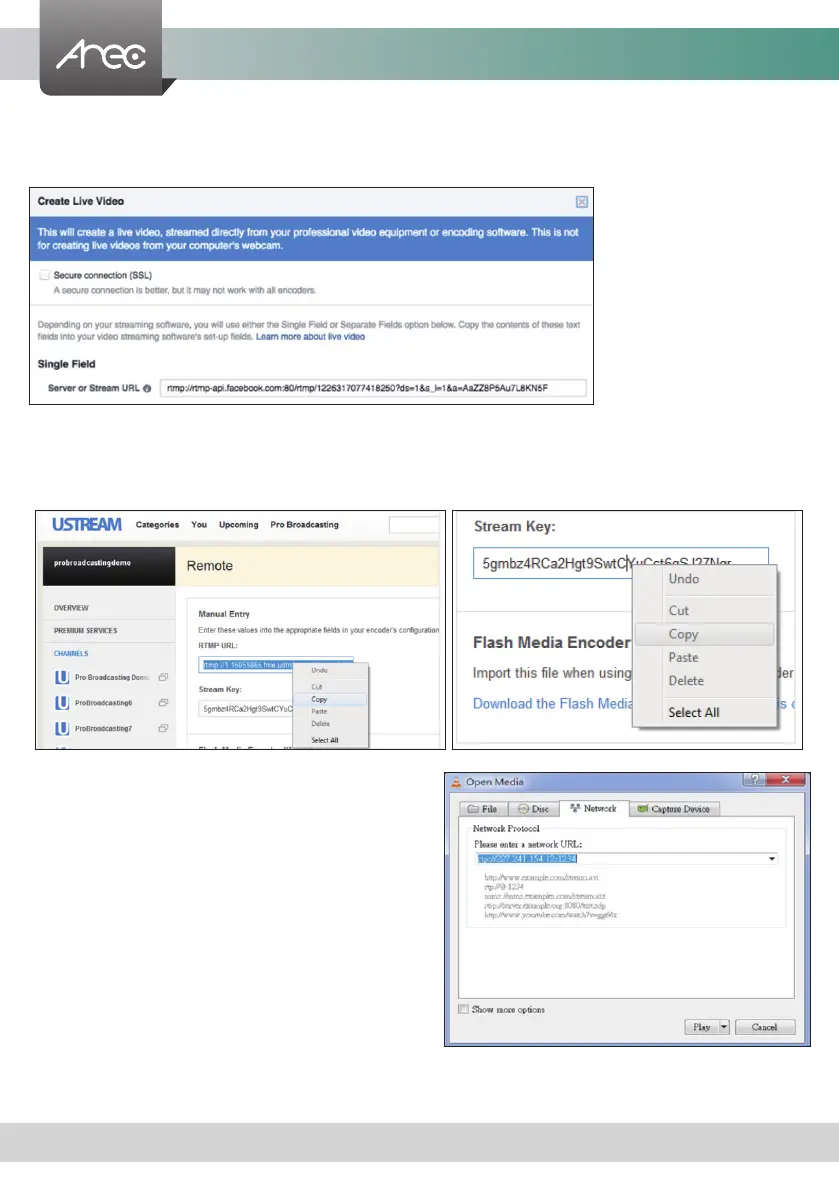
Combine the contents of both elds: RTMP URL and Stream Key, insert a slash between them. Paste this string into the
LS-200 streaming protocol setting eld. For example: rtmp:1.15059865.fme.stream.tv/ustreamVideo/15059865/5gmbz4RCa
2Hgt9SwtCYuCct6qS137Nar
Streaming to YouTube Live
Combine the contents of both elds: Primary Server URL and
Stream Name, insert a slash between them. Paste this string
into the LS-200 streaming protocol setting eld.
Streaming to a media player on a PC in the same LAN with the
LS-200
Enter the destination IP address and the port number where the
streaming is played in the format rtp://@:1234.
Unicast: For a single point connection, the destination IP must
be set to the location where the stream is played.
Multicast: The destination IP must be multicast IP address
where it can be shared with multiple viewers.
The LS-200 use IP address: 239.0.0.1 and port number: 5004
as the stream default. The available range of port number is
1024 to 65535.
To view the stream from a media player, open the URL in a
media player, such as:
Followings are some popular examples for streaming settings.
Streaming to Facebook Live
Copy the contents of the Single Field, Server or Stream URL, and paste in the LS-200 streaming protocol setting eld.



 To Next Page