HARDWARE INSTALLATION
45
LED Normal Status Problem Indication
Disk Activity When the activity LED is illu-
minated, there is I/O activity
on that disk drive. When the
LED is dark, there is no activ-
ity on that disk drive.
N/A
Fault LED When the fault LED is solid
illuminated, there is no disk
present.
When the Red LED is slow blinking
(2 times/sec), that disk drive has
failed and should be hot-swapped
immediately. When the Blue LED
is illuminated and Red LED is fast
blinking (10 times/sec) there is re-
building activity on that disk drive.
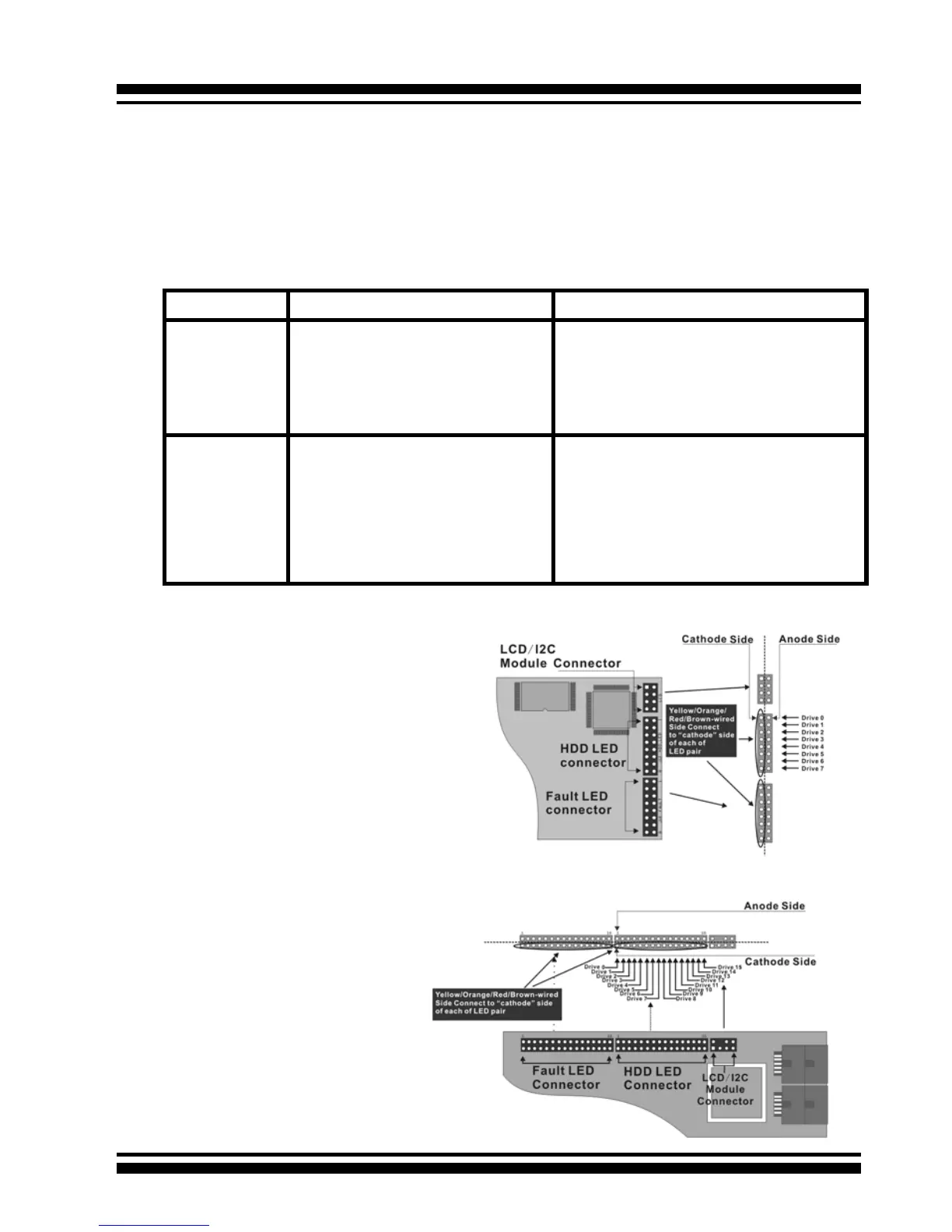
B: Individual LED indicator connector
Connect the cables for the drive activity LEDs and fault LEDs be-
tween the backplane of the cage and the respective connector on
the SATA RAID controller. The following describes the fault/activ-
ity LED.
Figure 2-21, ARC-
1110/1120/1210/1220
Individual LED indica-
tors connector, for each
channel drive.
Figure 2-22, ARC-
1130/1160/1230/1260
Individual LED indica-
tors connector, for each
channel drive.



 To Next Page