Subject to change · V 2.02.20 · EN
Page 40
www.argo-hytos.com
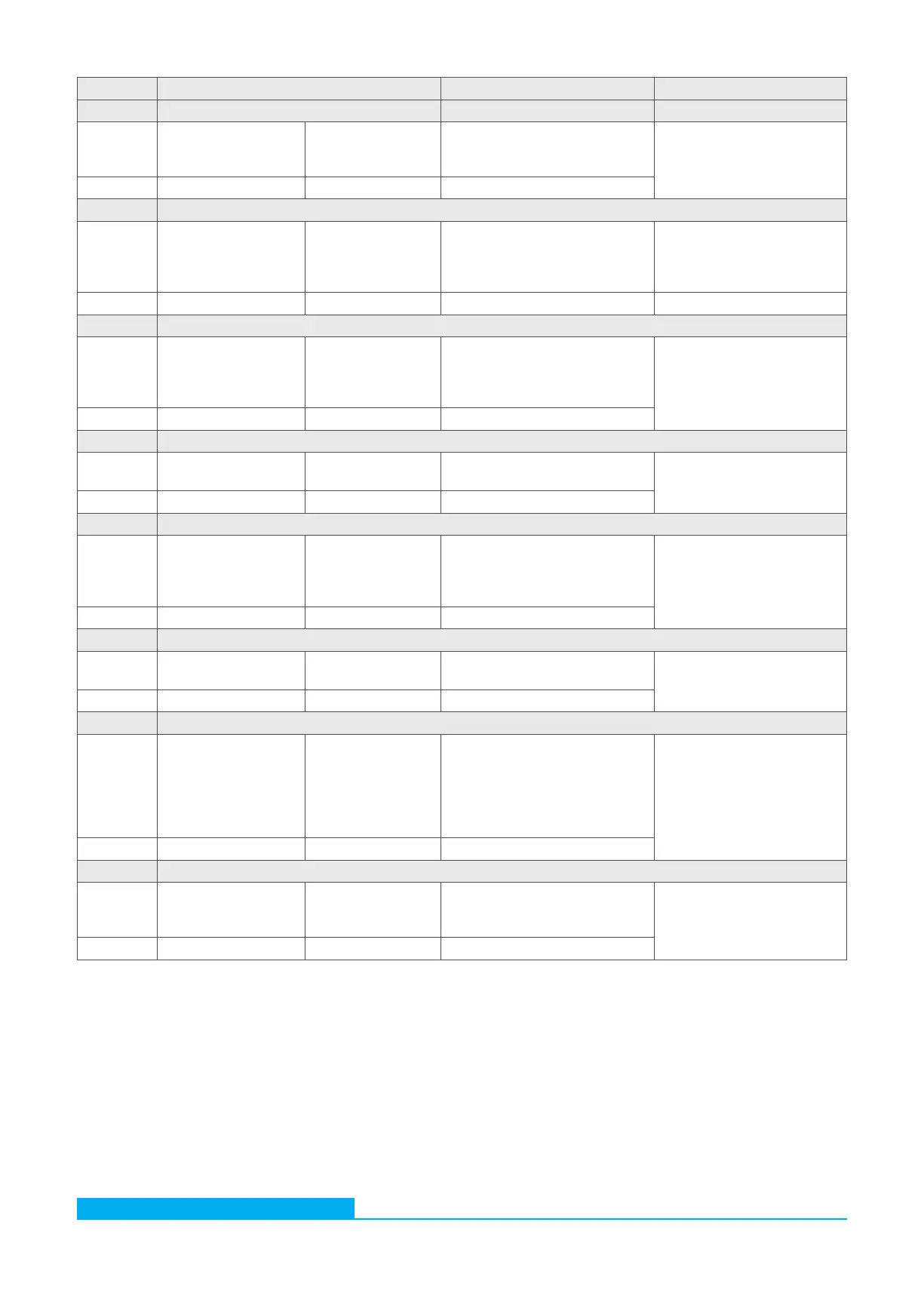
# Instruction format Specification Return format
18 Low-pass filter
Write WMean%d[CR] %d = 1...255
1 = no filter
Default: 2
Mean:%d[-];CRC:z[CR][LF]
Read RMean[CR] -
19 Communication type
Write SComMode%d[CR] %d = 0: RS232 (default)
%d = 1: CANopen
%d = 2: Autodetect
%d = 3: CAN J1939
ComMode:%d;CRC:z[CR][LF]
Read - - Siehe Antwort: "RCon"
20 RS232 Transmission rate
Write SRSBR%d[CR] %d = 0: 9600 Baud (default)
%d = 1: 19200 Baud
%d = 2: 57600 Baud
%d = 3: 115200 Baud
RSBR:%d;CRC:z[CR][LF]
Read - -
21 CAN Scheduling
Write SCTRM%d[CR] %d = 0: deactivated (default)
%d = 1: aktiviert (120Ω)
CTRM:%d;CRC:z[CR][LF]
Read - -
22 CAN Transmission rate
Write SCOBR%d[CR] %d = 3: 125K Baud
%d = 4: 250K Baud (default)
%d = 5: 500K Baud
%d = 6: 1000K Baud
COBR:%d;CRC:z[CR][LF]
Read - -
23 CAN Node-ID
Write WCOID%d[CR] %d = 1…255
Default: 10
COID:%d[-];CRC:z[CR][LF]
Read RCOID[CR] -
24 CAN Auto Default
Write WCAutoDef%d[CR] Decision which protocol should be
spoken (CANopen oder CAN
J1939) if communication type =
Autodetect
%d = 0: CANopen (default)
%d = 1: CAN J1939
CAutoDef:%d[-];CRC:z[CR][LF]
Read RCAutoDef[CR] -
25 CAN J 1939 - Interval in seconds for PDU 2
Write WCJInt%d[CR] %d = 0…60
0 = to be sent on value change
Default: 10
CJInt:%d[s];CRC:z[CR][LF]
Read RCJInt[CR] -
[CR] = Carriage Return [LF] = Line Feed %d / %c / %f = Place holder
Table 22: RS232 Configuration commands


 To Next Page