7-3ASUS RS540-E9-RS36-E
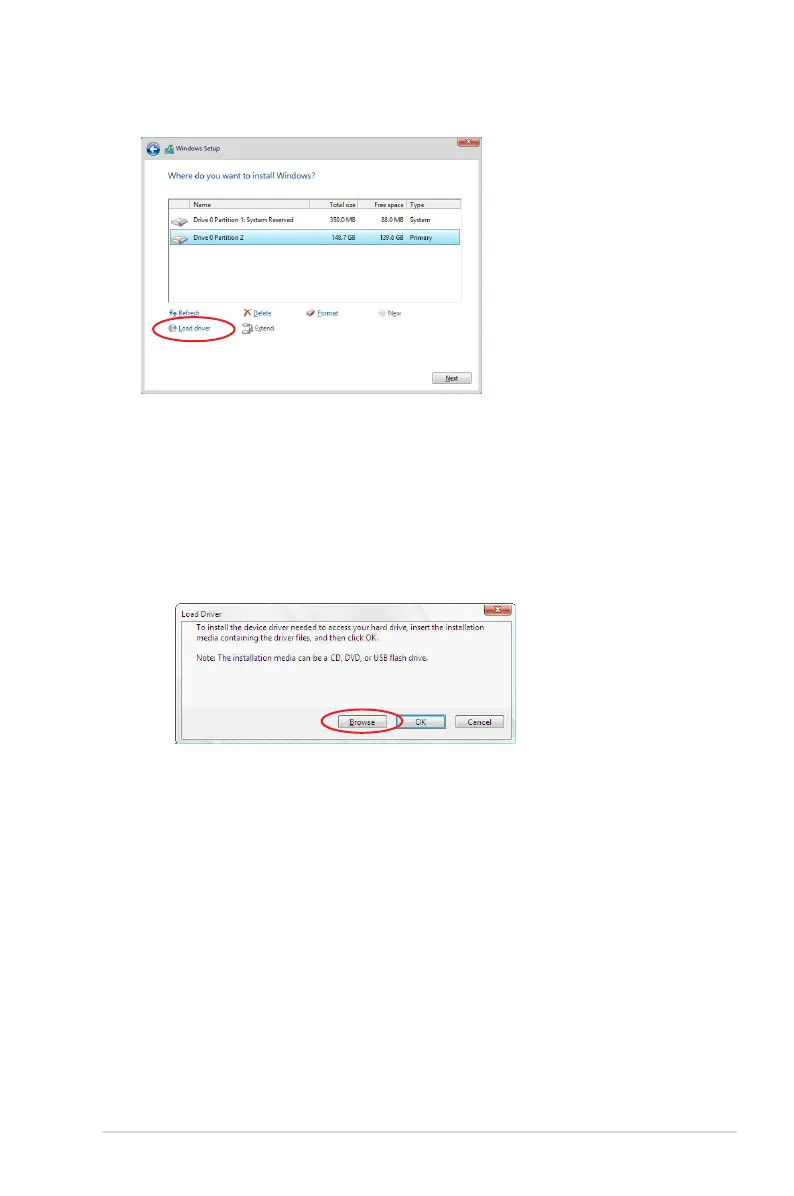
3. Click Load Driver.
4. A message appears reminding you to insert the installation media containing the driver of
the RAID controller driver (the installation media can be a CD, DVD, or USB ash drive).
•
If you have only one optical drive installed in your system, eject the Windows OS
installation disc and replace with the motherboard Support DVD into the optical
drive.
• Or y
ou may connect a USB ash drive containing the RAID controller driver.
Click
Browse
to continue.
5. Locate the driver in the corresponding folder of the Support DVD or USB ash drive
and then click
OK
to continue.
6. Select the RAID controller driver you need from the list and click
Next
.



 To Next Page