Chapter 4: Motherboard Information
4-14
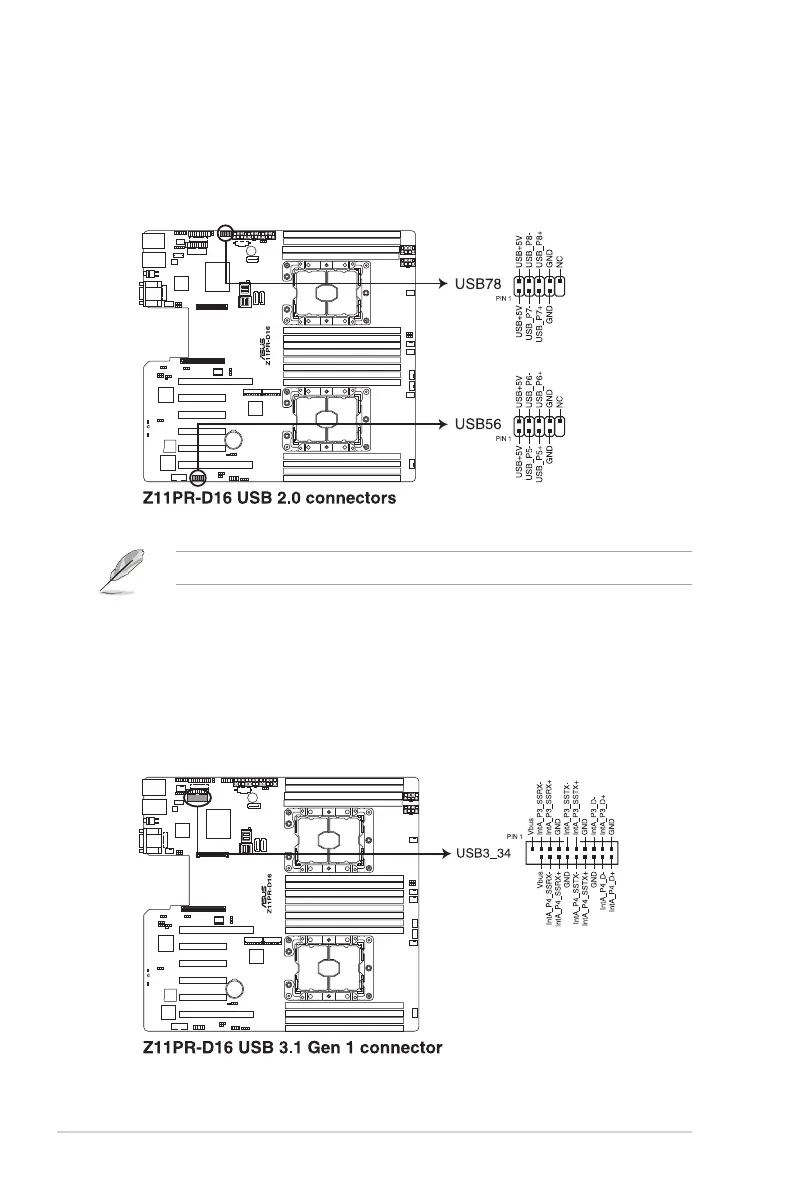
3. USB 2.0 connector (10-1 pin USB78; USB56)
This connector is for USB 2.0 ports. Connect the USB module cable to the connector,
and then install the module to a slot opening at the back of the system chassis. The
USB connectors comply with USB 2.0 specication that supports up to 480 Mbps
connection speed.
4. USB 3.1 Gen 1 connector (20-1 pin USB3_34)
This connector allows you to connect a USB 3.1 Gen 1 module for additional USB 3.1
Gen 1 front or rear panel ports. With an installed USB 3.1 Gen 1 module, you can enjoy
all the benets of USB 3.1 Gen 1 including faster data transfer speeds of up to 5Gbps,
faster charging time for USB-chargeable devices, optimized power efciency, and
backward compatibility with USB 2.0.
The USB port module is purchased separately.













 To Next Page