ASUS RS540-E9-RS36-E
4-15
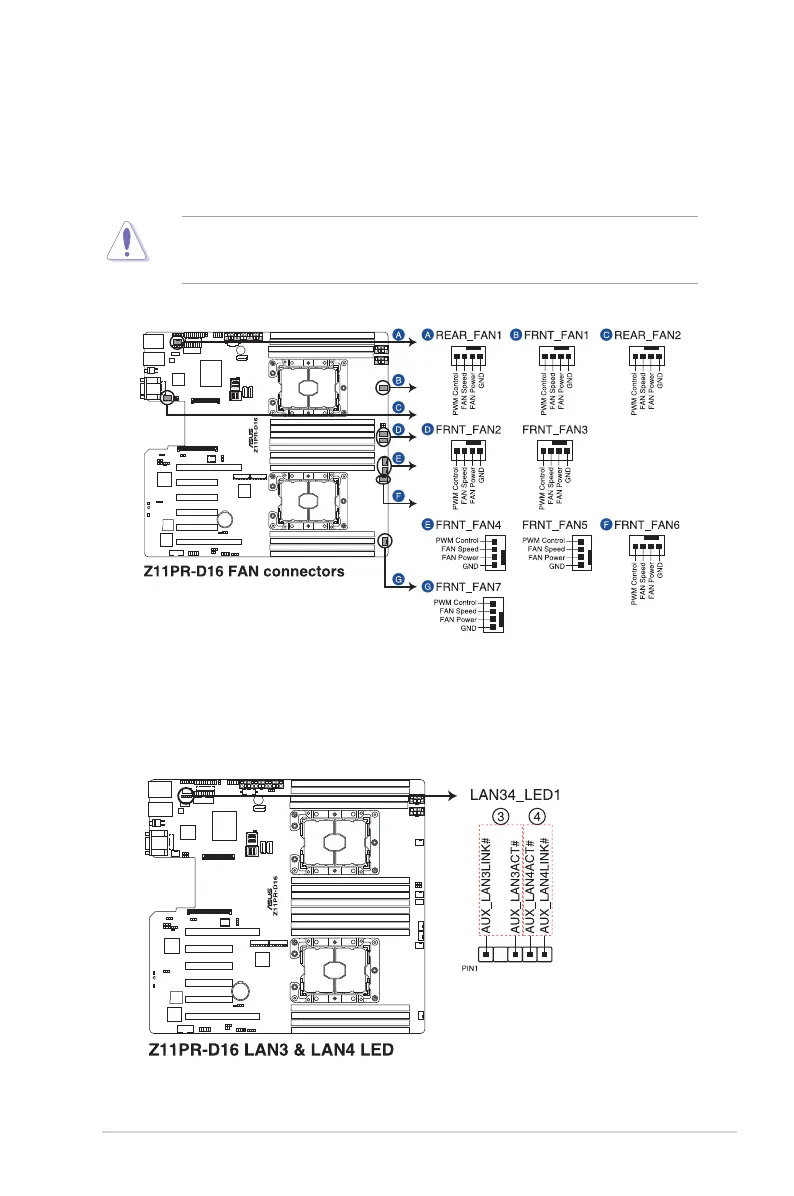
6. LAN Activity LED connector (5-1 pin LAN34_LED1)
These leads are for 10G LAN activity LEDs on the front panel. Connect the LAN LED
cable to the backplane for LAN activity indication.
5. CPU, front, and rear fan connectors (4-pin FRNT_FAN1-7; REAR_FAN1-2)
The fan connectors support cooling fans of 0.8A–1.0A (12 W max.) or a total of 6.4
A–8.0 A (96 W max.) at +12V. Connect the fan cables to the fan connectors on the
motherboard, making sure that the black wire of each cable matches the ground pin of
the connector.
DO NOT forget to connect the fan cables to the fan connectors. Insufcient air ow inside
the system may damage the motherboard components. These are not jumpers! DO NOT
place jumper caps on the fan connectors!













 To Next Page