EasyManua.ls Logo

Atexco X - 2.3 Main Interface Menu; 2.4 Nozzle Cleaning Menu

Atexco X
66 pages
Print Icon
To Next Page IconTo Next Page
To Previous Page IconTo Previous Page
Loading...
Model X High Speed Sublimation printer
22
Printing light: Shows the printing status.
The light is on: the machine is printing.
The light is off: the machine stops printing.
Printing on pause indicator: lights up when you click the Printing on pause option.
2.3 “Main interface” menu
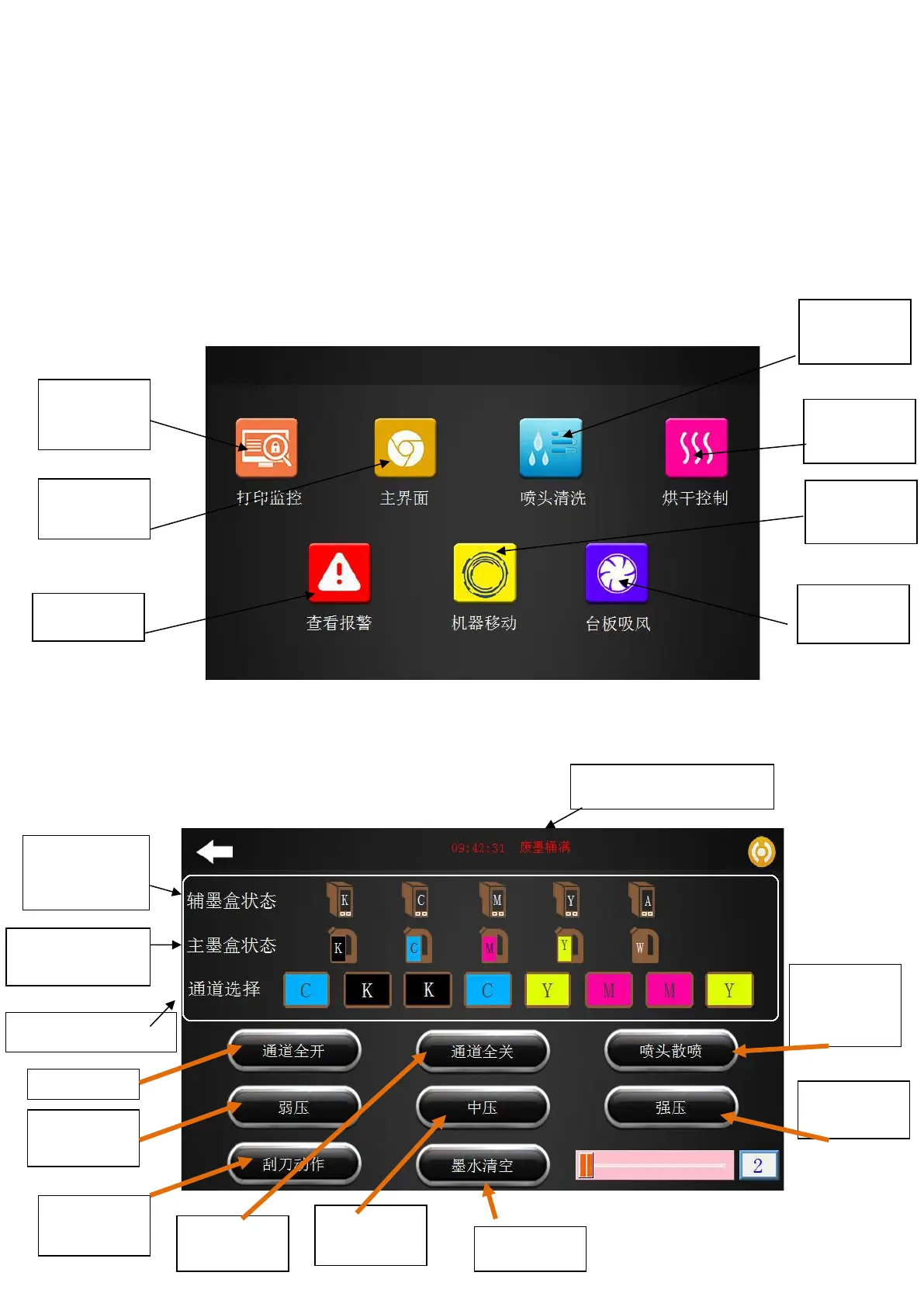
Click “Main interface” to return to the main menu of the boot, as shown in Figure 2-6 below.
Figure 2-6 Main interface
2.4“Nozzle cleaning” menu
Figure 2-7 Nozzle cleaning interface
Print
monitoring
Main
interface
View alarm
Nozzle
cleaning
Drying
control
Machine
movement
Platen
suction
Auxiliary
cartridge
status
Ink bucket full
Main cartridge
status
Channel selection
Full access
Weak
pressure
Scraper
action
Close all the
channels
Medium
pressure
Ink emptied
Spray
nozzle
Strong
pressure

Table of Contents

Related product manuals