29
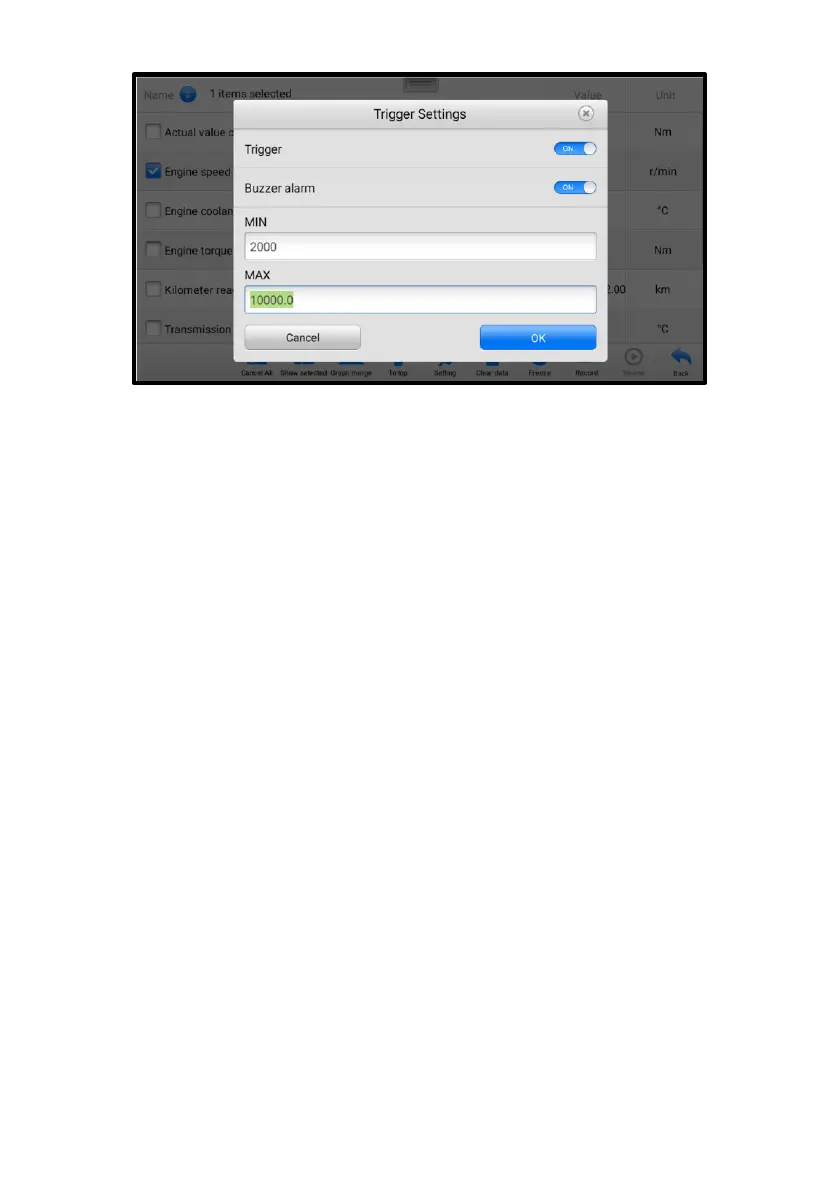
Figure 4-13 Trigger Setting Screen
Two buttons and two input boxes are available in the Trigger Settings screen.
a) Trigger On — switches the trigger on and off. The trigger is ON by default.
b) Buzzer Alarm — switches the alarm on and off. The alarm function makes a beeping
sound to alert you when the data reading reaches the preset minimum or maximum
values. The buzzer alarm will only sound at the first trigger.
c) MIN — tap this input box to enter the required lower threshold value.
d) MAX — tap this input box to enter the required upper threshold value.
➢ To set a trigger
1. Tap the drop-down button on the right of a parameter to open a submenu.
2. Tap the Trigger button on the right side of the submenu to open the Trigger
Settings screen.
3. Tap the MIN input box and enter the required minimum value.
4. Tap the MAX input box and enter the required maximum value.
5. Tap OK to save the settings and return to the Live Data screen, or tap Cancel
to exit without saving.
When the trigger is set, a trigger mark will appear in front of the parameter. The mark is
gray when it is not triggered, and displays orange when triggered. Moreover, two
horizontal lines display on each of the data graphs (when Waveform Graph Mode is
applied) to indicate the alarm point. The threshold lines are shown in different colors to
differentiate them from the parameter waveforms.
C. Function Buttons
The operations of available function buttons on the Live Data screen are described















 To Next Page