AS1635-MT-EN-03
p. 23/46
8. MAIN MENU
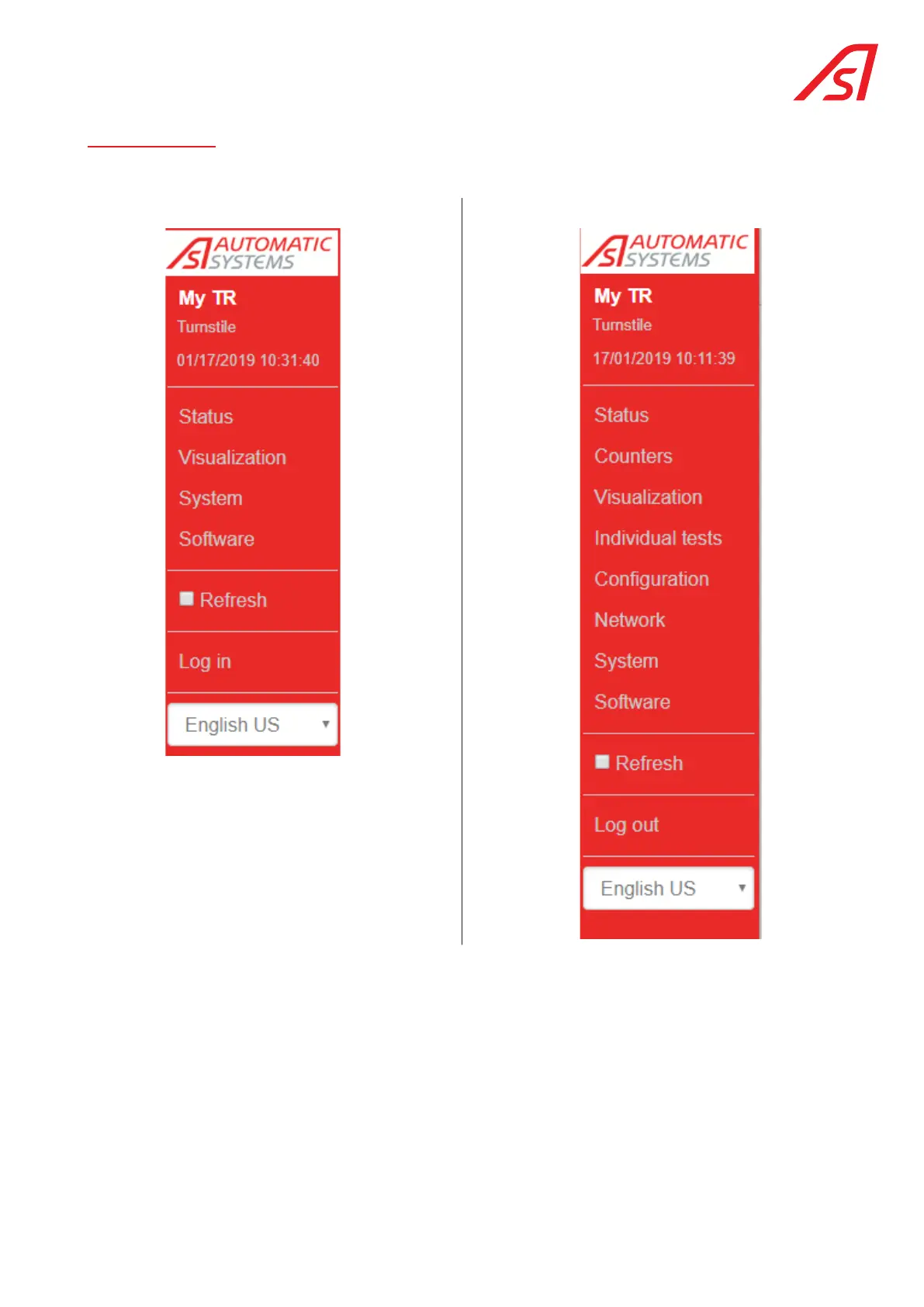
The Main menu will vary depending on the maintenance interface logon status:
Unidentified Logged on with identifier
The display of the Main menu and the screen content varies depending on the logon status:
• In Unidentified mode, it will be possible to see the status of the equipment and to access the Visualisation (without the
access authorisation control buttons in direction A or B), System, Software (only in display mode version) and Identification
pages.
• In Logged On mode, you will have access to all existing pages and control buttons with the technician password.
The Maintenance interface has been designed to adapt to several types of devices (PC, tablet, smartphone, etc.). Depending
on the size of the screen, it is possible that this menu could disappear. It will no longer be visible in its entirety, but in the
form of a clickable tab (in the upper left corner):
The information contained in this document is the property of Automatic Systems and is confidential. The recipient shall refrain from using this information for any purpose other
than the use of the products or the execution of the project to which it refers and from communicating it to third parties without prior written agreement of Automatic Systems. The
document is subject to change without notice.



 To Next Page