AS1635-MT-EN-03
p. 29/46
12. UNIT TESTS PAGE
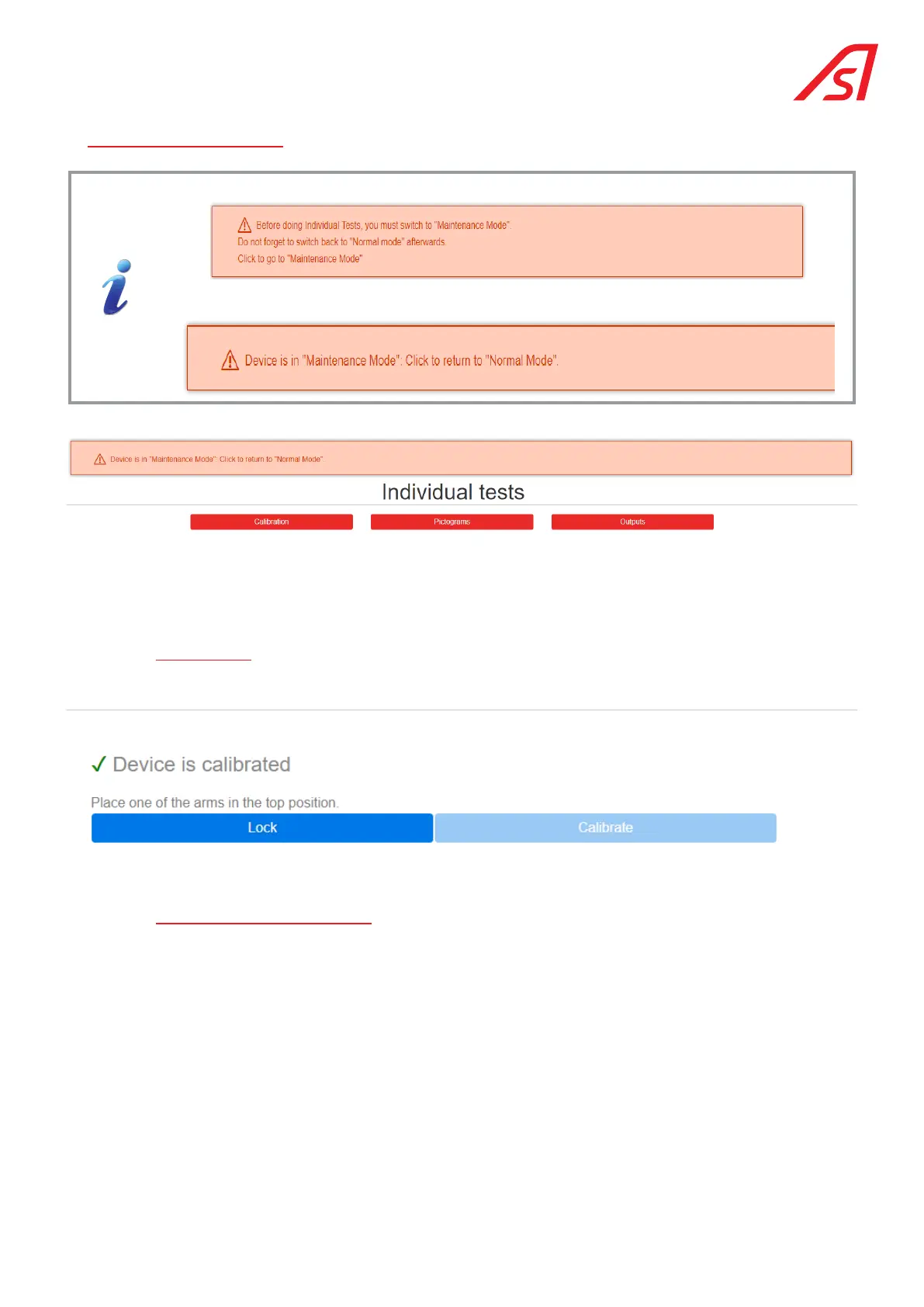
Access to this page requires the system to be in Maintenance mode. Click on the button:
To exit the Maintenance Mode, click on the warning pad:
The Maintenance mode can be exited at any time by clicking on the corresponding keypad..
The Individual Tests menu offers 3 tabs: Calibration, which concerns the rotation position sensor, Pictograms to test the colour
options of the pictograms and Outputs to manually test the digital outputs of the AS1635 circuit board. .
12.1. calibration
To calibrate the position sensor, simply place an arm horizontally in the locked position and click on "Calibrate".
12.2. pictograms (colour test)
This test makes it possible to check the colour schemes on the pictograms in directions A and B:
The information contained in this document is the property of Automatic Systems and is confidential. The recipient shall refrain from using this information for any purpose other
than the use of the products or the execution of the project to which it refers and from communicating it to third parties without prior written agreement of Automatic Systems. The
document is subject to change without notice.



 To Next Page