AS1635-MT-EN-03
p. 39/46
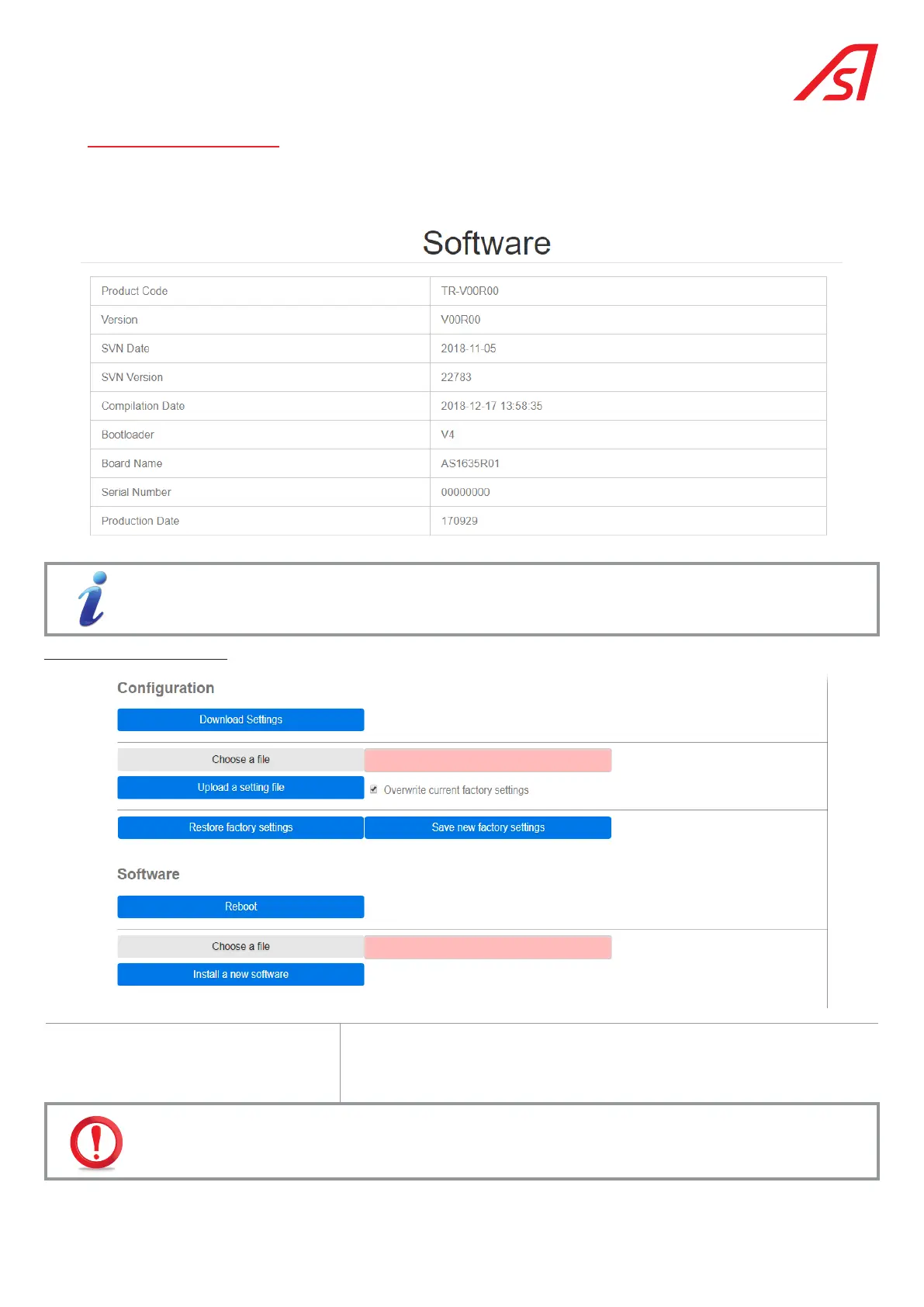
16. SOFTWARE PAGE
This page informs you of the version of the software on the equipment.
It is also here that you can make a backup or restore of the parameters, as well as an update of the software (see below).
The buttons below are only visible if you have identified yourself (with password).
For the Configuration menu:
Download settings Copy the configuration parameters in a file in order to be able to reinstall to
the same settings on other equipments,usually equipments with the same
electrical connections and the same options. In this case, all the settings of
the original equipment are copied.
Once you have configured your hardware, we advise you to save your configuration so that you can reinstall
it later if necessary.
The information contained in this document is the property of Automatic Systems and is confidential. The recipient shall refrain from using this information for any purpose other
than the use of the products or the execution of the project to which it refers and from communicating it to third parties without prior written agreement of Automatic Systems. The
document is subject to change without notice.



 To Next Page