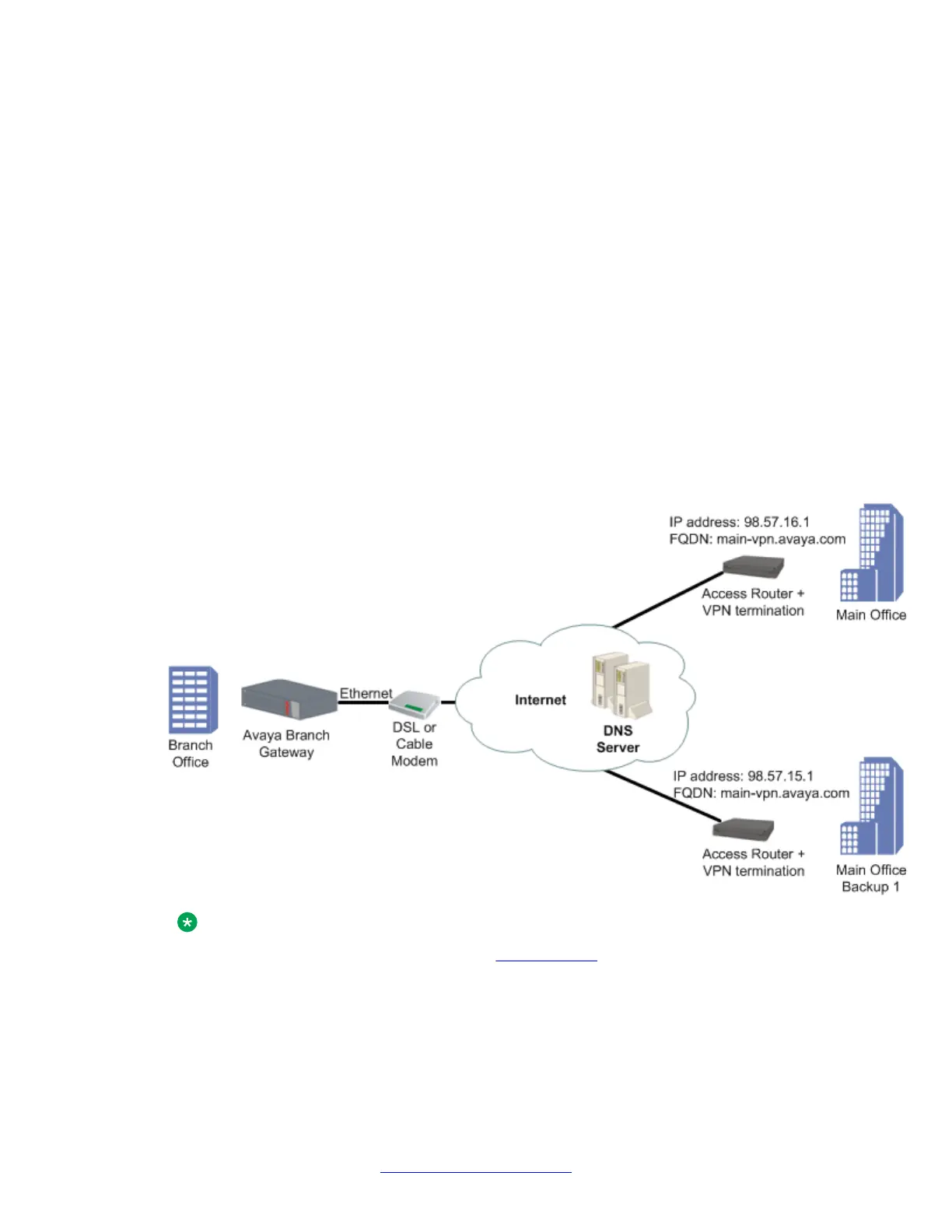
Failover using DNS
The VPN DNS topology provides failover by utilizing the DNS resolver feature.
Use this feature when your DNS server supports failover through health-checking of redundant
hosts. On your DNS server configure a hostname to translate to two or more redundant hosts,
which act as redundant VPN peers. On the Branch Gateway configure that hostname as your
remote peer. The Gateway will perform a DNS query in order to resolve the hostname to an
IP address before establishing an IKE connection. Your DNS server should be able to provide
an IP address of a living host. The Branch Gateway will perform a new DNS query and try to
re-establish the VPN connection to the newly provided IP address whenever it senses that the
currently active remote peer stops responding. The Branch Gateway can sense that a peer is
dead when IKE negotiation times-out through DPD keepalives and through object tracking.
VPN DNS topology
Note:
For an explanation of DNS resolver, see DNS resolver on page 74.
IPSec VPN
536 Administering Avaya G430 Branch Gateway October 2013
Comments? infodev@avaya.com



 To Next Page