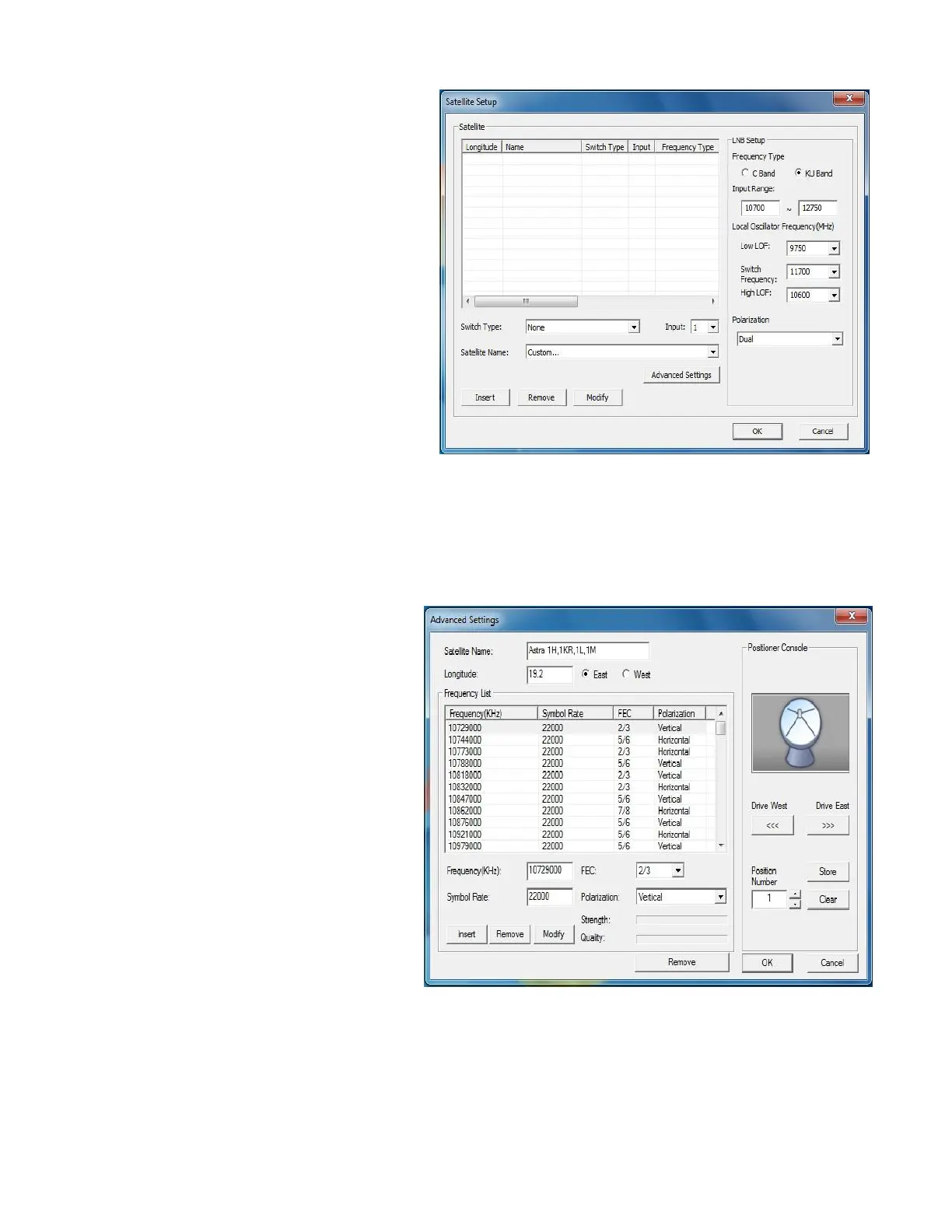
7. Click Satellite Setup.
8. Select the Switch
Type and Input port number if you
use a switch; otherwise, skip this
step.
9. Select the satellite you need from
the Satellite Name drop-down list.
10. Configure LNB Setup information.
11. Click Insert to add the satellite in
the list. Click Remove to delete
the selected satellite from the list.
12. Repeat the previous steps to add
more satellites you need.
13. Click on the satellite you want to
modify in the list.
14. Click Advanced Settings and you
can see the default frequency
table for the chosen satellite
in Frequency List section.
15. If you do not find the frequency
you need, just follow the
instructions below to add it
yourself.
16. Configure Frequency, FEC,
Symbol Rate, Polarization, etc.
17. Click Insert to add the frequency
you need to the list.
Click Remove to delete the
selected frequency data.
If you use a motor, you can
adjust the dish position, test the
signal strength, and save the
position for quick positioning next
time. Select any one of the



 To Next Page