System manual Coronis 5MP 75
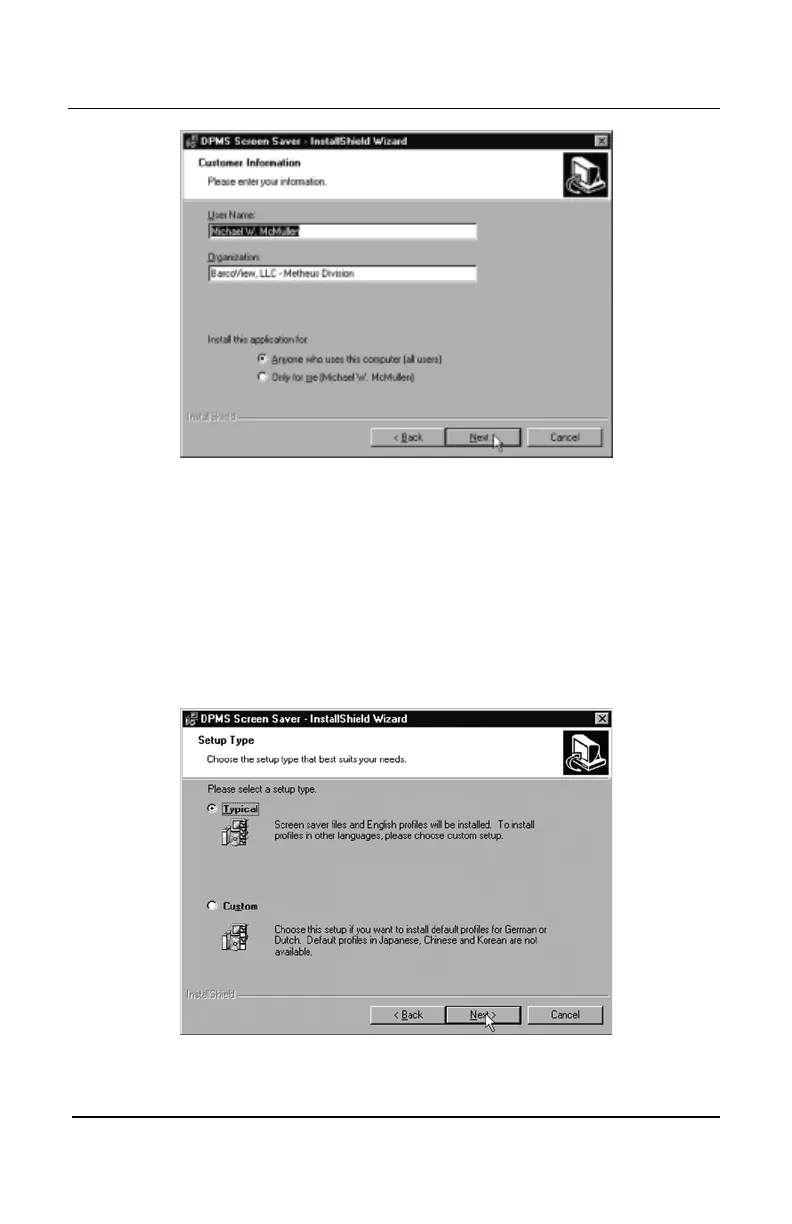
Figure 47
17. The “Setup Type” page will now appear. Choose
“T“T
“T“T
“T
ypical” ypical”
ypical” ypical”
ypical” to
install the default schemes with English names. Choose
“Custom” “Custom”
“Custom” “Custom”
“Custom” to install the default schemes with either Dutch or
German names. Currently the default schemes are not supported
in the Japanese, Korean and Chinese languages. We recommend
that the users of these three languages install the English default
schemes and then rename and save them into their language in
the DPMS configuration screen. Click
“Next” “Next”
“Next” “Next”
“Next” to continue (see
figure 48).
Figure 48
BarcoMed software driver installation


 To Next Page