6. Lenses & Lens selection
6.4 Lens removal
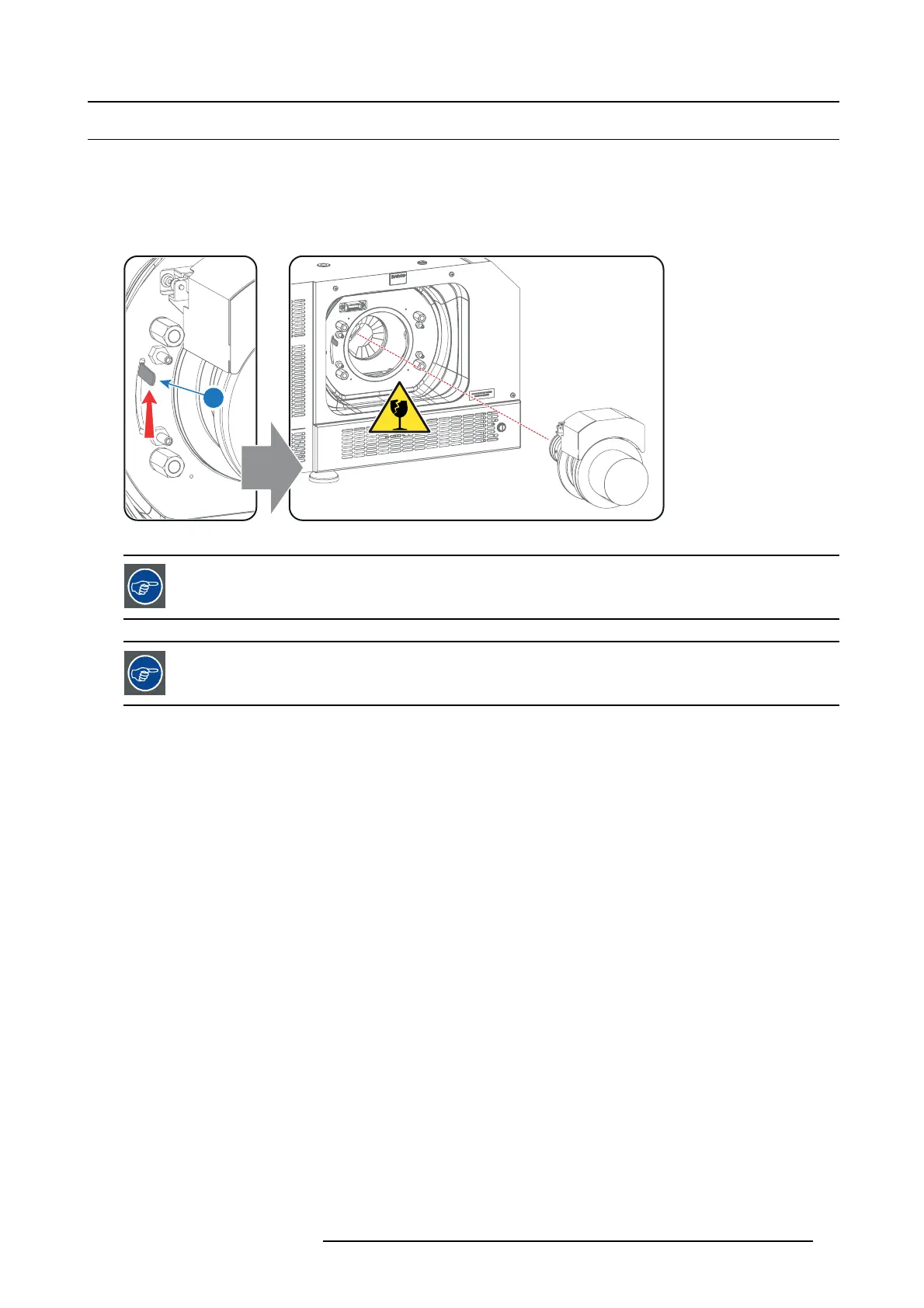
How to remove a lens from the Lens Holder?
1. Support the lens with one hand while you unlock the lens holder by sliding the lock handle (reference 1 imag e 6-9) towards the
“unlocked” position as illustrated.
2. Gently pull the lens out of the lens holder, maintaining its coaxial direction.
Caution: Do not accidentally bump with the lens against the electronic boards inside the Lens Holder.
1
Image 6-9
It’s recomm e nded to place the Lens caps of the original L ens packaging, back on b oth sides of the removed
Lens to protect the optics of the Lens.
It’s recomm end ed to place the foam rubber of the o riginal p rojector p ackaging, back into the Lens o pening to
prevent intrusion of dust. Note that this foam rubber is packed in a plastic bag to prevent the dust, emitted b y
the foam, f r om entering the projector.
R5977692 DP2K-S SERIES 10/12/2012 31



 To Next Page
 Loading...