119R5912128 /03 SP4K-B
10.5 Converging the green pattern onto the red
pattern
This adjustment procedure assumes that the projector is prepared for convergence adjustment.
Required tools
No tools required.
How to converge the green pattern onto the red pattern?
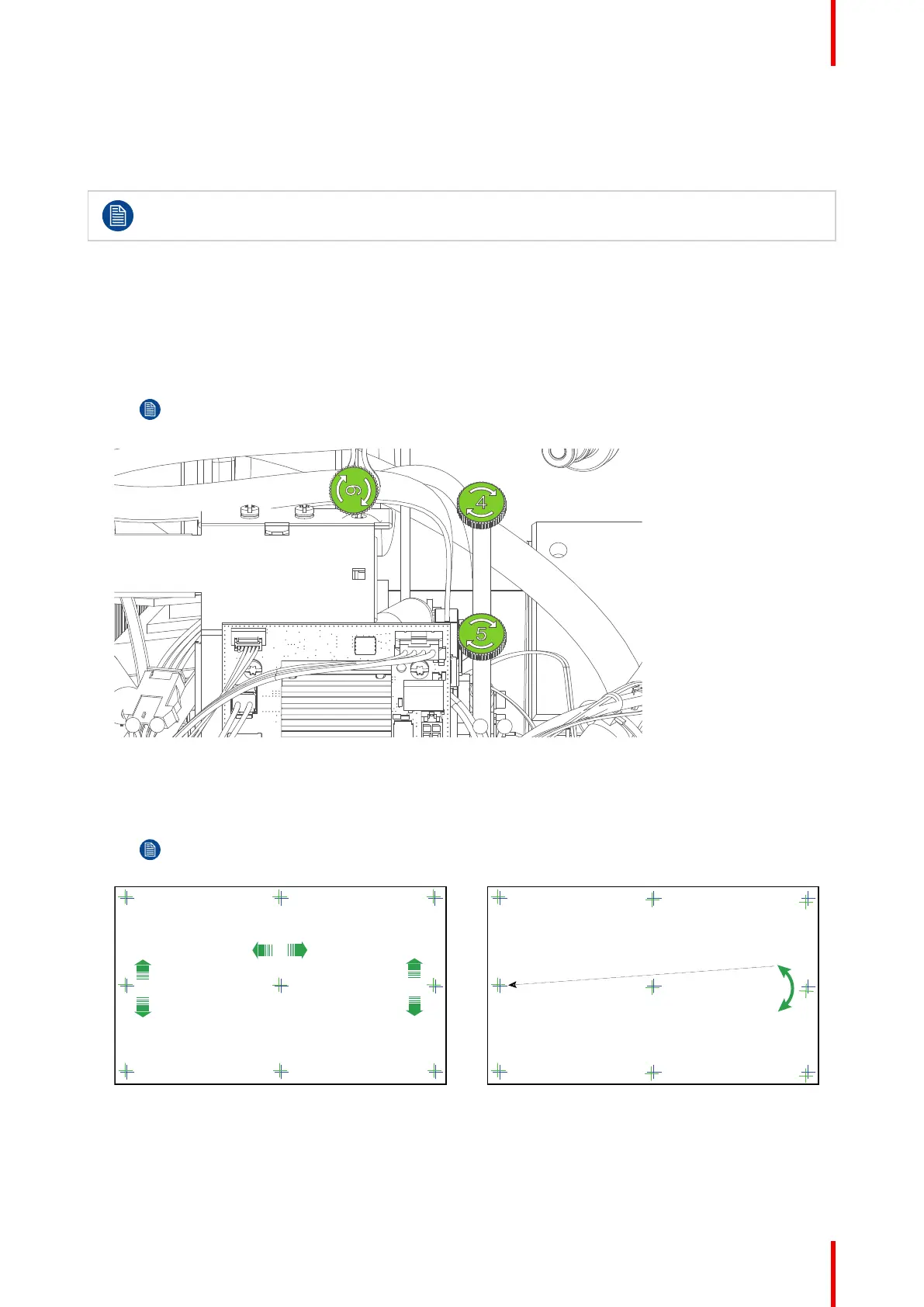
1. To translate the GREEN pattern vertically, slightly turn the green control knobs number 4 and 5. Turn both
control knobs in equal increments.
Note: Note that a turn of a few degrees corresponds with one full pixel. Turning the control knob
clockwise corresponds to the direction of the arrow of the test pattern.
Image 10–11 Location of the control knobs
2. To translate the GREEN pattern horizontally, slightly turn the green control knob number 6.
3. To rotate the GREEN pattern, sightly turn the green control knob number 4. If much rotation is required,
slightly turn the green control knob number 5 in the opposite direction.
Note: Slight corrections of the GREEN pattern in vertical direction may be required after
rotation.
Image 10–12
4. Repeat from step 1 until full coincidence is obtained of the GREEN pattern in the center, left and right of
the projected image.
5. If necessary repeat the blue convergence adjustment. For more info, see “Converging the blue pattern
onto the red pattern”, page 118.
Convergence



 To Next Page