R5912128 /03 SP4K-B48
4.4 Connecting the projector with the power net
WARNING: The total electrical installation should be protected by an appropriate rated and readily
accessible disconnect switch, circuit breakers and ground fault current interrupters. The installation
shall be done according to the local electrical installation codes.
CAUTION: ALL POWER CONNECTIONS to the SP4K-B projector are made to the five-terminal
strip located on the mains board behind the operator side cover and mains cover of the projector.
CAUTION: The cross-sectional area of the conductors in the Power Supply Cord shall be not less
than 4 mm
2
or AWG 10.
Required tools
• Flat screwdriver
• Open-end wrench 36 mm
• Torx screwdriver T20
Required parts
• Certified AC power supply cord 4 mm², 10 AWG, min. 300 V (in case of mono phase or Δ configuration)
• Certified AC power supply cord 4 mm², 10 AWG, min. 500 V (in case of Y configuration)
How to connect the main AC power with the projector
1. Make sure the net input cover has been removed. For more info, see “Accessing the power connections”,
page 45.
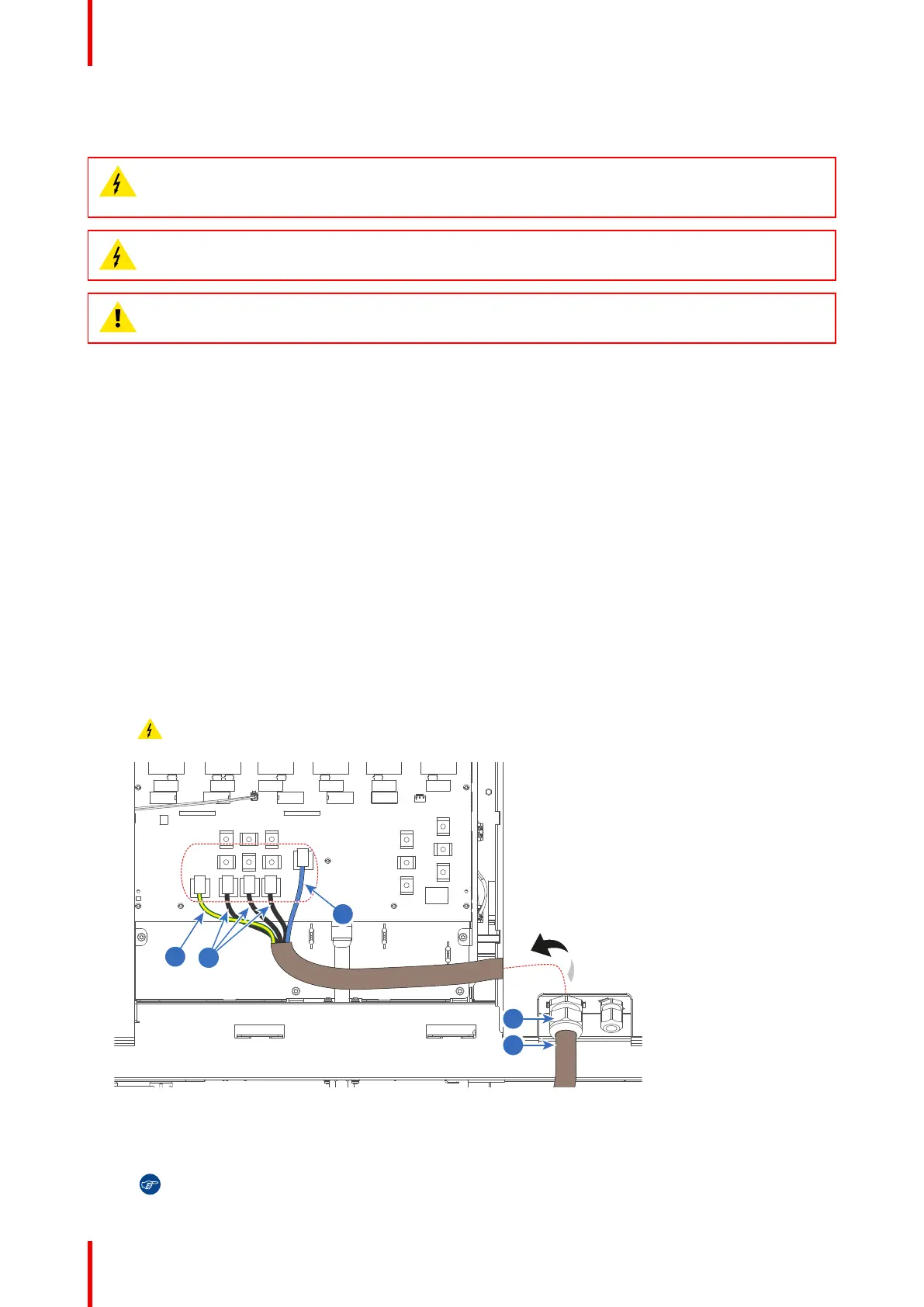
2. Guide the AC power cord (reference 2) through the cable gland (reference 3) and to the left side with the
removed power cover.
3. Connect the wires (references 4 - 6) to the 5–terminal strip as illustrated. Use a torque screwdriver to
fasten the screws of the 5-terminal strip with a torque of 3.3 Nm.
Warning: Always connect the PE wire (reference 4) first, then the other wires.
Image 4–11 Examole of the power wiring
2 AC Power cord
3 Cable gland
4 Protected Earth (PE) wire
5 Phases wiring (L1 - L3)
6 Neutral (N) wire
Tip: Check for good fixation by pulling on each wire.
Physical installation projector



 To Next Page