Site~Rite
®
8 Ultrasound System Page 22
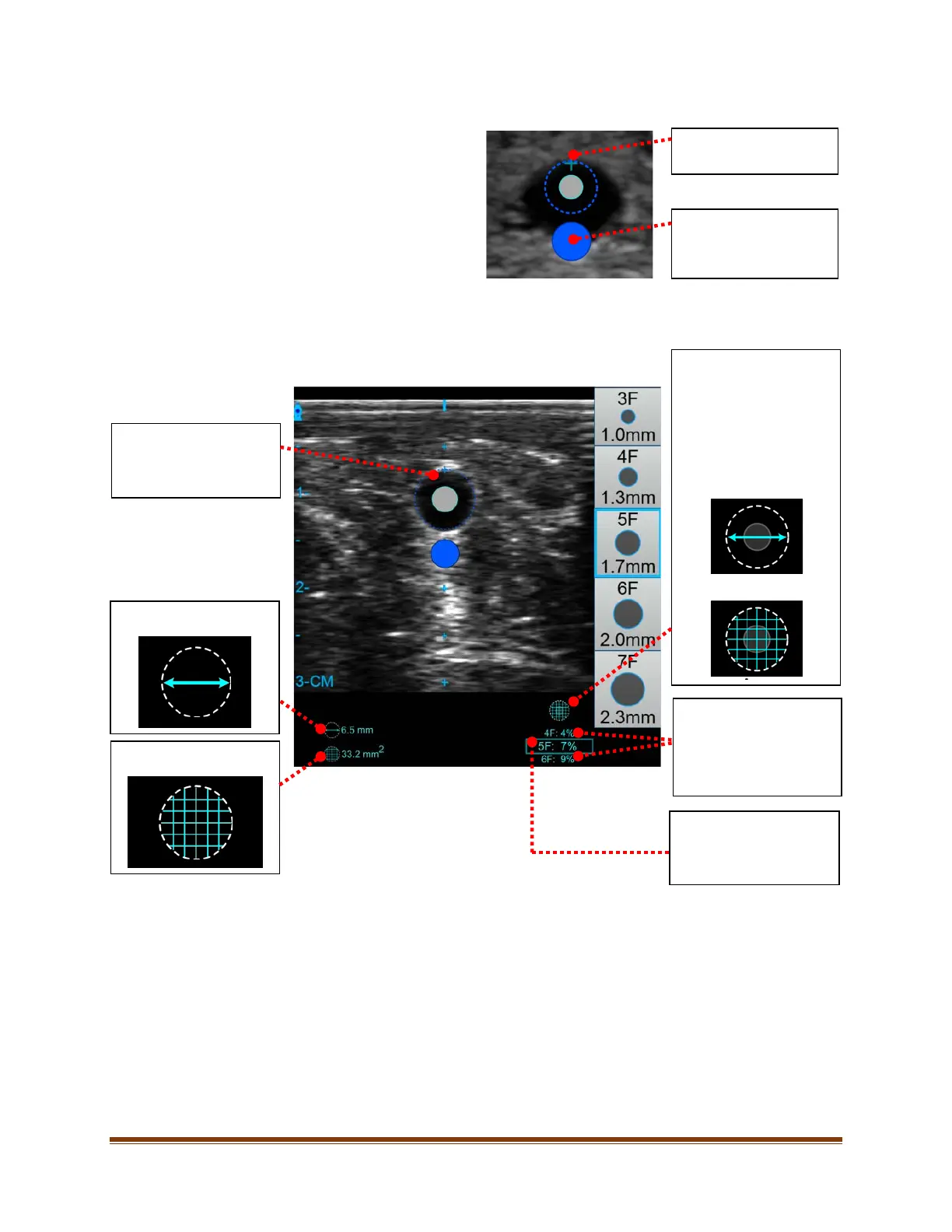
5. To manually resize the Vessel Occupancy
Circle to the target vessel, align the top
middle of the Vessel Occupancy Circle with
the top middle of the vessel by pressing and
holding the middle of the icon and dragging
it to the desired location. Drag the resizing
marker up or down in order to make the
Vessel Occupancy Circle match the target
vessel size
Note: When the Vessel Occupancy Circle is
resized, the Vessel Occupancy Percentage will change from the user-defined rule.
6. The area and diameter of the vessel Occupancy Circle will be displayed as shown below.
Note: See Section 24 for system measurement error information.
Align with top of vessel.
Resizing Marker
Resize circle to
approximate vessel size.
Indicator
This icon indicates
whether the vessel
occupancy is calculated
by Diameter or Area.
This can be set in the
Ultrasound Settings Tab
(see Section 11.1).
Diameter
Percentage for selected
catheter manually sized to
Occupancy Circle
(Matched to target
vessel).
Diameter.
Area.
Vessel Occupancy
Percentage for catheters
1 size larger and 1 size
smaller than catheter
selected (for reference).








 To Next Page