Site~Rite
®
8 Ultrasound System Page 31
10.2. Pinpoint™ GT Needle Technology Calibration
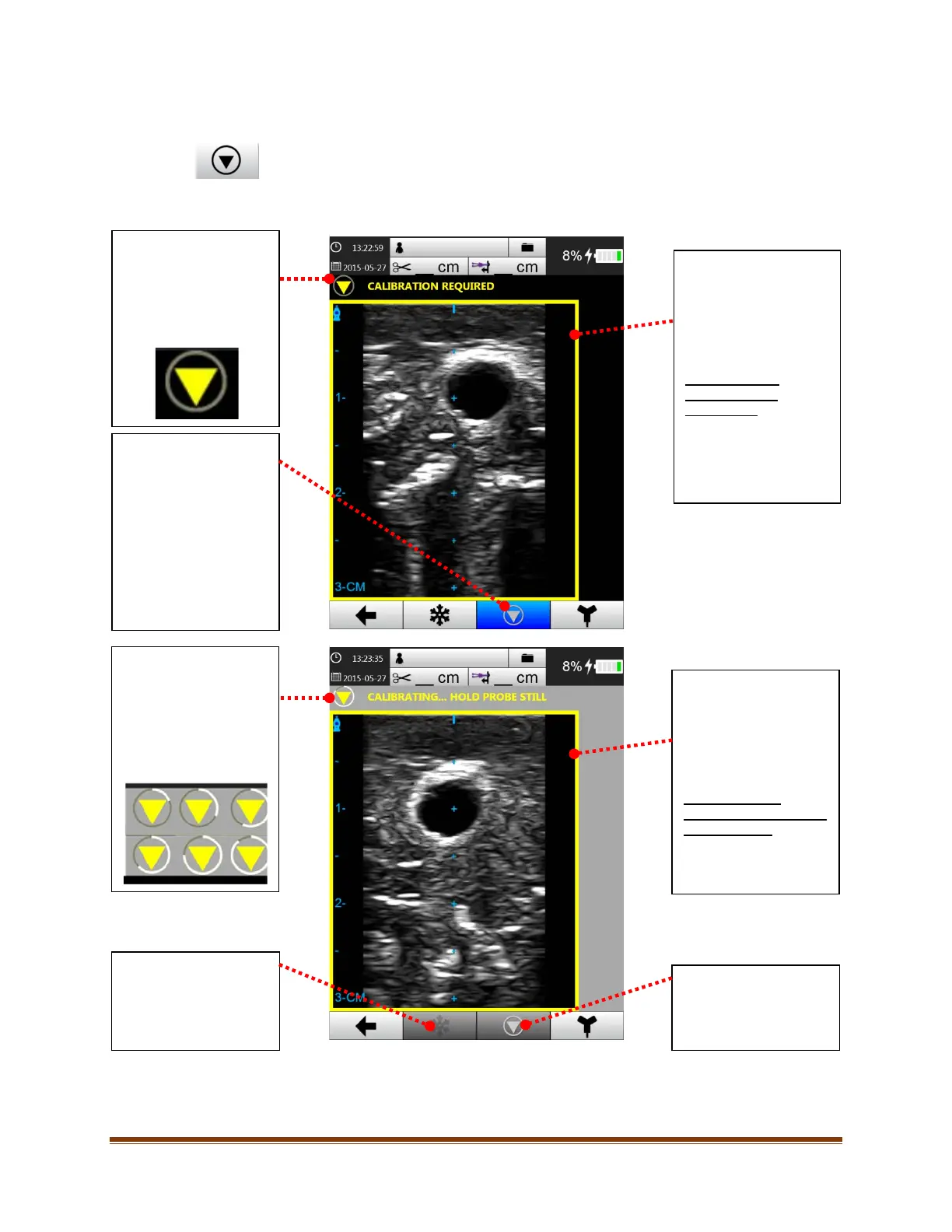
Selecting this button will calibrate Pinpoint™ Technology. The button also indicates the status of
calibration.
A calibration step is required to establish a baseline before bringing the needle close to the probe. Calibration is only
required prior to inserting the needle into the patient. the following screens will appear:
Prior to calibrating
Pinpoint™ GT Needle
Technology, the
calibration icon is a
yellow triangle.
This button calibrates
Pinpoint™ GT Needle
Technology.
This icon will have focus
and flash upon entering
Pinpoint™ GT Needle
Technology Mode and
whenever calibration is
required.
Border
This border indicates the
calibration status of
Pinpoint™ GT Needle
Technology.
Yellow Border –
“CALIBRATION
REQUIRED”
Calibration is required
before Pinpoint™ GT
Needle Technology will
begin tracking.
Upon selecting the
calibrate button, an
animation will appear
indicating the calibration
status of Pinpoint™ GT
Needle Technology.
Not accessible during
calibration of Pinpoint™
GT Needle Technology.
Border
This border indicates the
calibration status of
Pinpoint™ GT Needle
Technology.
Yellow Border –
“CALIBRATING… HOLD
PROBE STILL”
System is Calibrating. Do
not move the probe.
Not accessible during
calibration of Pinpoint™








 To Next Page