EasyManua.ls Logo

Bard Site-Rite 8 - Cue Needle Tracking System Settings (if Enabled)

Bard Site-Rite 8
80 pages
Print Icon
To Next Page IconTo Next Page
To Previous Page IconTo Previous Page
Loading...
Site~Rite
®
8 Ultrasound System Page 41
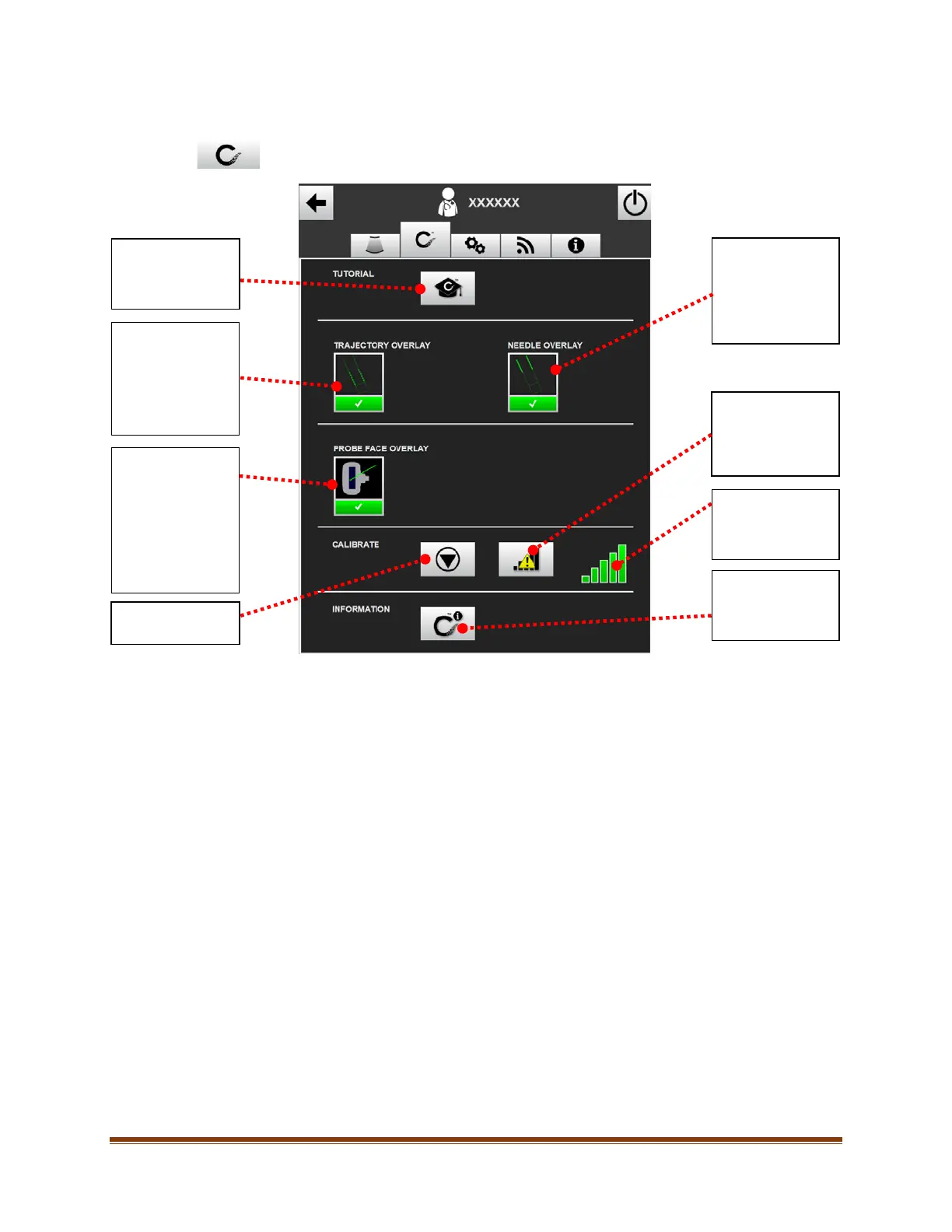
11.2. CueNeedle Tracking System Settings (if enabled)
To access the CueNeedle Tracking System settings, click on the CueNeedle Tracking System
settings tab at the top of the settings screen. The following screen will appear:
Toggles the
portion of the
needle tracking
overlay
representing the
needle On/Off.
Displays
information on
how to improve
the Performance
Indicator.
Performance
Indicator (see
Section 9.3.2).
Provides
information
regarding the
Cue™ Needle
Launches the
Cue™ Needle
Tracking System
tutorial.
Toggles the
portion of the
needle tracking
overlay
representing the
needle trajectory
On/Off.
Enters the
calibration screen.
Toggles the Probe
Face Overlay for
out-of-plane
insertions On/Off
(The Probe Face
Overlay will
always appear for
in-plane
insertions).

Table of Contents

Related product manuals