Site~Rite
®
8 Ultrasound System Page 33
10.4. Pinpoint™ GT Needle Technology Freeze Mode
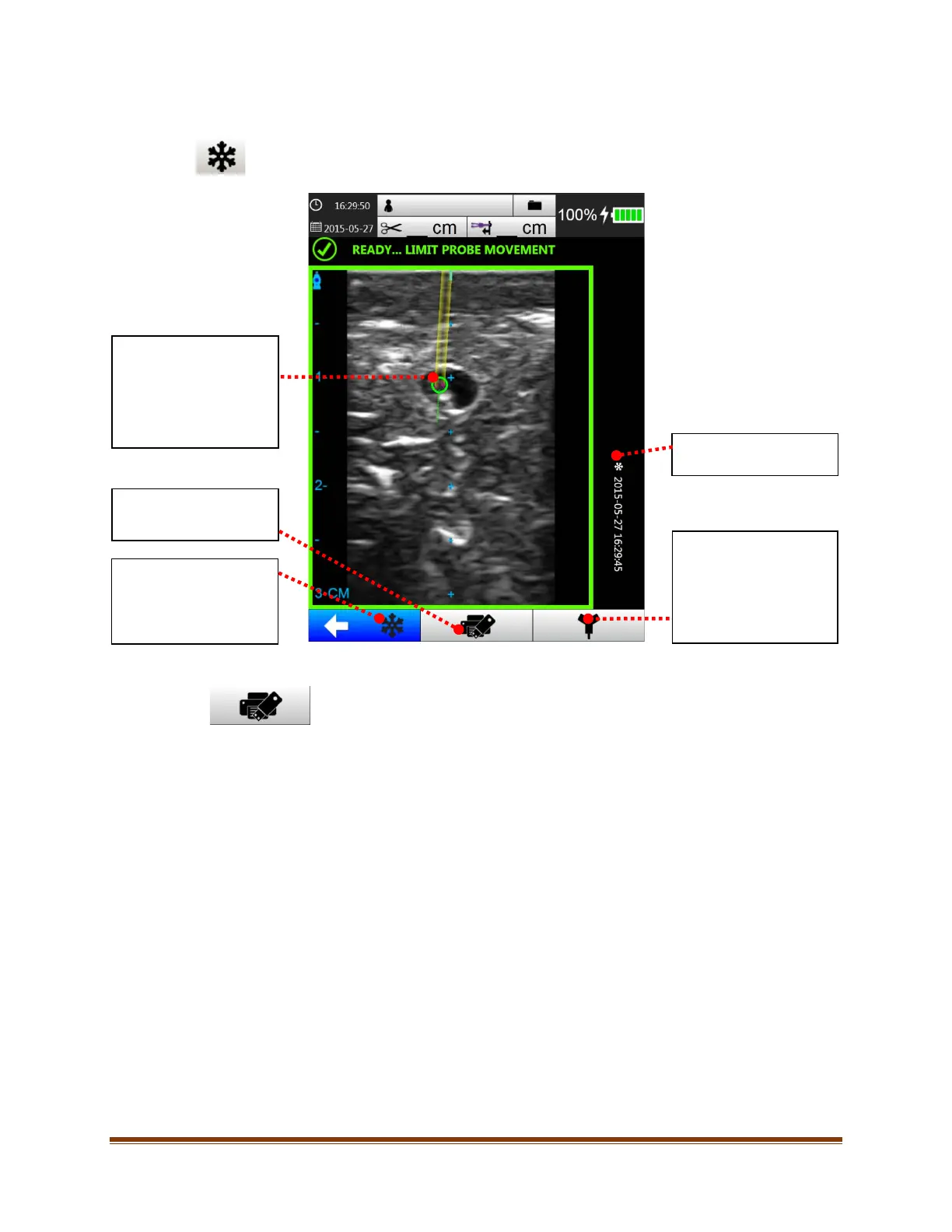
Access Pinpoint™ GT Needle Technology freeze mode by pressing the freeze button. The following
screen will appear:
10.4.1. Save/Print
When the Save/Print button is selected, the current ultrasound image with Pinpoint™ GT
Needle Technology Virtual Needle Image is saved to the system hard drive and any attached
USB storage devices. The image is also printed if a compatible printer is connected.
Technology Virtual
Needle Image
Virtual needle image of
the Pinpoint™ GT Safety
Introducer Needle.
Save/Print
See Section 10.4.1.
Unfreeze
Returns to Pinpoint™ GT
Needle Technology
Mode.
Date/Time when image
was frozen.
HERLOCK
Mode
Switches to SHERLOCK
3CG™ TCS Mode when
selected
(if enabled).








 To Next Page