Site~Rite
®
8 Ultrasound System Page 30
10. PINPOINT™ GT NEEDLE TECHNOLOGY MODE (if enabled)
10.1. Pinpoint™ GT Needle Technology Home Screen.
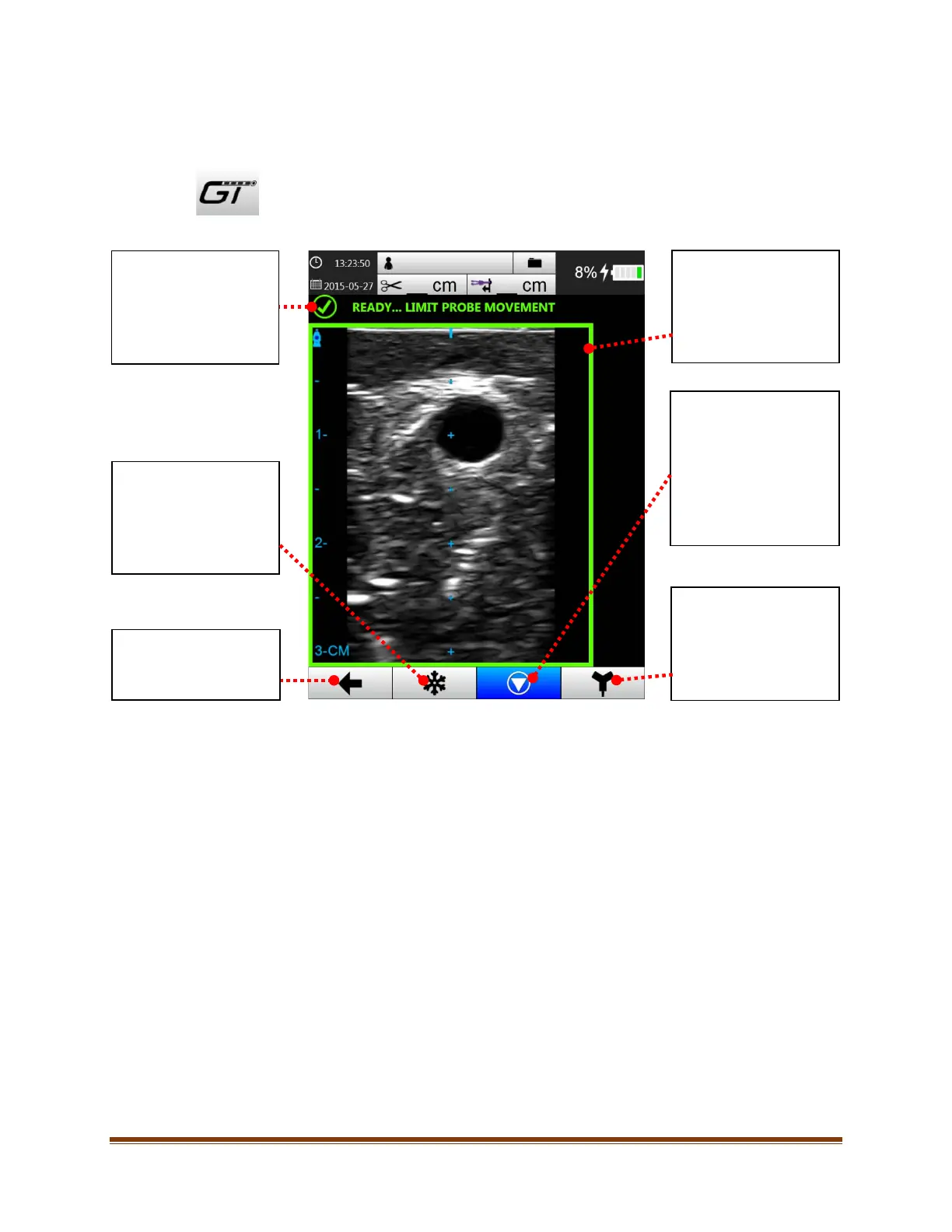
Access Pinpoint™ GT Needle Technology Mode by pressing the Pinpoint™ GT Needle Technology
button on the main ultrasound screen. The following screen will appear:
The calibration status of the Pinpoint
This icon indicates the
current calibration status
of Pinpoint™ GT Needle
Technology.
Freeze the Pinpoint™ GT
Needle Technology
virtual needle image by
pressing the freeze
button.
This button calibrates
Pinpoint™ GT Needle
Technology.
This icon will have focus
and flash upon entering
Pinpoint™ GT Needle
Technology Mode.
HERLOCK
Mode
Switches to SHERLOCK
3CG™ TCS mode when
selected
(if enabled).
Border
This border indicates the
calibration status of
Pinpoint™ GT Needle
Technology.
Returns the system to
active imaging mode.









 To Next Page