Site~Rite
®
8 Ultrasound System Page 44
11.3.2. System Password
To configure password protection, enable the password option in the general settings tab.
The first-time password protection is enabled, the system will display a prompt to create an
administrator password.
The administrator password will be used to make any future configuration changes to the system password. If the
administrator password is forgotten, contact customer service for a temporary password.
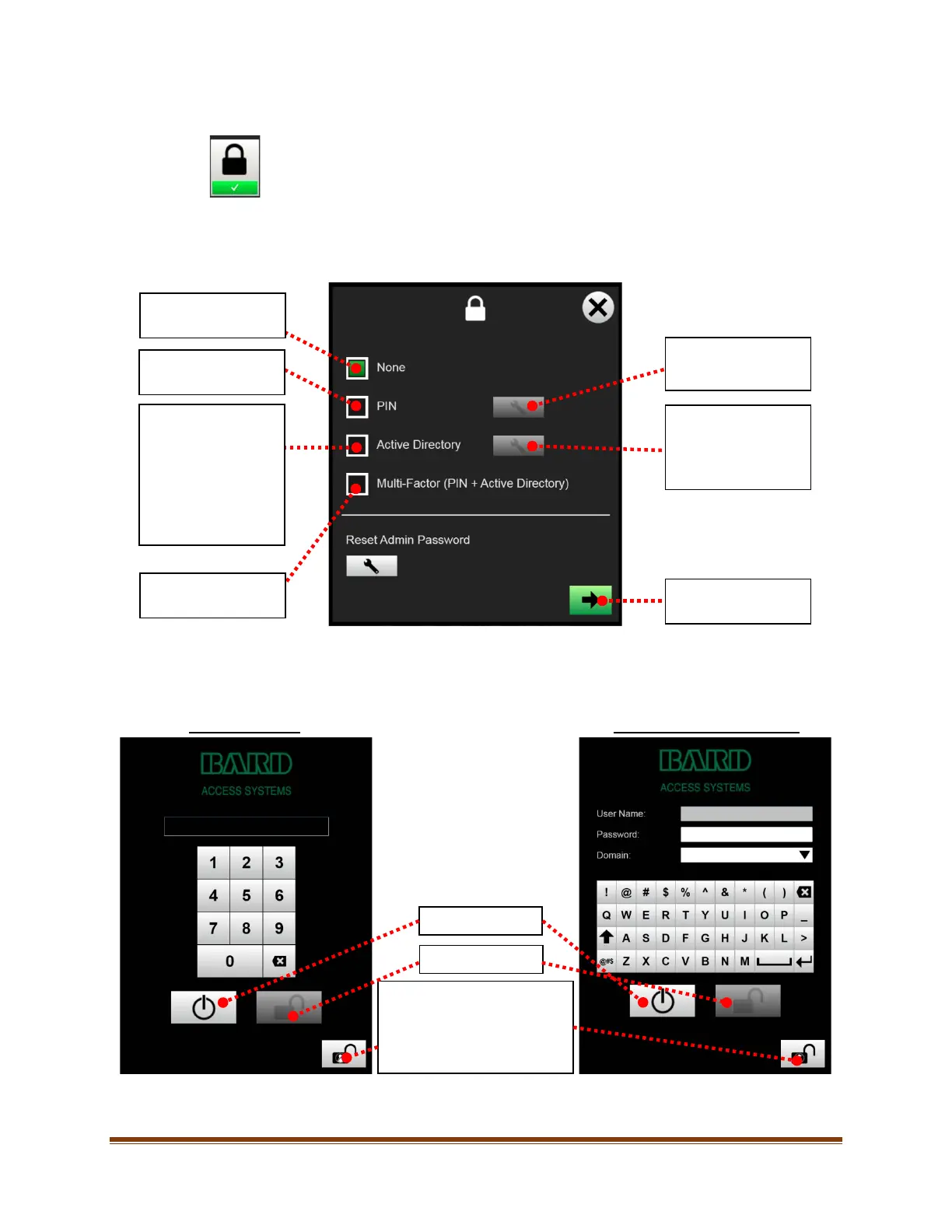
Upon creating or entering the administrator password, the following options will be displayed:
When password protection is enabled, the system will only prompt for the password upon system reboot or when
the lock button is selected from the power menu (see Section 5.2).
The lock screen will appear as shown below:
Active Directory Authentication
protection.
protection.
Directory
Authentication.
Ensure connectivity
settings are
configured (see either
Section 11.4.1 or
password protection.
settings (see Section
Authentication
settings
(see Section
configuration settings.
Select to enable basic system
functions without a password.
Patient information will not
be accessible.








 To Next Page