Site~Rite
®
8 Ultrasound System Page 40
11. SYSTEM SETTINGS
To access the system settings, press the ‘Settings’ button on the main ultrasound screen.
The Settings window consists of several tabs:
11.1. Ultrasound Settings
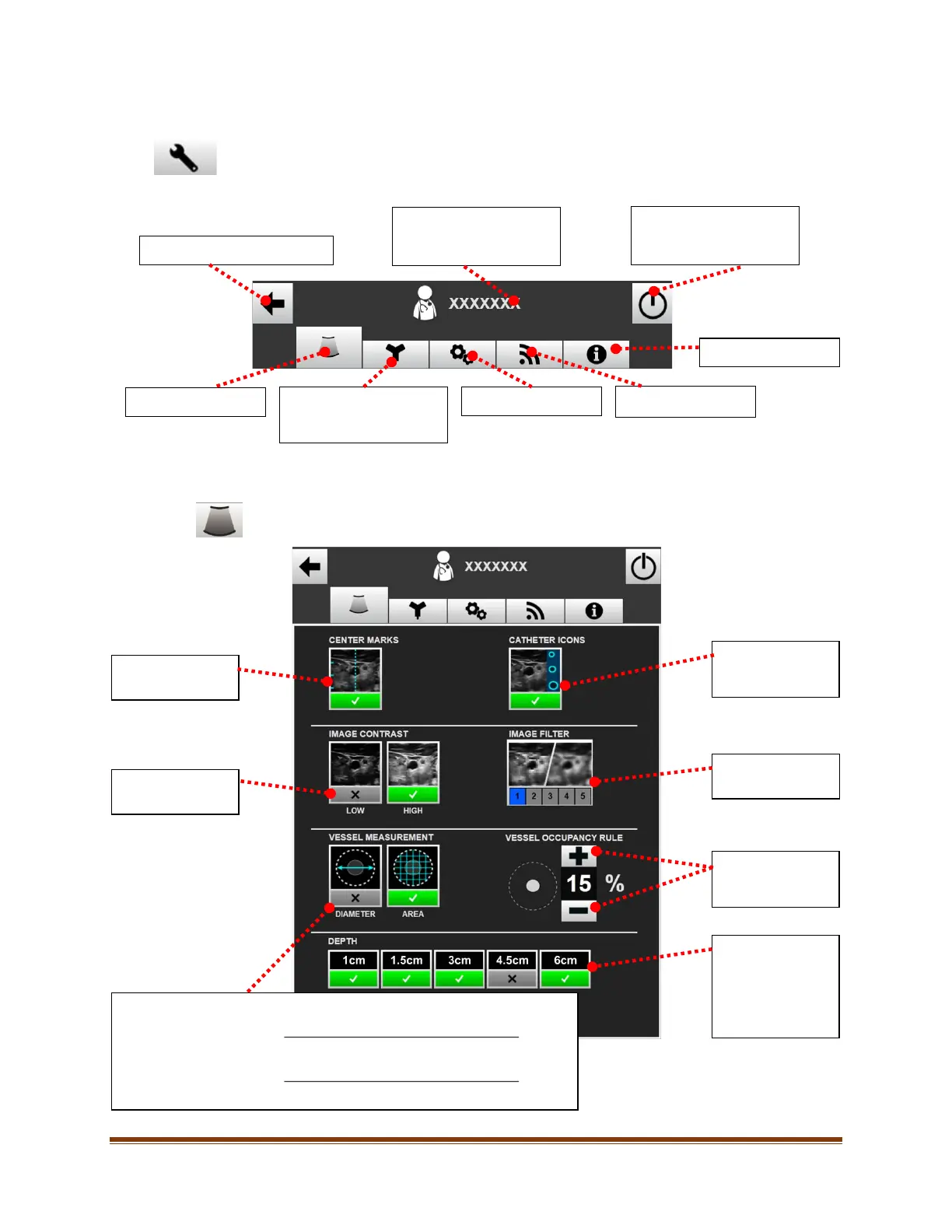
To access the ultrasound settings, click on the ‘Ultrasound Settings’ tab at the top of the settings screen.
The following screen will appear:
HERLOCK
Mode Settings (if
Opens the Power Menu.
entered). See Clinician
Presets, Section
13
Returns to the previous screen
catheter icons
markers On/Off.
Selects Low/High
contrast image.
Sets the image
Vessel Occupancy
Depths
Selected depths
will be available in
the main
ultrasound screen.
Sets the Vessel Occupancy Percentage to be calculated by Diameter or Area.
% Occupied (Diameter) =
x 100
Diameter of Vessel Occupancy Circle
% Occupied (Area) =
x 100
Area of Vessel Occupancy Circle








 To Next Page