Site~Rite
®
8 Ultrasound System Page 23
9. CUE™ NEEDLE TRACKING SYSTEM MODE (if enabled)
9.1. Enabling Cue™ Needle Tracking System
Ensure the Cue™ Probe is attached (see Section 3.2). Turn on the system and ensure the ultrasound system is scanning.
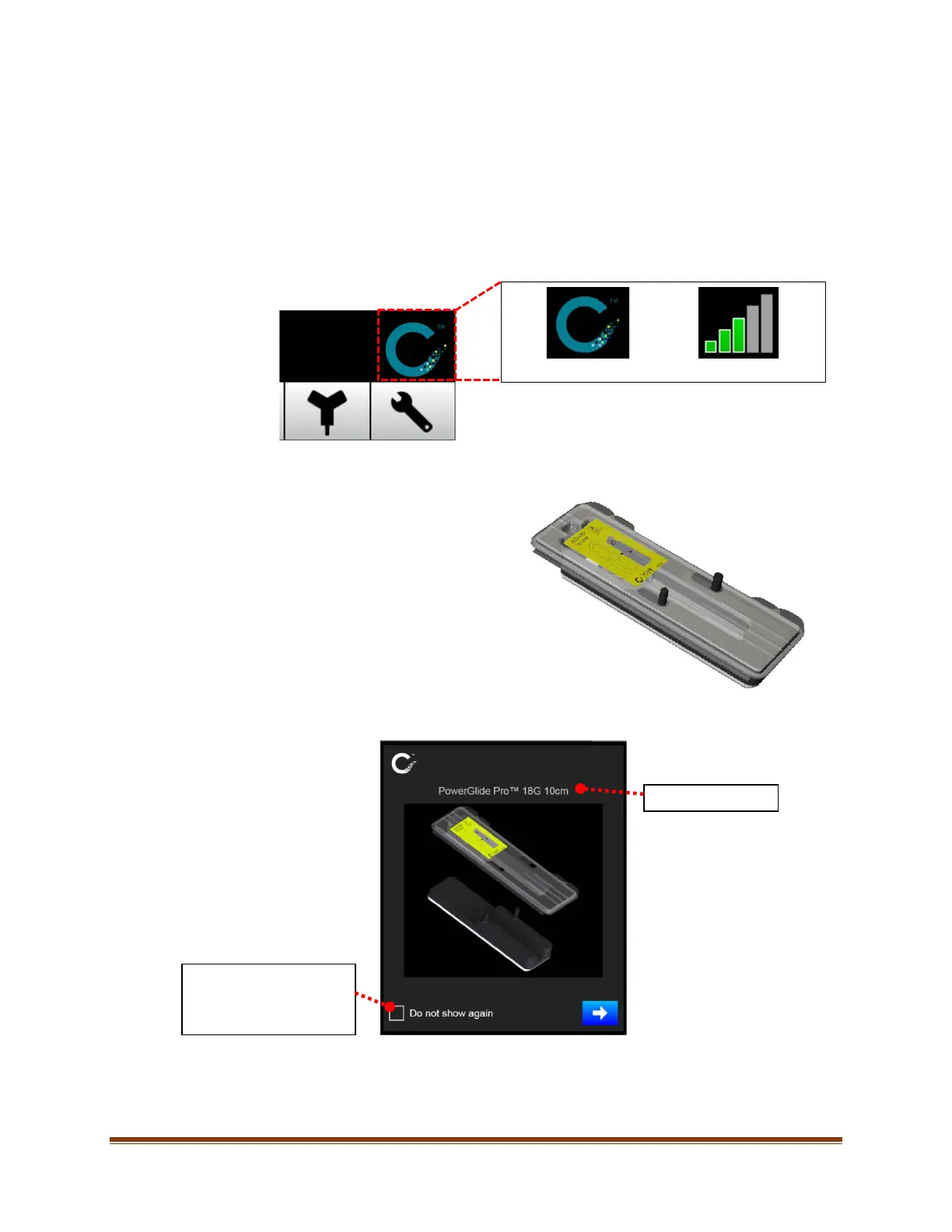
The Cue™ Activator icon will appear, as shown below, when the Cue™ Probe is attached. Turn on the system and
ensure the system images. Connect the provided USB cable to the Cue™ Activator. Then connect the other end of the
USB cable to a USB port on the ultrasound system.
Ensure the Activator icon indicates a connection.
9.2. Activating the Cue™ Needle Tracking System Compatible Needle
Place a tray containing a Cue™ Needle Tracking System
compatible needle on the Cue™ Activator as shown.
Note: Ensure the tray is fully seated in the Activator,
making complete contact with the Activator.
When the needle is activated, the following window shall appear.
The Cue™ Needle Tracking System compatible needle and software are now activated.
If selected, this window will
not be shown for the
currently selected Clinician








 To Next Page